

Lecture#
Prerequisites#
Ensure you have followed the simulation instructions and have everything set up before running any code in this lecture.
Before You Start
Remove the
log/,build/, andinstall/folders.Do a
git pull.Compile lecture 12 packages only:
colcon build --symlink-install \
    --cmake-args -DCMAKE_BUILD_TYPE=Release \
    --packages-up-to lecture12_meta
Source your workspace.
Verify Gazebo launches cleanly:
ros2 launch rosbot_gazebo husarion_world.launch.py
Namespaces#
A namespace is a prefix applied to a ROS 2 node and all its associated entities (topics, services, parameters). It provides a hierarchical organization that prevents naming conflicts when running multiple instances of the same node.
Without namespaces, running two camera nodes produces a topic conflict. With namespaces, each instance lives in its own isolated prefix.
The Problem: Identical Topic Names#
Consider a robot with three cameras. Each runs the same camera_node
and publishes on /image_raw. Running two instances immediately
causes a conflict: both nodes compete for the same topic, and
subscribers receive data from whichever node happened to publish last.
Note
A namespace solves this by prepending a unique prefix.
camera_node under namespace /front publishes on
/front/image_raw; under /rear it publishes on
/rear/image_raw. The node code is identical in both cases.
What a Namespace Affects#
When you apply namespace /rear to a node:
The node name becomes
/rear/camera_node.Every relative topic or service (e.g.,
image_raw) becomes/rear/image_raw.Parameters are stored under the fully-qualified node name
/rear/camera_node.Absolute topics (starting with
/) are not affected by the namespace.
Important
If a topic is defined with a leading slash (e.g., /image_raw),
the namespace has no effect on it. Always use relative topic names
inside node code if you intend the namespace to apply.
Applying Namespaces#
Namespaces can be applied from the command line at launch time, or declared inside a Python launch file.
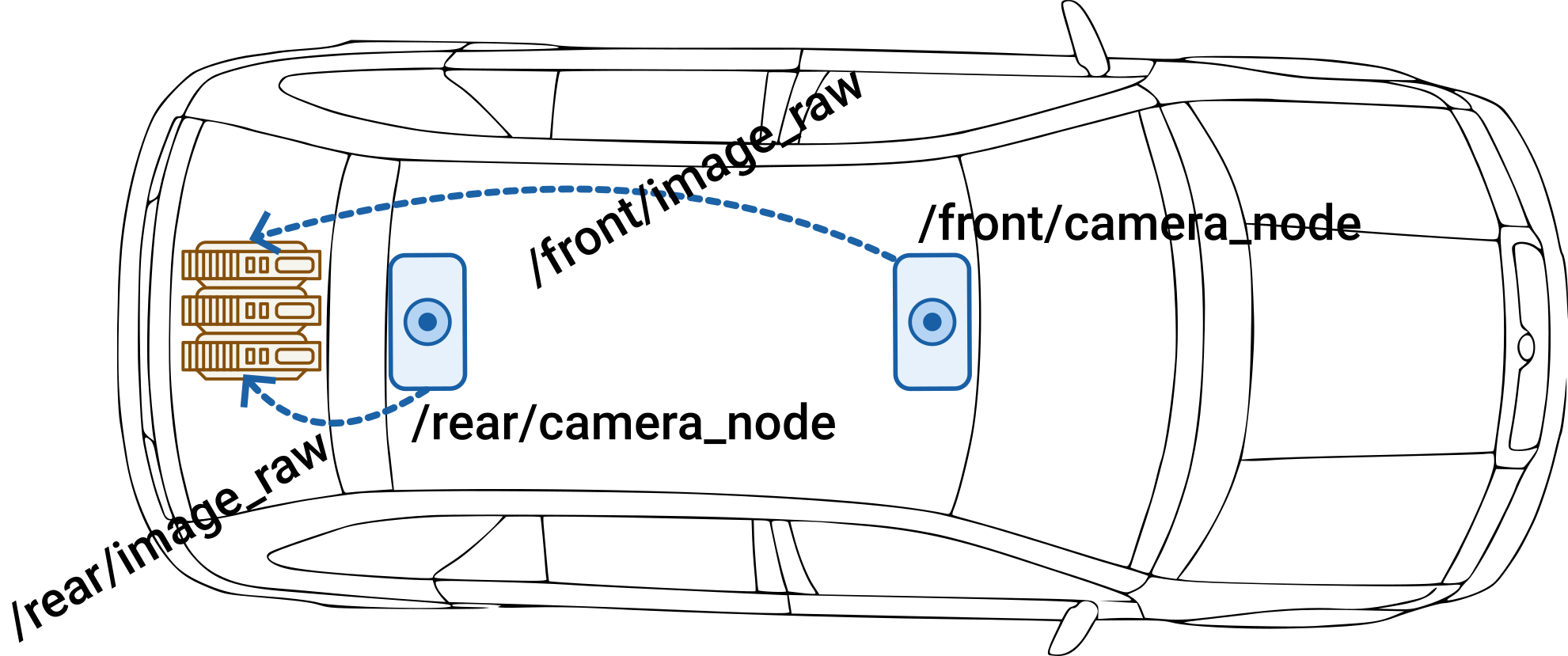
Fig. 94 Namespace applied to node and topic names.#
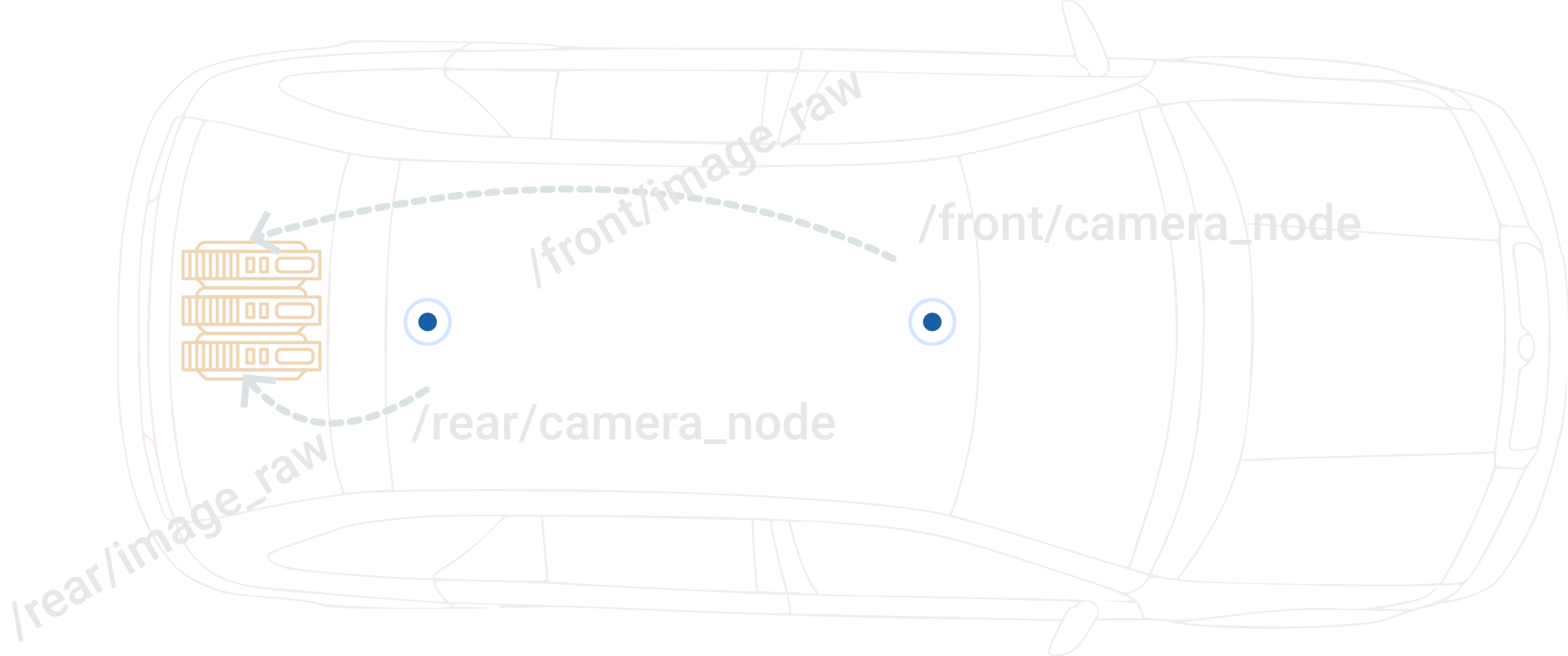
Fig. 95 Namespace applied to node and topic names.#
CLI: ``–ros-args -r __ns``
ros2 run namespace_demo camera_demo_exe --ros-args -r __ns:=/rear
__nsis a special remapping target for the namespace.Verify with
ros2 node listandros2 topic list.
Demonstration: CLI Namespace
Command |
What to observe |
|
|---|---|---|
T1 |
|
Node starts as |
T2 |
|
Second instance starts as |
T3 |
|
Both |
T3 |
|
|
T3 |
|
Two separate nodes, each publishing on its own namespaced topic |
Observe
How many nodes appear in rqt_graph? What are their full names?
What topics do each publish?
Launch File: ``namespace`` Argument
front_camera = Node(
    package='namespace_demo',
    executable='camera_demo_exe',
    namespace='front',
    output='screen',
)
rear_camera = Node(
    package='namespace_demo',
    executable='camera_demo_exe',
    namespace='rear',
    output='screen',
)
Demonstration: Launch File Namespace
Command |
What to observe |
|
|---|---|---|
T1 |
|
Both camera nodes start in separate namespaces |
T2 |
|
|
T2 |
|
|
Remapping#
Remapping lets you change the name of any ROS 2 entity (node name, topic, service, parameter) at runtime without modifying the node’s source code. It is the primary mechanism for adapting existing nodes to new system architectures.
Note
Every node in a ROS 2 system must have a unique name. Node remapping lets you run the same executable under a different name without touching the code.
Node Remapping#
Node remapping assigns a new name to a running node without modifying its source code. This is essential when launching multiple instances of the same executable.
CLI: ``–ros-args -r __node``
ros2 run remapping_demo camera_demo_exe --ros-args -r __node:=front_camera
__nodeis the special remapping target for the node name.The node that would normally be named
/camera_nodeis now/front_camera.All parameters are stored under the remapped name.
All CLI commands must use the new name:
ros2 node info /front_camera.
Demonstration: CLI Node Remapping
Command |
What to observe |
|
|---|---|---|
T1 |
|
Node starts as |
T2 |
|
Second instance starts as |
T3 |
|
Both |
Launch File: ``name`` Argument
front_camera = Node(
    package="remapping_demo",
    executable="camera_demo_exe",
    name="front_camera",
    output="screen",
)

rear_camera = Node(
    package="remapping_demo",
    executable="camera_demo_exe",
    name="rear_camera",
    output="screen",
)
Demonstration: Launch File Node Remapping
Command |
What to observe |
|
|---|---|---|
T1 |
|
Both nodes start with remapped names |
T2 |
|
|
Topic Remapping#
Topic remapping redirects a publisher or subscriber to use a different topic name, allowing nodes with incompatible naming conventions to communicate without modifying either node.
CLI: ``-r original:=new``
ros2 run remapping_demo camera_demo_exe --ros-args -r image_raw:=/sensors/front/image
The format is
-r original_name:=new_name.The topic
/image_rawis now published as/sensors/front/image.Subscribers must use the remapped name.
Launch File: ``remappings`` Argument
front_camera = Node(
    package='remapping_demo',
    executable='camera_demo_exe',
    name='front_camera',
    remappings=[
        ('image_raw', '/sensors/front/image'),
    ],
    output='screen',
)
Tip
Use relative names (without a leading /) in the left side of the
remapping tuple so that namespaces continue to compose correctly.
Absolute names on the right side are fine when you want a fixed
destination regardless of namespace.
Demonstration: Connecting Two Nodes with Incompatible Names
A camera_node publishes on image_raw. An image_processor
subscribes on camera/image. Without remapping, they never connect.
Command |
What to observe |
|
|---|---|---|
T1 |
|
Both camera and processor nodes start |
T2 |
|
Remapped topic |
T2 |
|
A message is received (publisher and subscriber are connected) |
T2 |
|
Arrow from camera node through remapped topic to processor node |
Parameter Remapping#
Parameters can be overridden at launch time using -p on the CLI or
the parameters argument in a launch file. This was introduced in
L10.
Namespaces vs. Remapping#
Situation |
Tool |
Why |
|---|---|---|
Running the same node multiple times (e.g., three cameras) |
Namespace |
All topics, services, and parameters are isolated automatically under one prefix. |
Two nodes use different names for the same data (e.g., one
publishes |
Topic remapping |
Bridges the naming gap without touching either node’s code. |
Running the same executable twice in the same namespace |
Node remapping |
Each instance must have a unique node name; |
Overriding a parameter value at launch time |
Parameter remapping ( |
Faster than editing a YAML file; no source change needed. |
Both isolation and renaming in one launch |
Namespace + remapping together |
Namespace isolates the group; remapping fine-tunes individual names within it. |
A namespace is a bulk operation that moves everything under a new prefix at once. Remapping is a surgical operation that changes one specific name. Use namespaces first for isolation, then remapping to fix anything the namespace alone does not handle correctly.
Behavior Trees#
A behavior tree (BT) is a hierarchical structure for organizing robot behaviors. Unlike a state machine, where transitions are encoded as edges between states, a BT separates what the robot does (leaf nodes) from how decisions are made (composite nodes). This makes behaviors modular, reusable, and easy to extend.
Resources
Core Concepts#
Every node in a behavior tree returns one of three statuses when ticked: SUCCESS, FAILURE, or RUNNING. The tree is ticked at a fixed rate; the root node propagates ticks downward and collects statuses upward.
Node type |
Symbol |
Behavior |
|---|---|---|
Sequence |
|
Ticks children left to right. Fails on first FAILURE. Succeeds only if all children succeed. Like logical AND. |
Fallback |
|
Ticks children left to right. Succeeds on first SUCCESS. Fails only if all children fail. Like logical OR. |
Action |
Rectangle |
Leaf node that does real work (e.g., publish |
Condition |
Diamond |
Leaf node that checks a condition. Returns SUCCESS or FAILURE instantly, never RUNNING. |
Note
A condition node never modifies world state. An action node always does. This separation is the key design principle of behavior trees.
Drive to Goal with Recovery#
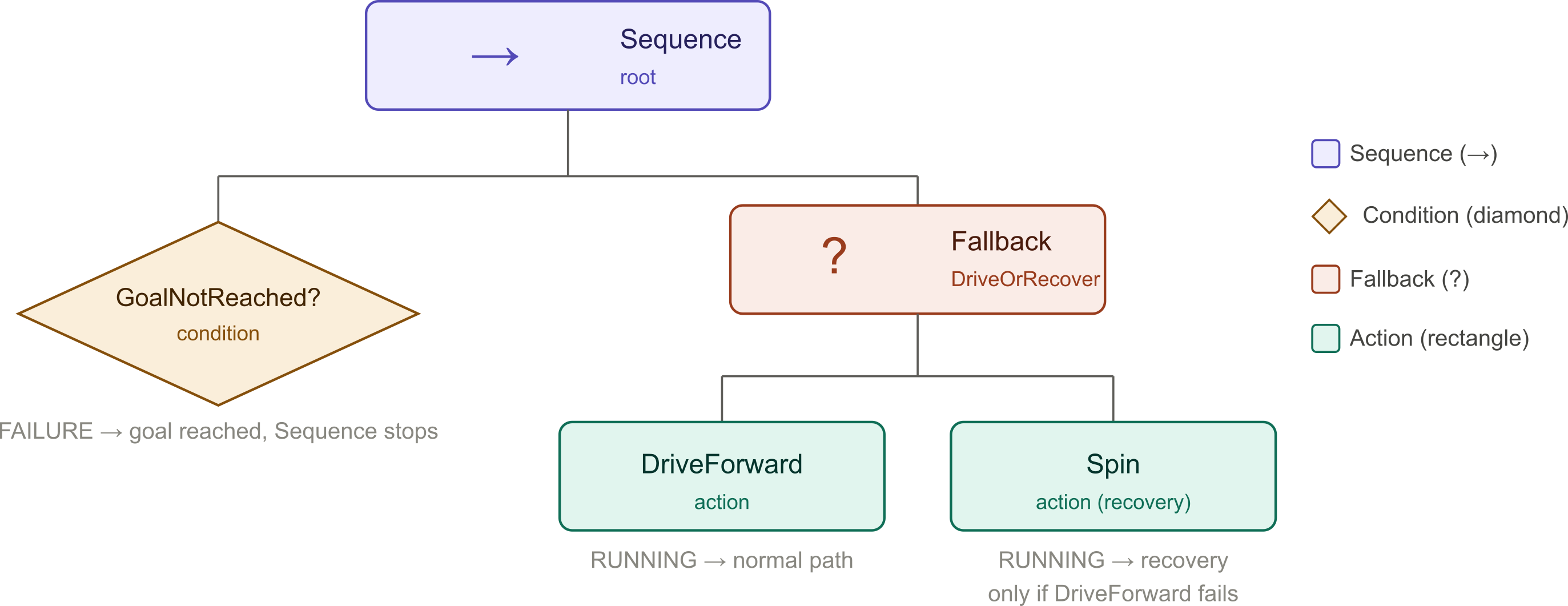
Fig. 96 Drive-to-goal BT with Fallback recovery.#
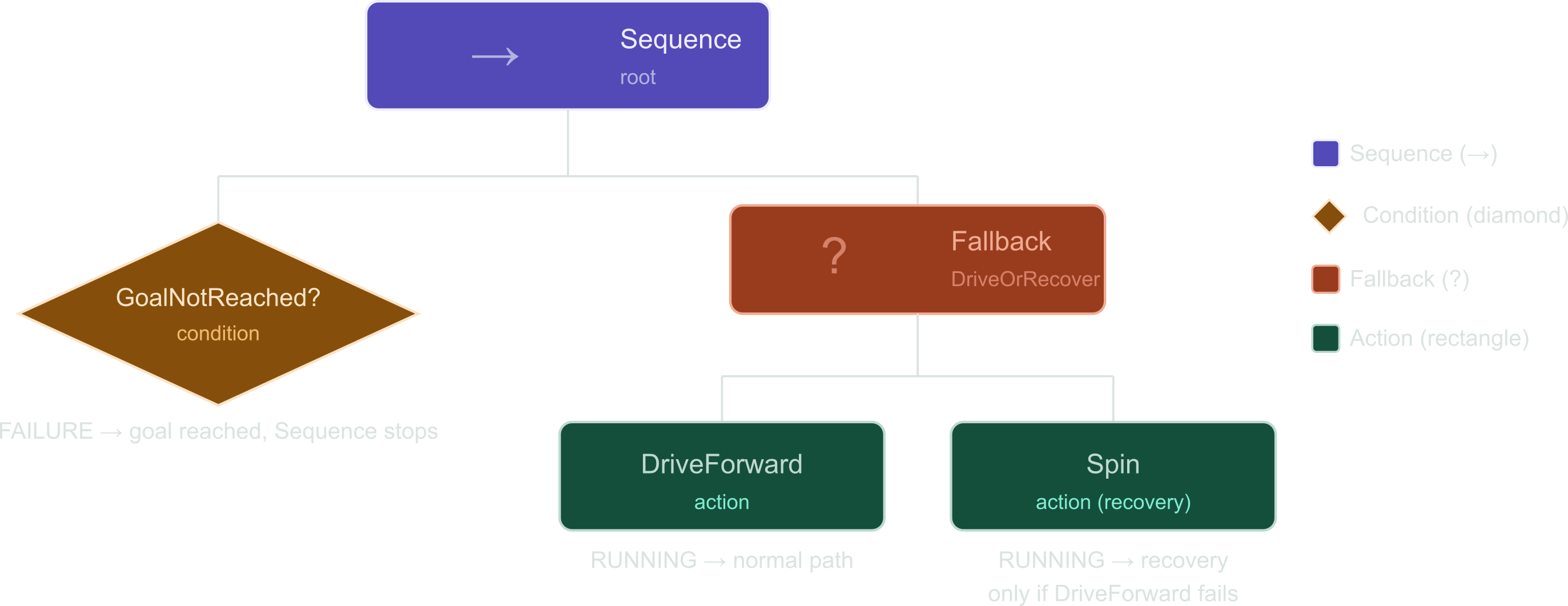
Fig. 97 Drive-to-goal BT with Fallback recovery.#
The root Sequence ticks GoalNotReached? first.
If the robot has not reached the goal (SUCCESS), the Sequence ticks the Fallback.
The Fallback tries DriveForward (wrapped in a Timeout decorator) first. While driving, it returns RUNNING and the robot moves.
If the Timeout expires (e.g., the robot is stuck), the decorator forces FAILURE and the Fallback ticks Spin as a recovery.
Once the robot reaches the goal, GoalNotReached? returns FAILURE and the Sequence stops. No velocity is published and the robot halts.
The Tick#
The tick is the fundamental mechanism of a behavior tree. At each tick:
The root node is ticked.
The root passes the tick to its children according to its own logic.
Each leaf node executes its behavior and returns SUCCESS, FAILURE, or RUNNING.
Statuses propagate back up to the root.
RUNNING: the action is still in progress.
SUCCESS: the action or condition completed successfully.
FAILURE: the action or condition failed. The parent composite decides what to do next.
py_trees and py_trees_ros#
py_trees is a pure Python behavior tree library. py_trees_ros
adds ROS 2 integration: a tick loop driven by a ROS 2 timer, and
pre-built behaviors for subscribing to topics, calling services, and
sending action goals.
Installation:
sudo apt install ros-jazzy-py-trees ros-jazzy-py-trees-ros
Class |
Purpose |
|---|---|
|
Base class for all custom leaf nodes. |
|
Composite: ticks children in order (AND). |
|
Composite: ticks children until one succeeds (OR). |
|
Wraps a |
|
Enum: |
Note
py_trees.composites.Selector is the py_trees name for a
Fallback node. The terms are interchangeable.
Writing a Custom Leaf Node#
Every custom behavior inherits from py_trees.behaviour.Behaviour
and overrides four methods:
import py_trees

class MyBehaviour(py_trees.behaviour.Behaviour):
    def __init__(self, name: str):
        super().__init__(name=name)

    def setup(self, **kwargs):
        # Called once before the first tick.
        # Acquire ROS 2 resources here (node, publishers, etc.)
        pass

    def initialise(self):
        # Called each time the node transitions from idle to running.
        # Reset internal state here.
        pass

    def update(self) -> py_trees.common.Status:
        # Called every tick while this node is active.
        # Return SUCCESS, FAILURE, or RUNNING.
        return py_trees.common.Status.SUCCESS

    def terminate(self, new_status: py_trees.common.Status):
        # Called when the node exits (succeeds, fails, or is preempted).
        pass
Scenario#
We build a behavior tree that drives a ROSbot toward a goal position
using a proportional controller, monitors the robot’s odometry, and
stops when the goal is reached. If DriveForward times out, a
SpinInPlace recovery rotates the robot toward a fixed target
heading (goal_yaw, default 0.0 rad) before retrying.
Fig. 98 Drive-to-goal BT with Fallback recovery.#
Fig. 99 Drive-to-goal BT with Fallback recovery.#
Review#
File |
Description |
|---|---|
|
Action node: steers the robot toward a goal using a P-controller
( |
|
Action node: rotates toward a target heading using a P-controller
( |
|
Condition node: subscribes to odometry and returns SUCCESS while far from the goal, FAILURE when within tolerance. |
|
Entry point: assembles a Sequence with a condition gate and a Selector fallback (Timeout + Spin recovery), reads ROS 2 parameters, and runs the tree. |
|
Launch file: exposes all tuneable values (goal, gains, timeout) as launch arguments. |
Decorators#
A decorator wraps a single child node and modifies how its return status is interpreted or how long it is allowed to run.
Decorator |
Effect |
|---|---|
|
Flips SUCCESS to FAILURE and vice versa. Leaves RUNNING unchanged. |
|
Returns FAILURE if the child is still RUNNING after a set duration. |
|
Re-ticks the child up to N times on FAILURE before propagating. |
|
Converts SUCCESS to RUNNING, useful for continuous monitoring. |
Example: Timeout
drive = DriveForward(name='DriveForward', goal_x=goal_x, goal_y=goal_y,
                     k_rho=k_rho, k_alpha=k_alpha)

drive_with_timeout = py_trees.decorators.Timeout(
    child=drive,
    name=f'DriveForward ({timeout_duration} s)',
    duration=timeout_duration,
)
Decorators in py_trees are found in py_trees.decorators. They
wrap any single node; they cannot have more than one child.
Reading the Terminal Output#
When unicode_tree_debug=True, py_trees_ros prints the tree on
every tick. Here is an example:
[-] DriveToGoal [*]
    --> GoalNotReached? [✓]
    {o} DriveOrRecover [*]
        -^- DriveForward (10.0 s) [*] -- remaining: 6.8s
            --> DriveForward [*]
        --> Spin
Symbol |
Node type |
Meaning |
|---|---|---|
|
Sequence |
Ticks children left-to-right (AND). |
|
Selector |
Tries children until one succeeds (OR / Fallback). |
|
Decorator |
Wraps a single child and modifies its result. |
|
Leaf |
A behaviour node (action or condition) with no children. |
|
RUNNING |
The node is currently active. |
|
SUCCESS |
The node completed successfully. |
|
FAILURE |
The node failed. |
(blank) |
INVALID |
The node has not been ticked yet. |
Demonstration#
bt_demo Demonstration
Command |
|
|---|---|
T1 |
|
T2 |
|
T2 |
|
T2 |
|
T3 |
|
T3 |
|