

Lecture#
Class Methods and Static Methods#
Alternative method types that operate on the class rather than a specific instance.
Refer to L7_class_static_methods.py to follow along with the examples below.
The Three Method Types
Python classes support three kinds of methods. The right choice depends on whether the method needs access to instance state, class state, or neither.
Type |
Decorator |
First Param |
Access |
|---|---|---|---|
Instance method |
(none) |
|
Instance + class state |
Class method |
|
|
Class state only |
Static method |
|
(none) |
No implicit access |
The following example shows all three types in a single class:
class Robot:
    total_robots = 0

    def __init__(self, name: str, battery: int = 100):
        self._name = name
        self._battery = battery
        Robot.total_robots += 1

    def status(self):
        return f"{self._name}: {self._battery}%"

    @classmethod
    def get_fleet_size(cls):
        return f"Fleet size: {cls.total_robots}"

    @staticmethod
    def is_valid_battery(level: int) -> bool:
        return isinstance(level, int) and 0 <= level <= 100

scout = Robot("Scout")
print(scout.status())              # Scout: 100%
print(Robot.get_fleet_size())      # Fleet size: 1
print(Robot.is_valid_battery(50))  # True
status()is an instance method. It receivesselfand accesses per-instance state (_name,_battery).get_fleet_size()is a class method. It receivesclsand accesses class-level state (total_robots), which is shared across all instances.is_valid_battery()is a static method. It receives neitherselfnorclsand performs a pure validation with no access to any state.
Instance Methods
Instance methods are the default. Python passes the calling instance as self
automatically.
class Robot:
    def __init__(self, name: str, battery: int = 100):
        self._name = name
        self._battery = battery

    def status(self) -> str:
        return f"{self._name}: {self._battery}%"

scout = Robot("Scout")
print(scout.status())   # Scout: 100%
Class Methods and Factory Methods
Class methods receive the class itself as cls instead of an instance. They
are the standard way to write factory methods – alternative constructors that
build instances with a predefined configuration.
Use Cases
Alternative constructors: create instances from different input formats (
from_dict,from_json,from_config).Factory methods: return pre-configured instances with meaningful names (
create_scout,create_heavy_lifter).Accessing or modifying class attributes: read or update shared state that applies across all instances (fleet counters, registries).
Subclass-aware construction: when called on a subclass,
clsrefers to the subclass, so the factory returns the correct type automatically.
class Robot:
    def __init__(self, name: str, battery: int = 100):
        self._name = name
        self._battery = battery

    @classmethod
    def create_scout(cls) -> "Robot":
        return cls("Scout", 100)

    @classmethod
    def create_scout_team(
        cls, count: int = 3
    ) -> list["Robot"]:
        return [cls(f"Scout-{i+1}", 100)
                for i in range(count)]

scout = Robot.create_scout()
team  = Robot.create_scout_team(4)
Note
Calling cls(...) instead of Robot(...) ensures the factory works
correctly in subclasses. create_scout() encapsulates the construction
logic so callers do not need to know the default values.
create_scout_team() shows that factory methods can return collections
of instances, not just a single object.
Static Methods
Static methods receive no implicit first argument. They behave like plain functions that live inside the class namespace for organizational clarity.
Use Cases
Validation helpers: check whether a value is valid before creating an instance (
is_valid_name,is_valid_battery_level).Unit conversion: convert between units without needing instance or class state (
meters_to_feet,degrees_to_radians).Pure computations: perform a calculation logically related to the class but independent of any instance (
compute_distance,normalize_angle).Formatting utilities: produce a string representation of a value in a domain-specific format (
battery_to_bar,status_to_label).
class Robot:
    def __init__(self, name: str, battery: int = 100):
        self._name = name
        self._battery = battery

    @staticmethod
    def is_valid_name(name: str) -> bool:
        return isinstance(name, str) and len(name) > 0

    @staticmethod
    def battery_to_bar(level: int) -> str:
        bars = level // 10
        return "[" + "#" * bars + "." * (10 - bars) + "]"

print(Robot.is_valid_name("Scout"))   # True
print(Robot.battery_to_bar(70))       # [#######...]
Note
is_valid_name() validates input before constructing a Robot. It does
not need any instance to do its job. battery_to_bar() converts a number
to a visual string – a pure computation with no side effects. Both can be
called on the class directly (Robot.is_valid_name(...)) or on an instance,
though calling on the class is the clearer style.
Object Relationships#
Modeling how objects interact and depend on one another.
Refer to L7_relationships.py to follow along with the examples below.
Types of Object Relationships
Before writing code, the design phase identifies how objects relate to each other. There are three fundamental relationships in OOP, each with different strength and lifetime implications.
Relationship |
Keyword |
UML Symbol |
Lifetime |
Example |
|---|---|---|---|---|
Association |
“uses-a” |
Arrow |
Independent |
Robot uses Task |
Aggregation |
“has-a” |
Hollow diamond |
Part outlives whole |
Team has Robots |
Composition |
“has-a” |
Filled diamond |
Part destroyed with whole |
Robot owns Sensors |
The UML class diagram below shows all three relationships for the competition domain.
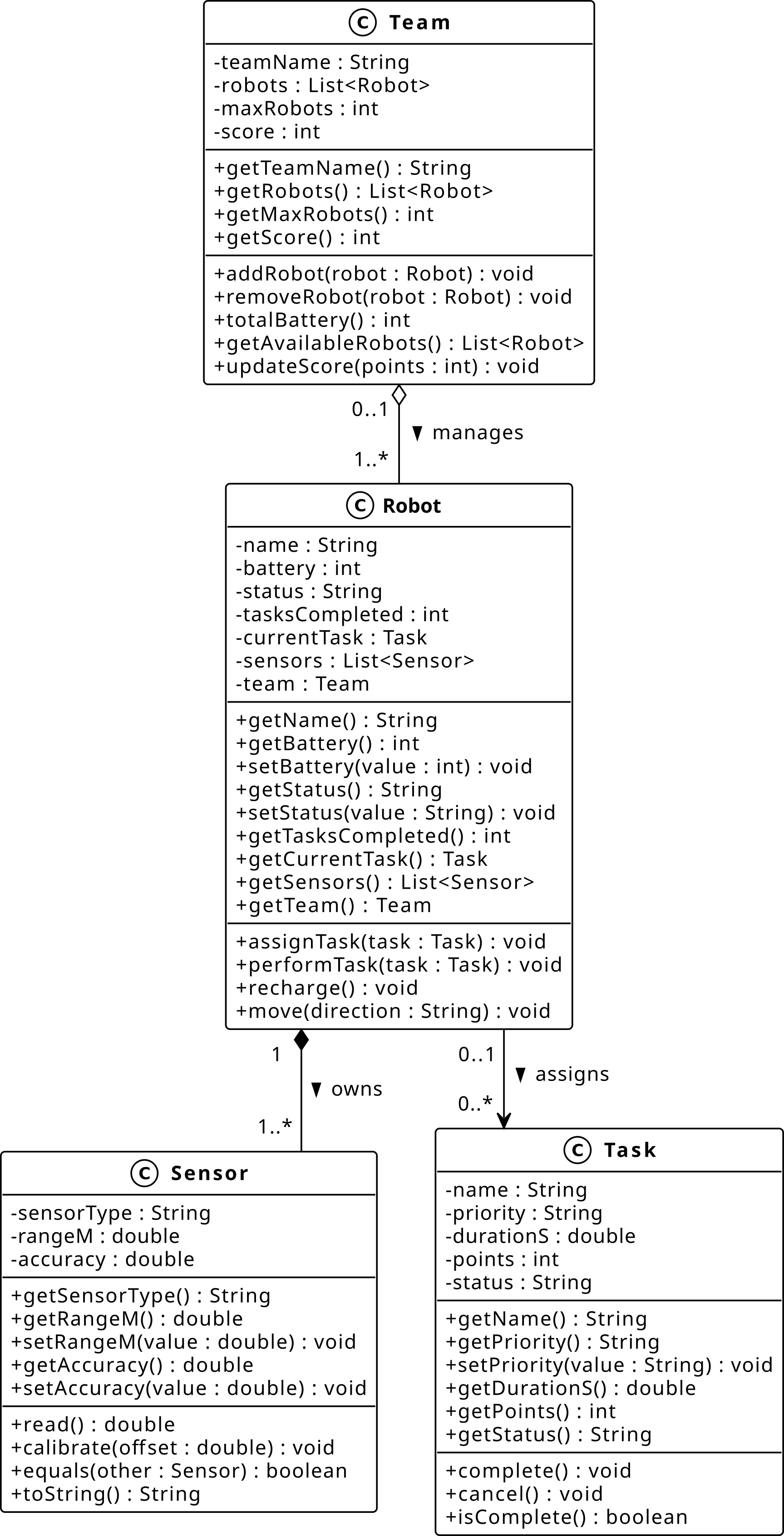
Fig. 1 UML class diagram: association (Robot-Task), aggregation (Team-Robot), and composition (Robot-Sensor).#

Association (uses-a)
Association is a relationship between two objects that establishes a connection for a certain period. One object can cause another to perform an action on its behalf.
Unidirectional: Only one class knows about the other.
Bidirectional: Both classes are aware of each other.
Physical world examples
A Driver uses a Car – the driver exists independently of any particular car.
A Doctor treats a Patient – neither owns the other.
A Student enrolls in a Course – both exist before and after the enrollment.
Robotics Competition examples
A Robot is assigned a Task – the task exists before and after the robot executes it.
A Robot uses a Sensor – the sensor can be shared or reassigned across robots.
A Referee monitors a Team – neither object owns the other.
Class Diagram
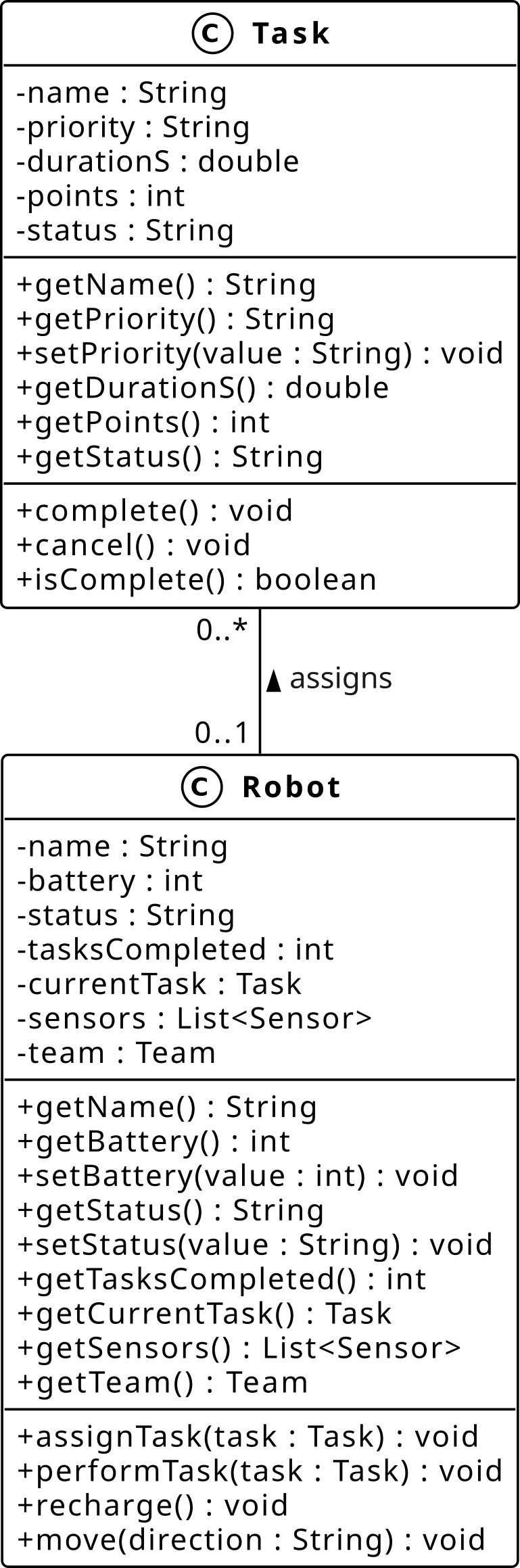
Fig. 3 Unidirectional association from Robot to Task.#

Reading the Diagram
This is a unidirectional association:
Robotholds a reference toTaskvia_currentTask.Taskhas no reference back toRobot.assignTask()sets_currentTask;performTask()uses it. Both methods take aTaskparameter but the persistent reference is stored in_currentTask.The cardinality
0..1on theRobotside means aTaskis assigned to at most oneRobot, or to none at all.The cardinality
0..*on theTaskside means aRobotcan have zero or more tasks over its lifetime.Both ends use
0, making the relationship fully optional on both sides. ATaskcan exist without aRobot, and aRobotcan exist with no task currently assigned.
Code Example
class Task:
    def __init__(self, name: str, priority: int):
        self._name = name
        self._priority = priority

class Robot:
    def __init__(self, name: str):
        self._name = name
        self._current_task: Task | None = None

    def assign_task(self, task: Task) -> None:
        self._current_task = task

pick  = Task("pick widget", priority=1)
scout = Robot("Scout")
scout.assign_task(pick)
What is Happening?
Robotholds a reference to aTaskobject created outside and passed in.Taskhas no reference back toRobot. This is unidirectional._current_task: Task | Nonesignals that the relationship is optional. ARobotcan exist with no task assigned.If
pickis deleted,scoutstill exists. Ifscoutis deleted,pickstill exists.
Note
The associated object is passed in as a parameter, not created inside the
class. In Python, calling del pick does not destroy the Task object as
long as scout._current_task still references it. The garbage collector only
destroys an object when its reference count reaches zero.
Aggregation (has-a, independent lifetime)
Aggregation is a “has-a” relationship where the part can exist independently of the whole. The part is created outside the container and passed in. Deleting the container does not destroy the part.
Whole: The containing object (e.g.,
Team).Part: The contained object that can outlive the whole (e.g.,
Robot).
Physical world examples
A Library has Books – the books exist before and after the library closes.
A Playlist has Songs – deleting the playlist does not delete the songs.
A Department has Employees – employees exist independently of the department.
Robotics Competition examples
A Team has Robots – dissolving the team does not destroy the robots.
A Arena has Zones – zones can be reassigned to a different arena.
A TaskQueue has Tasks – tasks exist before being added to the queue.
Class Diagram
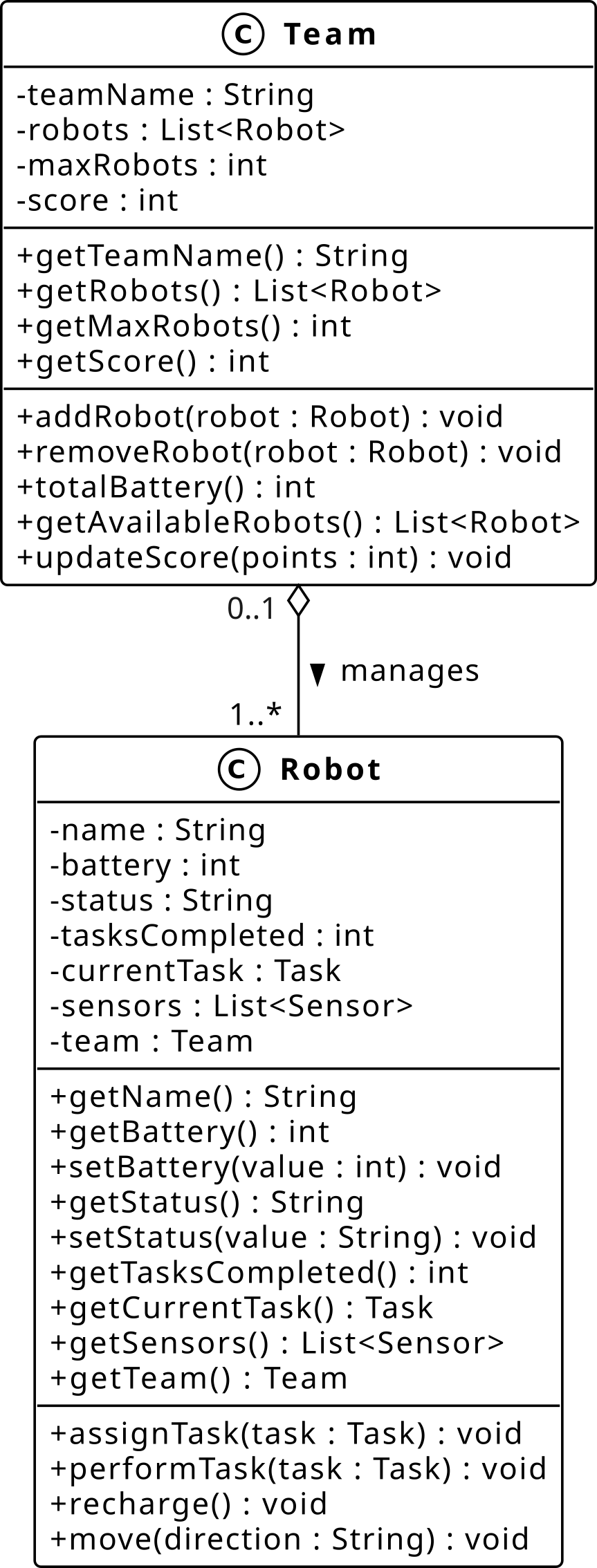
Fig. 5 Aggregation from Team to Robot (hollow diamond on Team side).#
Reading the Diagram
The hollow diamond is on the
Teamside, indicatingTeamis the whole andRobotis the part.The cardinality
1..*on theRobotside means a team must have at least one robot.The cardinality
0..1on theTeamside means a robot belongs to no team (e.g., out of commission) or exactly one team.The relationship is bidirectional:
Robotholds a_teamreference back to itsTeamto enforce the0..1constraint.Dissolving the
Teamhas no effect on theRobotobjects. They continue to exist.
Code Example
class Robot:
    def __init__(self, name: str, battery: int = 100):
        self._name = name
        self._battery = battery
        self._team: "Team | None" = None

    @property
    def name(self) -> str:
        return self._name

class Team:
    def __init__(self, team_name: str):
        self._team_name = team_name
        self._robots: list[Robot] = []

    def add_robot(self, robot: Robot) -> None:
        if robot._team is not None:
            raise ValueError(f"{robot.name} already in a team")
        self._robots.append(robot)
        robot._team = self

    def remove_robot(self, robot: Robot) -> None:
        self._robots.remove(robot)
        robot._team = None

scout = Robot("Scout")
alpha = Team("Alpha")
alpha.add_robot(scout)
del alpha
print(scout.name)   # Scout -- still exists
What is Happening?
Robotobjects are created outsideTeamand passed in viaadd_robot().Teamholds a collection of robots but does not own them.Robotholds a_teamback-reference to enforce the0..1constraint. If a robot already belongs to a team,add_robot()raises aValueError.Deleting
alphadoes not deletescout. It continues to exist independently.
Note
Parts are created outside the container and passed in. Enforcing 0..1
membership requires a back-reference in Robot, making this a bidirectional
aggregation. The hollow diamond in UML signals that the part can outlive the
whole.
Composition (has-a, dependent lifetime)
Composition is a strong “has-a” relationship where the part cannot exist independently of the whole. The part is created inside the whole’s
__init__and is owned exclusively by it. Destroying the whole destroys the parts.
Whole: The containing object that owns its parts (e.g.,
Robot).Part: The contained object whose lifetime is tied to the whole (e.g.,
Sensor).
Physical world examples
A House has Rooms – rooms cannot exist without the house they belong to.
A Car has an Engine – the engine is built as part of the car.
A Human has a Heart – the heart cannot exist independently.
Robotics Competition examples
A Robot owns its Sensors – sensors are created with the robot and destroyed with it.
A Robot owns its BatteryUnit – the battery is an integral part of the robot.
A Arena owns its Obstacles – obstacles are created as part of the arena layout.
Class Diagram
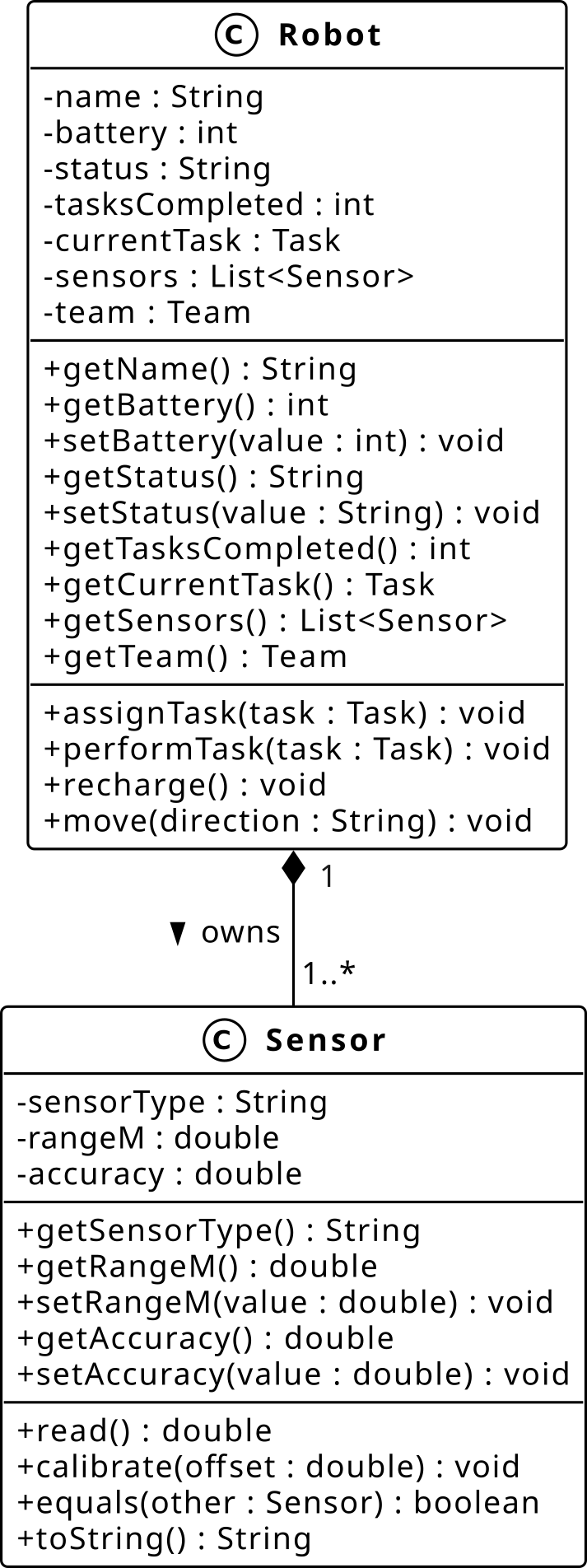
Fig. 7 Composition from Robot to Sensor (filled diamond on Robot side).#

Reading the Diagram
The filled diamond is on the
Robotside, indicatingRobotis the whole andSensoris the part.The cardinality
1..*on theSensorside means aRobotmust have at least one sensor.The cardinality
1on theRobotside means eachSensorbelongs to exactly oneRobot– it cannot be shared or reassigned.There is no back-reference from
SensortoRobot. This is unidirectional: the robot knows its sensors; the sensors do not know their robot.
Code Example
class Sensor:
    def __init__(self, sensor_type: str, range_m: float):
        self._sensor_type = sensor_type
        self._range_m = range_m

    def read(self) -> float:
        return self._range_m

    def __repr__(self) -> str:
        return f"Sensor('{self._sensor_type}', {self._range_m})"

class Robot:
    def __init__(self, name: str):
        self._name = name
        # Sensors are created here -- they belong to this robot only
        self._sensors: list[Sensor] = [
            Sensor("lidar", 50.0),
            Sensor("camera", 30.0),
        ]

scout = Robot("Scout")
for s in scout._sensors:
    print(s)
# Sensor('lidar', 50.0)
# Sensor('camera', 30.0)

del scout   # Sensors are destroyed with the robot
What is Happening?
Sensorobjects are created insideRobot.__init__. They have no existence outside the robot that owns them.Robotholds the only references to its sensors. When the robot is destroyed, the reference count for each sensor drops to zero and the garbage collector reclaims them.There is no way to pass a sensor from one robot to another – the relationship is exclusive by design.
This is the strongest form of “has-a”: the part’s lifetime is entirely controlled by the whole.
Note
The key question that distinguishes composition from aggregation is:
“Can the part exist without the whole?” If yes, use aggregation (hollow
diamond). If no, use composition (filled diamond). The key signal in code:
the part is created inside __init__, not passed in as a parameter.
Inheritance#
Defining new classes that extend existing ones.
Refer to L7_inheritance.py to follow along with the examples below.
What Is Inheritance?
Inheritance is an “is-a” relationship. A child class (subclass) inherits all attributes and methods of its parent class (superclass) and can extend or override them. The child class is placed in parentheses after the class name.
Parent class (superclass): the class being inherited from.
Child class (subclass): the class that inherits and may extend the parent.
Physical world examples
A Car is a Vehicle – it inherits wheels, engine, and movement from the vehicle concept but adds car-specific features.
A GoldenRetriever is a Dog is an Animal – a multi-level chain.
A SavingsAccount is a BankAccount – it inherits deposit/withdraw behavior and adds interest calculation.
Robotics Competition examples
A MobileRobot is a Robot – it inherits battery, name, and task logic, and adds navigation speed.
A ManipulatorRobot is a Robot – it inherits the same base and adds arm reach and gripping behavior.
A ScoutRobot is a MobileRobot – a multi-level specialization.
Code Example
class Parent:
    def greet(self) -> None:
        print("Hello from Parent")

class Child(Parent):     # Child inherits from Parent
    def greet(self) -> None:
        print("Hello from Child")
What is Happening?
The child class is placed in parentheses after the class name.
Childinherits everything fromParent.Child.greet()overridesParent.greet().
The UML class diagram below shows the full robot hierarchy for the competition domain.
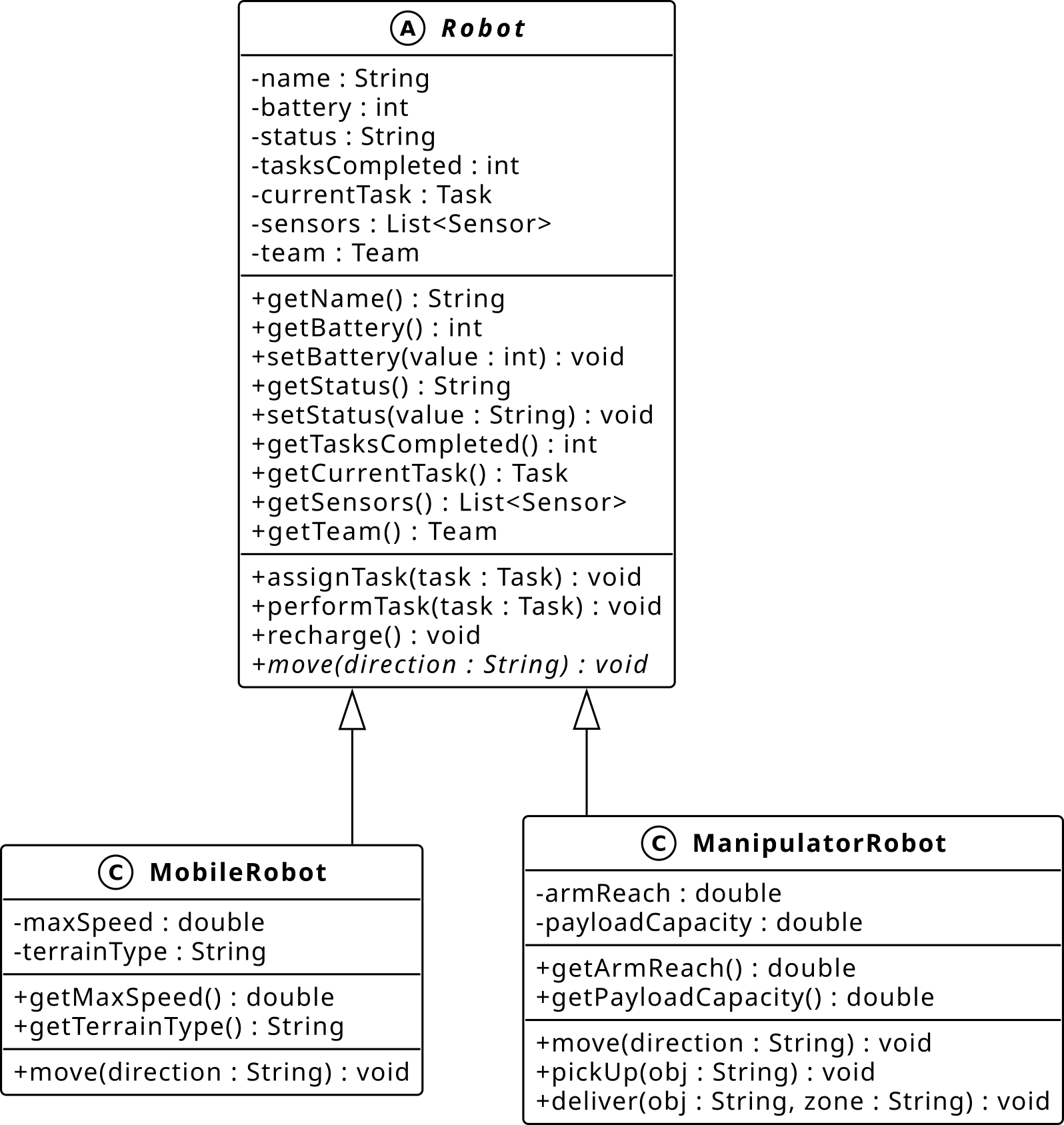
Fig. 9 Inheritance hierarchy: MobileRobot and ManipulatorRobot are specializations of Robot.#

Generalization vs. Specialization
There are two complementary ways to arrive at an inheritance hierarchy.
Generalization is the process of identifying common attributes and behaviors across multiple classes and moving them into a shared base class. It is a bottom-up design activity.
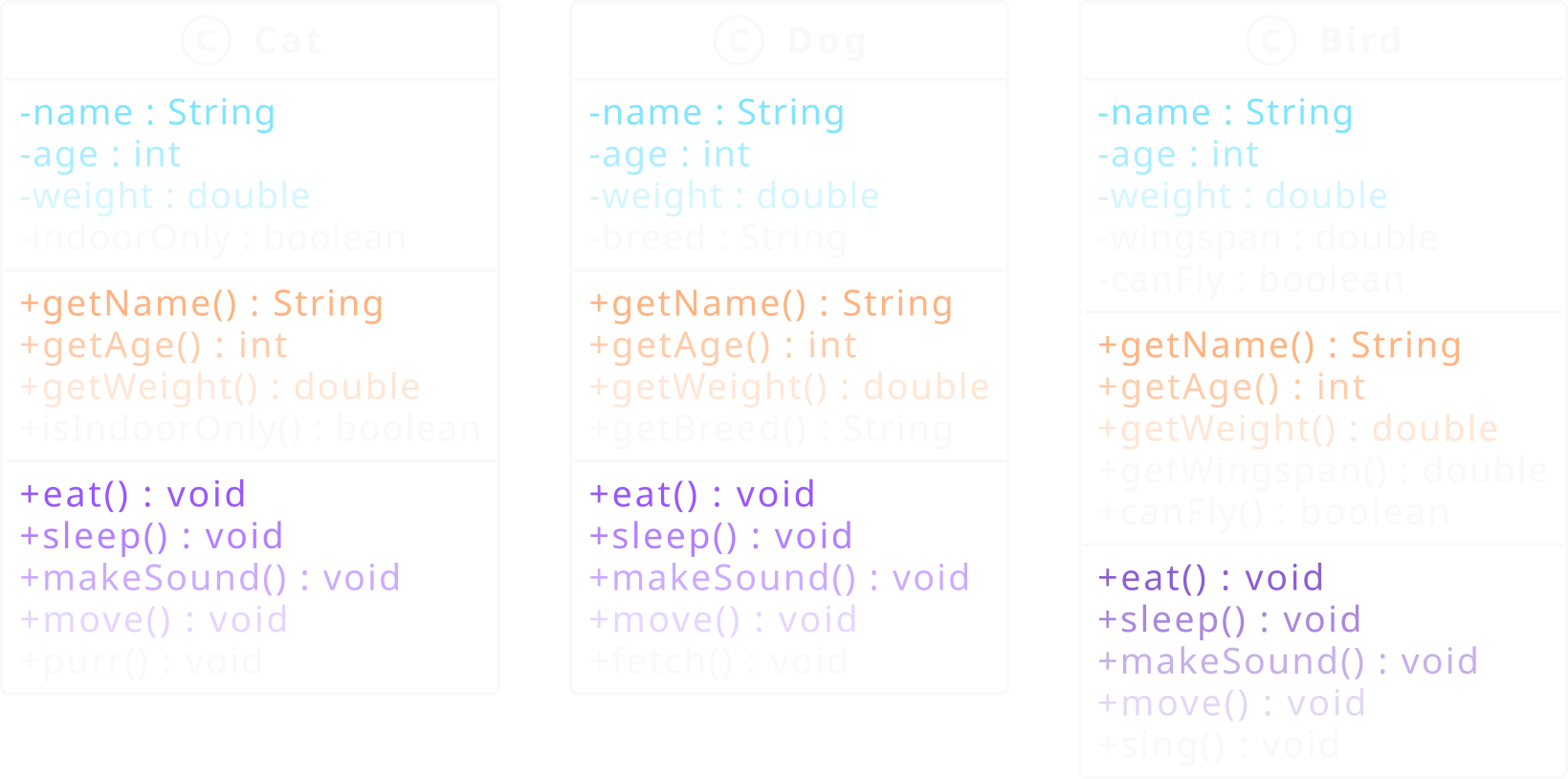
Start with Cat, Dog, and Bird defined independently. Each carries
its own _name, _age, _weight, and methods such as eat() and
sleep().
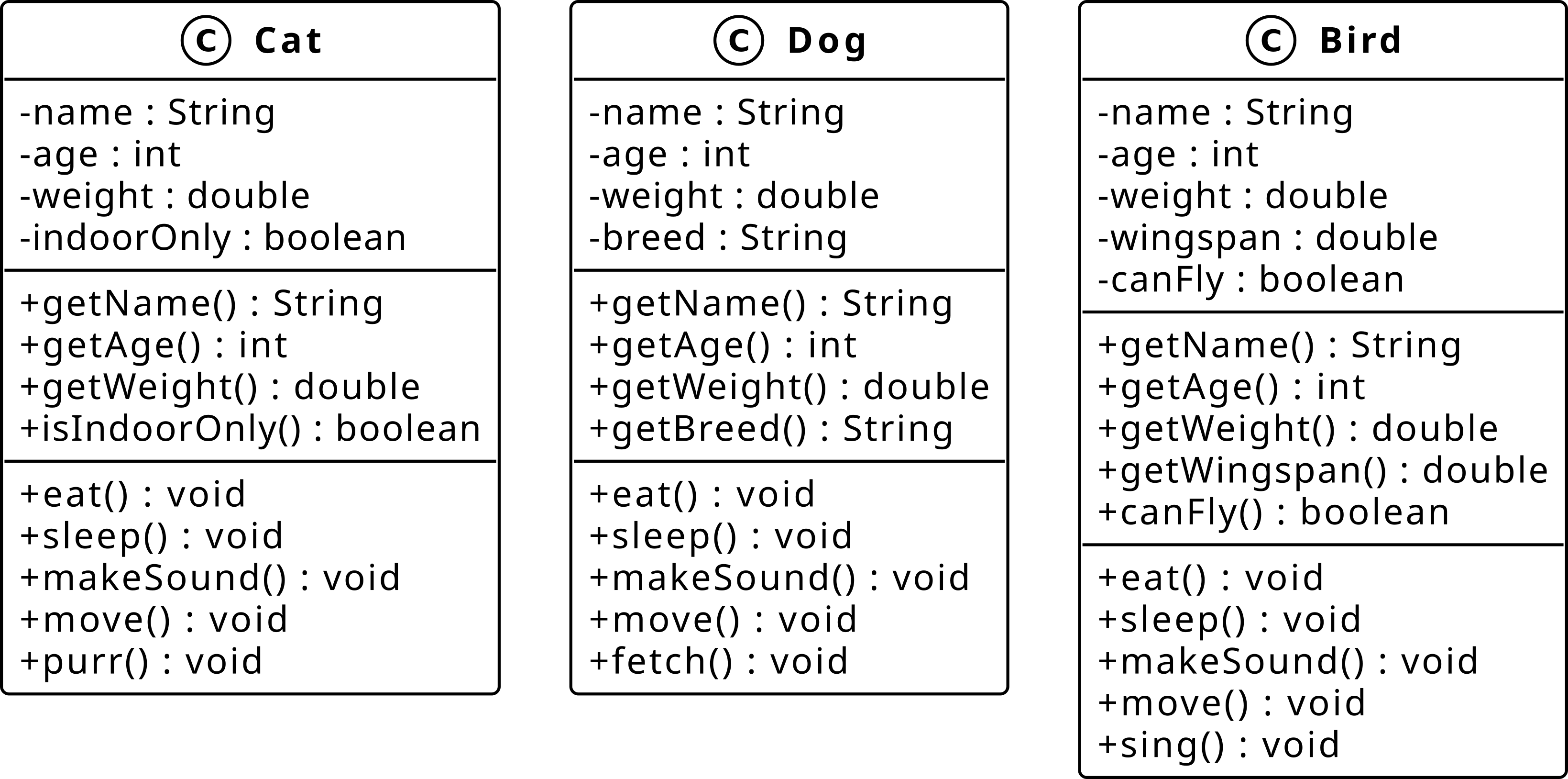
Fig. 11 Step 1: Cat, Dog, and Bird as independent classes sharing common attributes.#

The shared attributes and methods are highlighted: _name, _age,
_weight, eat(), sleep(), make_sound(), and move() appear
in all three classes.
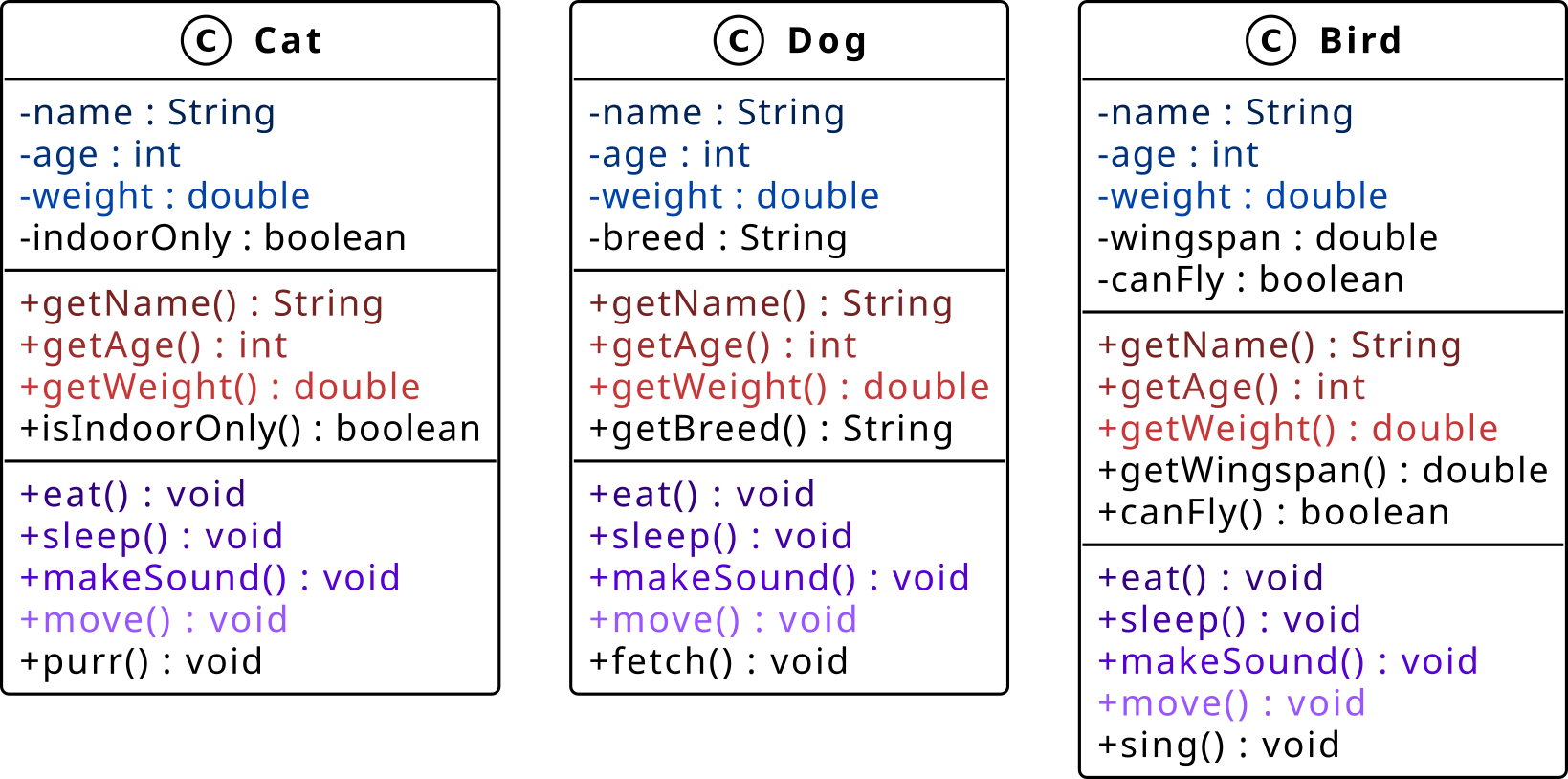
Fig. 13 Step 2: Common attributes and methods highlighted across all three classes.#
Extract the shared members into a new Animal base class. Each subclass
retains only what is unique to it.
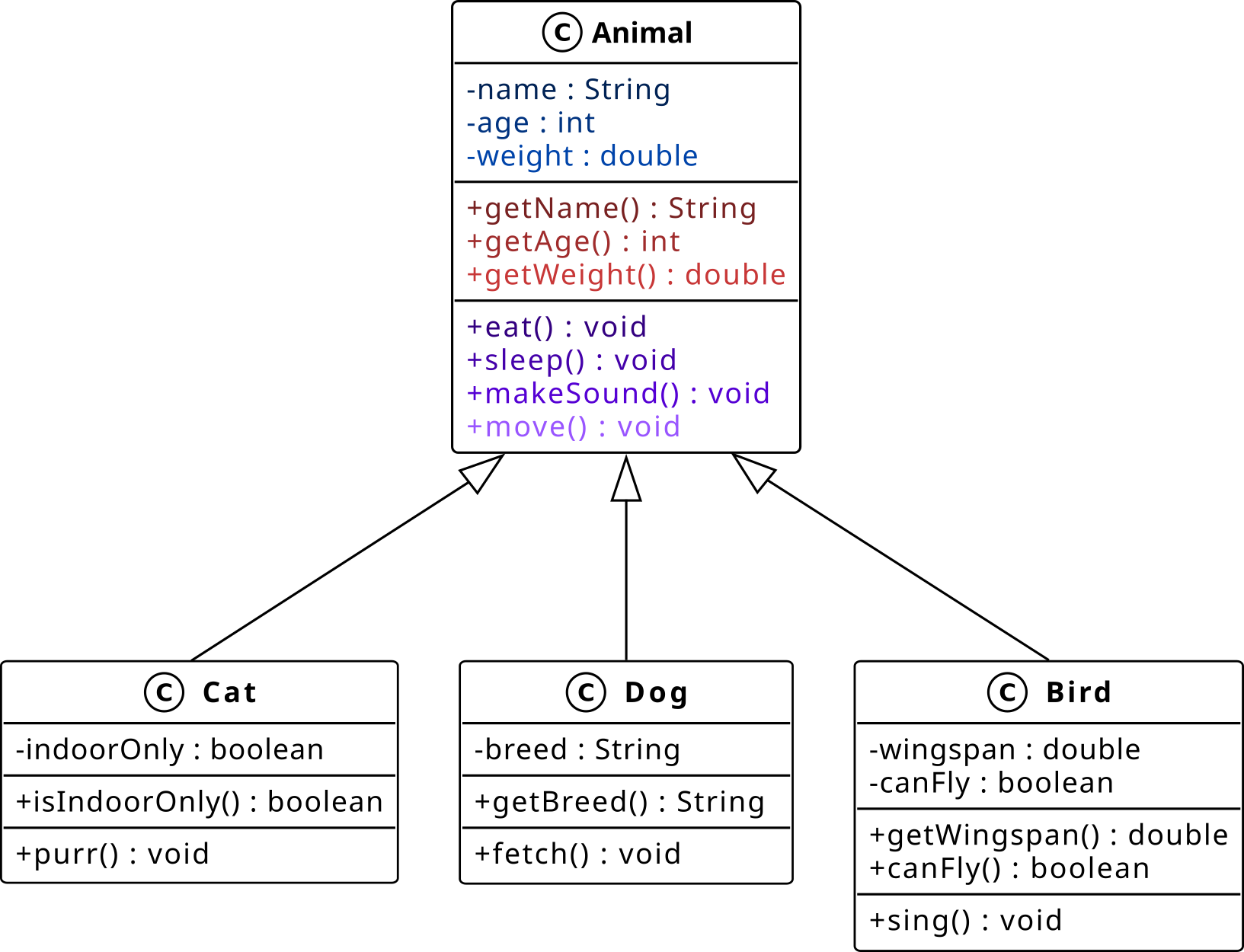
Fig. 15 Step 3: Common attributes generalized into the Animal base class (bottom-up approach).#
UML Class Diagram
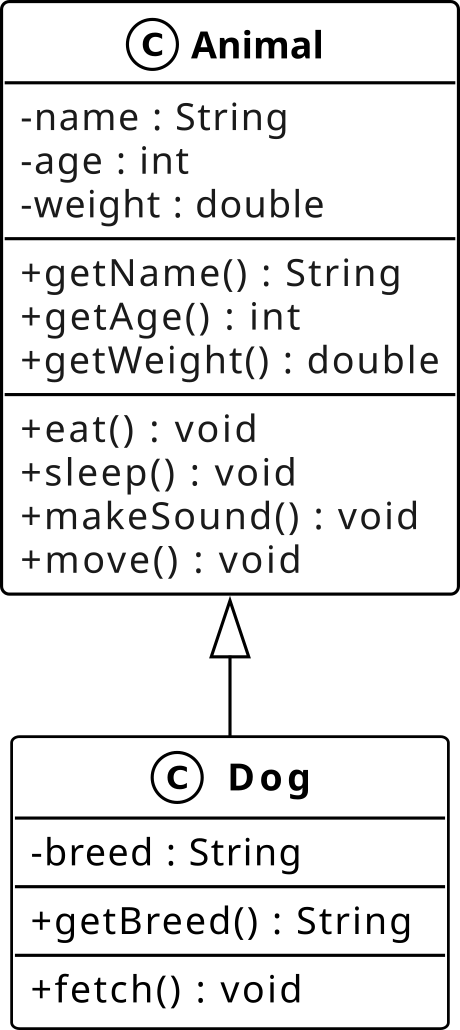
Fig. 17 UML representation of the Animal hierarchy.#

Reading the Diagram
The hollow-headed arrow points from the child to the parent and means “inherits from.”
The parent lists the attributes and methods shared by all subclasses.
The child lists only the attributes and methods it adds or overrides.
Everything in the parent is implicitly available in the child – it does not need to be repeated.
The relationship reads: “
Dogis anAnimal.”
Python Translation
class Animal:
    def __init__(self, name: str, age: int, weight: float) -> None:
        self._name = name
        self._age = age
        self._weight = weight

    def eat(self) -> None: ...
    def sleep(self) -> None: ...
    def make_sound(self) -> None: ...
    def move(self) -> None: ...

class Dog(Animal):
    def __init__(self, name: str, age: int, weight: float, breed: str) -> None:
        super().__init__(name, age, weight)
        self._breed = breed

    @property
    def breed(self) -> str:
        return self._breed

    def fetch(self) -> None: ...
What Is Happening?
class Dog(Animal)expresses the inheritance relationship:Dogis anAnimal.Animaldefines the attributes and methods shared by all subclasses.Dogdeclares only_breedandfetch(). Everything else is inherited.super().__init__()delegates_name,_age, and_weightinitialization toAnimal.
Specialization is the reverse: starting from a general base class and creating derived classes that extend or override its behavior for a specific context. It is a top-down design activity.
What Is Wrong With This Design?
Consider an Animal class that tries to accommodate every possible animal
type in a single class:
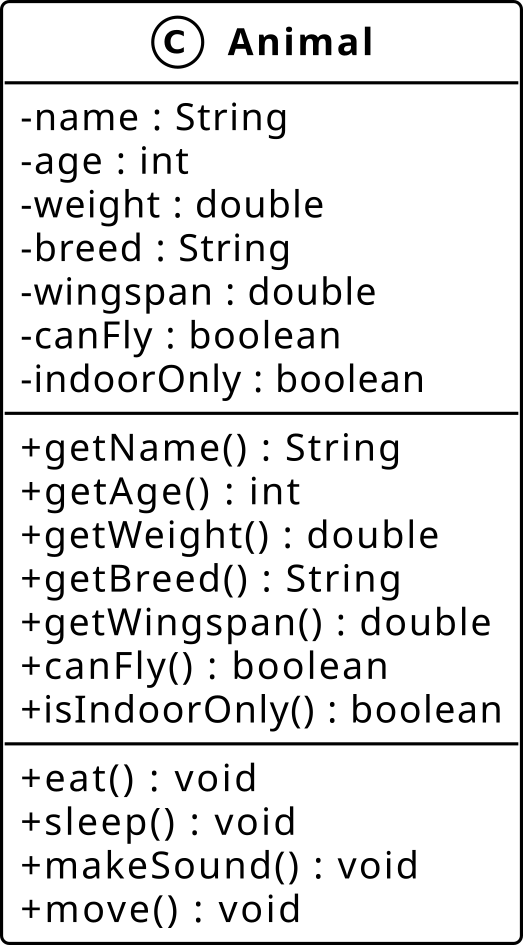
Fig. 19 Design smell: a bloated Animal class carrying None values for attributes that only apply to some subclasses.#

Does every animal have a
wingspan?Does every animal have a
breed?What do you set
wingspanto for aCat?Nonevalues for inapplicable attributes are a design smell.Adding a new animal type forces changes to a class that should not need to change.
The class becomes harder to maintain with every new animal type added.
Note
Specialization is the solution: keep shared attributes in Animal and
push type-specific attributes down into dedicated subclasses. Each subclass
extends the base with only what makes sense for that type.
After Specialization
Fig. 21 Animal specialized into Cat, Dog, and Bird, each extending the parent with only the attributes unique to that type (top-down approach).#
What Changed?
name,age,weight,eat(),sleep(),make_sound(), andmove()live inAnimal– every animal has them.breedmoves intoDog– only dogs have a breed.wingspanandcan_flymove intoBird– only birds have wings.indoor_onlymoves intoCat– only cats have this attribute.No subclass carries a
Nonevalue for an attribute that does not apply to it.
Note
Each subclass extends Animal with only what makes it unique. Adding a
Fish class tomorrow requires no changes to Dog, Cat, or Bird.
Types of Inheritance
Python supports four inheritance patterns:
Type |
Description |
Example |
|---|---|---|
Single |
One child inherits from one parent |
|
Multi-level |
A child inherits from a child |
|
Multiple |
One child inherits from several parents |
|
Hierarchical |
Several children share one parent |
|
Single inheritance: one child extends one parent. Simple, predictable, and easy to follow. The recommended starting point.
Hierarchical inheritance: multiple children share one parent. Promotes code reuse and a consistent interface across subclasses.
Multi-level inheritance: a chain of inheritance across multiple levels. Useful for progressive specialization but deep chains are difficult to read and debug. Prefer shallow hierarchies.
Multiple inheritance: one child inherits from several parents. Powerful but introduces complexity around MRO and the diamond problem. Use with caution and prefer composition when possible.
Attribute Initialization with super()
When a child class defines __init__, it must call super().__init__() to
ensure parent attributes are initialized. Always call it first.
class Robot:
    """Base class for all competition robots."""

    def __init__(self, name: str, battery: int = 100) -> None:
        self._name = name
        self._battery = battery

    def perform_task(self, task_name: str) -> None:
        if self._battery >= 10:
            print(f"{self._name} performing: {task_name}")
            self._battery -= 10
        else:
            print(f"{self._name} needs recharging!")

    def __repr__(self) -> str:
        return f"Robot(name='{self._name}', battery={self._battery})"

class MobileRobot(Robot):
    """A robot that can navigate -- extends Robot with speed."""

    def __init__(self, name: str, speed: float, battery: int = 100) -> None:
        super().__init__(name, battery)   # Initialize parent attributes first
        self._speed = speed               # Then add child-specific attributes

    def __repr__(self) -> str:
        return (f"MobileRobot(name='{self._name}', "
                f"battery={self._battery}, speed={self._speed})")

class ManipulatorRobot(Robot):
    """A robot with a manipulator arm -- extends Robot with reach."""

    def __init__(self, name: str, reach_m: float, battery: int = 100) -> None:
        super().__init__(name, battery)
        self._reach_m = reach_m

    def grip(self, object_name: str) -> None:
        print(f"{self._name} gripping: {object_name}")

    def __repr__(self) -> str:
        return (f"ManipulatorRobot(name='{self._name}', "
                f"battery={self._battery}, reach_m={self._reach_m})")

scout = MobileRobot("Scout", speed=1.5)
arm   = ManipulatorRobot("Arm-1", reach_m=0.8)

scout.perform_task("navigate to zone B")  # inherited from Robot
arm.perform_task("pick widget")           # inherited from Robot
arm.grip("widget-42")                     # ManipulatorRobot only

print(scout)  # MobileRobot(name='Scout', battery=90, speed=1.5)
print(arm)    # ManipulatorRobot(name='Arm-1', battery=90, reach_m=0.8)
Warning
If you omit super().__init__(), the parent’s __init__ is never called
and parent attributes such as _name and _battery will not exist. Any
method that accesses them will raise AttributeError.
Method Resolution Order (MRO)
When Python looks up a method or attribute, it follows the Method Resolution Order (MRO): a deterministic chain from the class itself up through its ancestors, computed by the C3 linearization algorithm.

Fig. 23 MRO for MobileRobot: Python searches left to right along the chain.#

print(MobileRobot.__mro__)
# (<class 'MobileRobot'>, <class 'Robot'>, <class 'object'>)
How Python resolves a method call:
Look in
MobileRobotfirst.If not found, look in
Robot.If not found, look in
object.If not found anywhere, raise
AttributeError.
super() returns a proxy that routes calls to the next class in the MRO,
not necessarily the direct parent. This is what makes super() work correctly
in multiple inheritance scenarios.
Note
super() does not return the parent class. It returns a proxy object that
knows your position in the MRO and delegates attribute lookups to the next
class in the chain.
isinstance() and issubclass()
Two built-in functions let you inspect the class hierarchy at runtime.
scout = MobileRobot("Scout", speed=1.5)
arm   = ManipulatorRobot("Arm-1", reach_m=0.8)

# isinstance: is this object an instance of the given class (or a subclass)?
print(isinstance(scout, MobileRobot))      # True
print(isinstance(scout, Robot))             # True -- Scout is-a Robot
print(isinstance(scout, ManipulatorRobot))  # False

# issubclass: is the first class a subclass of the second?
print(issubclass(MobileRobot, Robot))       # True
print(issubclass(Robot, MobileRobot))       # False -- parent is not a subclass of child
Note
Prefer isinstance() over type(obj) == SomeClass.
isinstance() correctly handles the full inheritance chain, while
type() only matches the exact class.
Polymorphism#
The same interface, different behavior depending on the object.
Refer to L7_polymorphism.py to follow along with the examples below.
What Is Polymorphism?
Polymorphism (from Greek: poly = many, morphe = form) means that different objects respond to the same method call in their own way. The caller does not need to know the concrete type of the object – only that it supports the required interface.
Method overriding: a subclass provides its own implementation of an inherited method.
Duck typing: an object is compatible if it has the required methods, regardless of its class hierarchy.
Physical world examples
A remote control sends the same “play” signal to a TV, a DVD player, and a streaming device – each responds differently.
An on/off switch works on a lamp, a fan, and a heater – the same interface, different behavior.
Robotics Competition examples
perform_task("pick widget")on aMobileRobottriggers navigation; on aManipulatorRobotit triggers arm extension – same call, different behavior.make_sound()on aCatprints “Meow”; on aDogprints “Woof” – duck typing requires no shared base class.
Duck Typing |
Class-based Polymorphism |
|---|---|
No shared base class required |
Relies on a common base class or interface |
Compatible if the method exists |
Compatible if the class hierarchy matches |
Checked at runtime |
Can be checked statically |
More flexible, less explicit |
More explicit, better tooling support |
Duck Typing
Duck typing is the mechanism Python uses to achieve polymorphism. An object is compatible with an interface if it has the required methods, regardless of its type or class hierarchy.
A single function processes a mixed list of Cat and Dog objects. Each class
defines make_sound() independently. Since neither inherits it from Animal,
this is pure duck typing: Python checks at runtime whether the object has
make_sound(), and calls it if it does.
class Animal:
    def __init__(self, name: str):
        self._name = name

class Cat(Animal):
    def make_sound(self) -> None:
        print(f"{self._name} says: Meow")

class Dog(Animal):
    def make_sound(self) -> None:
        print(f"{self._name} says: Woof")

def chorus(animals: list[Animal]) -> None:
    for animal in animals:
        animal.make_sound()   # polymorphic call

chorus([Cat("Kitty"), Dog("Rex")])
# Kitty says: Meow
# Rex says: Woof
What is Happening?
Animaldoes not definemake_sound().CatandDogeach add it independently.chorus()does not check the type of each object. It simply callsmake_sound().Any object with
make_sound()works here. This is duck typing.Getting different outputs from the same call on a mixed list is polymorphism in action.
Warning
Nothing stops a developer from forgetting to implement make_sound() in a
new subclass. Abstract base classes solve this, as we will see shortly.
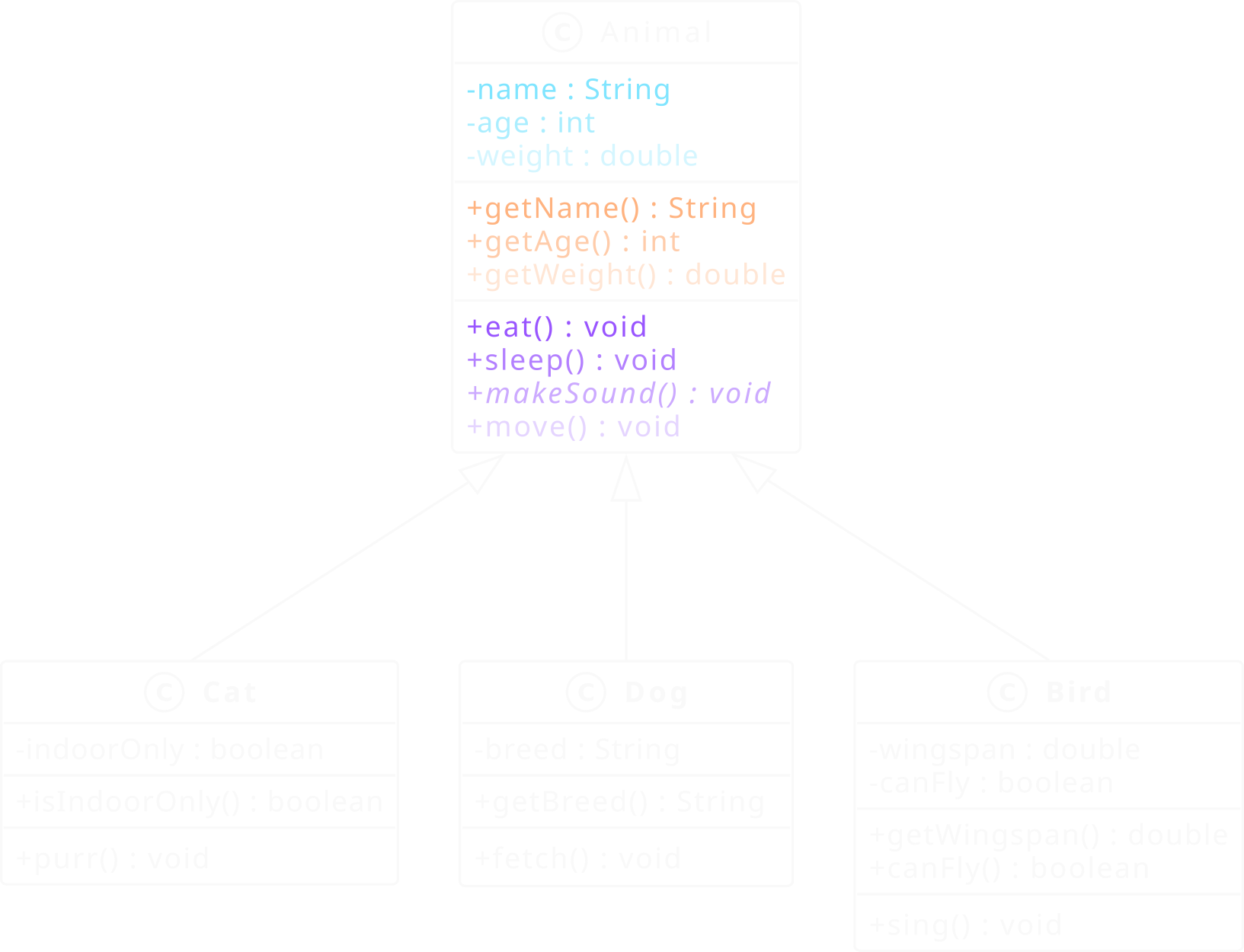
Class Diagram
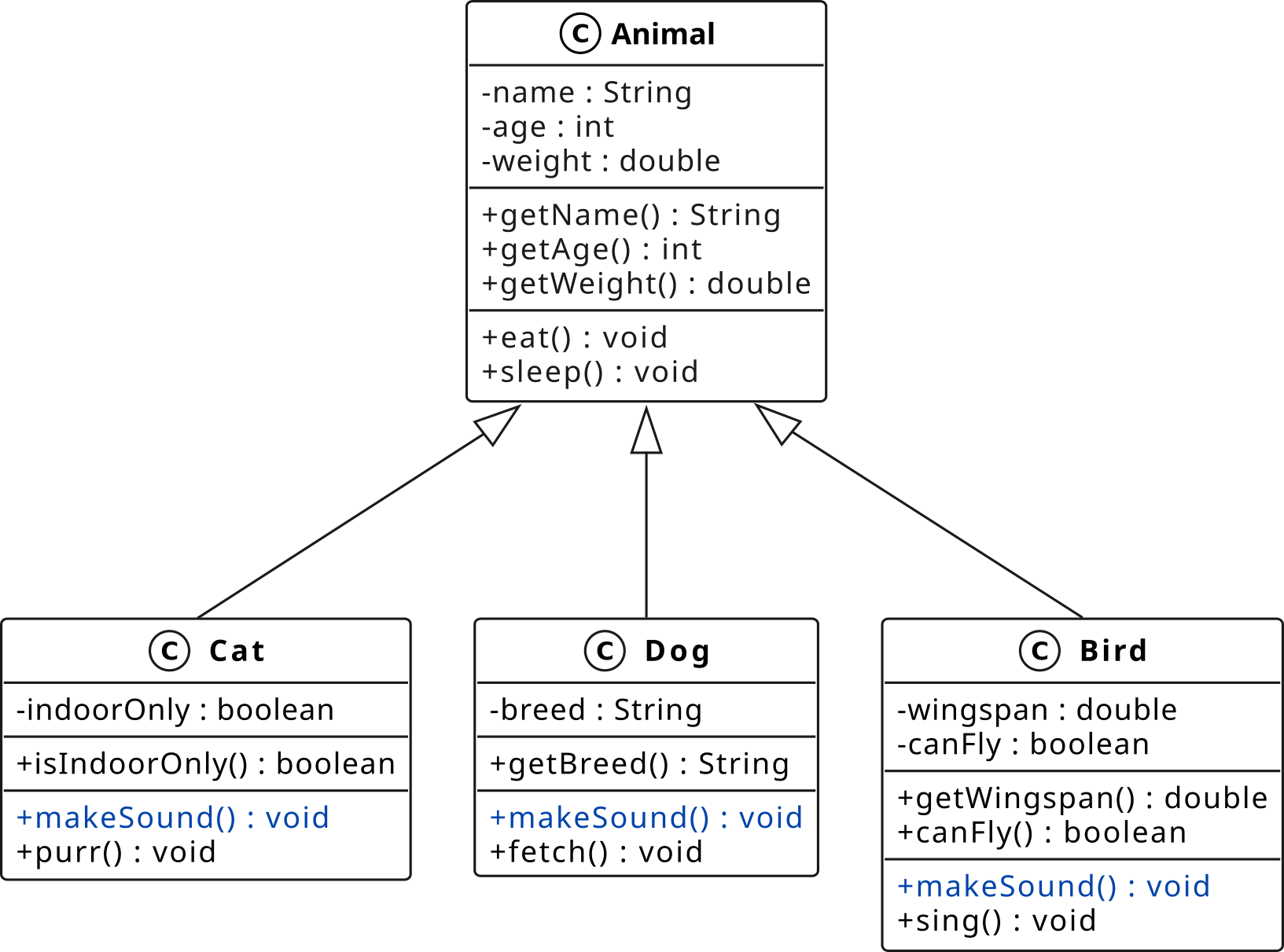
Fig. 25 Each subclass independently defines make_sound().#
Reading the Diagram
Animaldoes not declaremake_sound(). It only defines shared attributes andeat()andsleep().Cat,Dog, andBirdeach addmake_sound()independently, with no contract from the parent.This is duck typing: the method exists on each subclass by convention, not enforcement.
eat()andsleep()are defined inAnimaland inherited as-is by all subclasses.Method overriding with enforcement will be introduced with abstract base classes in the next section.
Polymorphism via Method Overriding
When child classes override a parent method, calling the same method on different subclass instances produces different behavior.
class Robot:
    def __init__(self, name: str) -> None:
        self._name = name

    def perform_task(self, task_name: str) -> None:
        print(f"{self._name} performing: {task_name}")

class MobileRobot(Robot):
    def __init__(self, name: str, speed: float) -> None:
        super().__init__(name)
        self._speed = speed

    def perform_task(self, task_name: str) -> None:
        print(f"{self._name} navigating at {self._speed} m/s")
        super().perform_task(task_name)

class ManipulatorRobot(Robot):
    def __init__(self, name: str, reach_m: float) -> None:
        super().__init__(name)
        self._reach_m = reach_m

    def perform_task(self, task_name: str) -> None:
        print(f"{self._name} extending arm to {self._reach_m} m")
        super().perform_task(task_name)

robots: list[Robot] = [
    MobileRobot("Scout", speed=1.5),
    ManipulatorRobot("Arm-1", reach_m=0.8),
    Robot("Base"),
]

for robot in robots:
    robot.perform_task("pick widget")

# Scout navigating at 1.5 m/s
# Scout performing: pick widget
# Arm-1 extending arm to 0.8 m
# Arm-1 performing: pick widget
# Base performing: pick widget
The same call robot.perform_task("pick widget") produces different output
depending on which subclass robot refers to at runtime.
Built-in Polymorphism
Python’s built-in functions achieve polymorphism through dunder methods. The same function call works on many types because each type implements the corresponding dunder method.
# len() calls __len__ on whatever object it receives
print(len("hello"))          # 5    (str.__len__)
print(len([1, 2, 3]))        # 3    (list.__len__)
print(len({"a": 1}))         # 1    (dict.__len__)

# str() calls __str__ on whatever object it receives
print(str(42))               # '42'
print(str(3.14))             # '3.14'
print(str(True))             # 'True'

# + calls __add__ on whatever object it receives
print(1 + 2)                 # 3
print("hello" + " world")    # hello world
print([1, 2] + [3, 4])       # [1, 2, 3, 4]
Every time you call len(), str(), or +, you are relying on
polymorphism. Python’s built-in functions work with any object that implements
the corresponding dunder method.
Operator Overriding
Operator overriding is a form of polymorphism. Every class inherits default
dunder methods from object (such as __eq__, __add__, __lt__).
Providing your own implementation overrides the inherited version, giving the
operator a meaning specific to your class.
class Animal:
    def __init__(self, name: str, age: int, weight: float):
        self._name = name
        self._age = age
        self._weight = weight

    def __repr__(self) -> str:
        return (f"Animal(name={self._name!r}, age={self._age}, "
                f"weight={self._weight} kg)")

    def __eq__(self, other: object) -> bool:
        if not isinstance(other, Animal):
            return NotImplemented
        return self._name == other._name and self._age == other._age

    def __add__(self, other: "Animal") -> float:
        return self._weight + other._weight   # combined weight

kitty = Animal("Kitty", age=3, weight=4.2)
rex   = Animal("Rex",   age=5, weight=30.0)

print(kitty == rex)   # False
print(kitty + rex)    # 34.2  (combined weight)
Abstract Base Classes#
Defining interfaces that subclasses are required to implement.
Refer to L7_abstract_classes.py to follow along with the examples below.
What Is an Abstract Class?
An abstract class (circled A in UML, class name in italics) is a class that cannot be instantiated directly. It is designed to be subclassed and defines a set of methods that must be implemented by any concrete subclass (circled C in UML). This enforces a consistent interface across all subclasses.
Abstract method: declared but not implemented; subclasses must override it.
Concrete method: fully implemented; subclasses inherit it as-is.
Physical world examples
A Shape is abstract: it declares
area()andperimeter()but cannot define them without knowing the actual shape.CircleandRectangleare concrete.A Vehicle is abstract: it declares
move()but the implementation differs between aCar, aBoat, and aPlane.
Robotics Competition examples
Robotis abstract: it declaresmove()but the implementation differs between aMobileRobotand aManipulatorRobot.Attempting to instantiate
Robotdirectly raisesTypeErrorat instantiation time, catching the omission as early as possible.
The UML diagram below shows the notation for abstract and concrete classes.
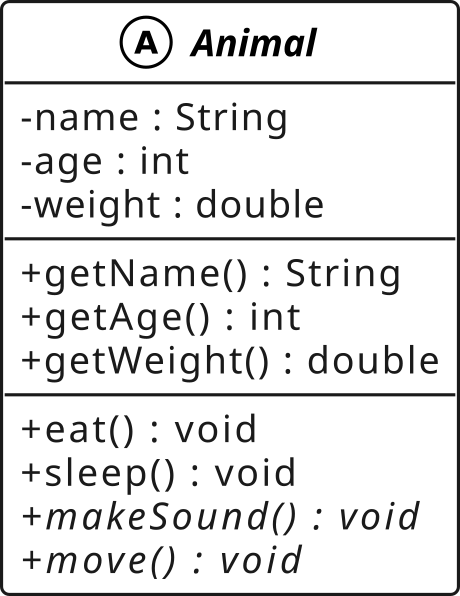
Fig. 27 UML notation: Animal is an abstract base class. Abstract class name appears in italics with a circled A; concrete subclasses carry a circled C. Abstract methods are also italicized.#

The abc Module and @abstractmethod
Import ABC and abstractmethod from abc. Inheriting from ABC
marks the class as abstract, but on its own it does not prevent
instantiation and does not enforce any interface. TypeError is only raised
when at least one @abstractmethod is declared and a subclass fails to
implement it.
from abc import ABC, abstractmethod

class Animal(ABC):
    def __init__(self, name: str):
        self._name = name

    @abstractmethod
    def make_sound(self) -> None: ...

    @abstractmethod
    def move(self) -> None: ...

class Cat(Animal):
    def make_sound(self) -> None:
        print(f"{self._name} says: Meow")

    def move(self) -> None:
        print(f"{self._name} walks gracefully")

# OK: all abstract methods implemented
kitty = Cat("Kitty")
kitty.make_sound()   # Kitty says: Meow
Note
@abstractmethod declares that a method must be overridden in every
concrete subclass. A subclass that omits any abstract method cannot be
instantiated – Python raises TypeError at instantiation time, not at
the point where the missing method would be called. An abstract method can
have a body (callable via super().make_sound()), but an empty body is
the norm. ABC alone does not prevent instantiation; it is
@abstractmethod that enforces the contract. ABC sets ABCMeta
as the metaclass; class Animal(metaclass=ABCMeta) is equivalent but
class Animal(ABC) is the preferred style.
Implementing an Abstract Class
A concrete class inherits from the abstract base and implements all abstract
methods. If any abstract method is missing, Python raises TypeError at
instantiation time – not at the point where the missing method is called.
UML Diagram
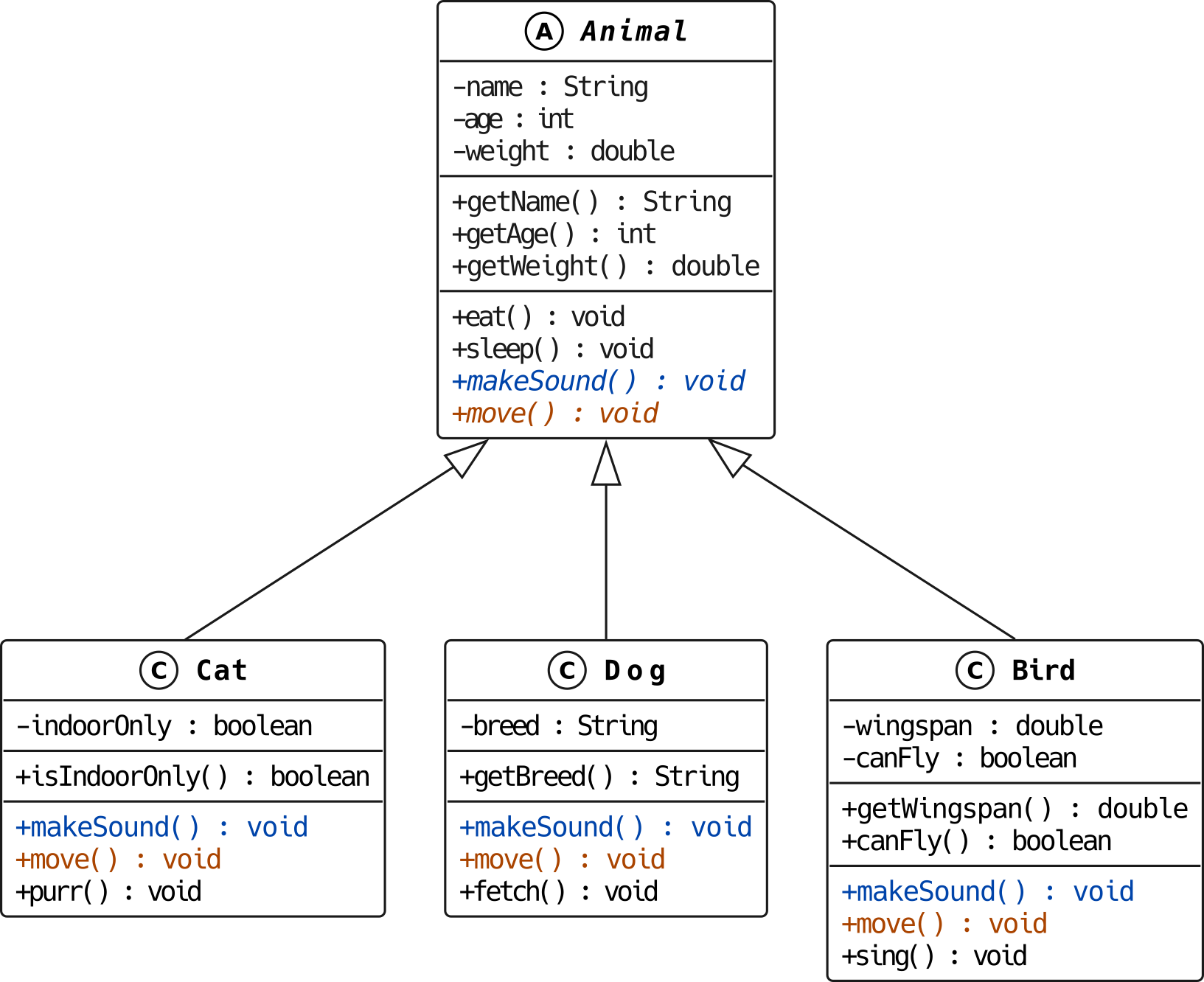
Fig. 29 Abstract Animal with concrete subclasses Cat, Dog, and Bird.#
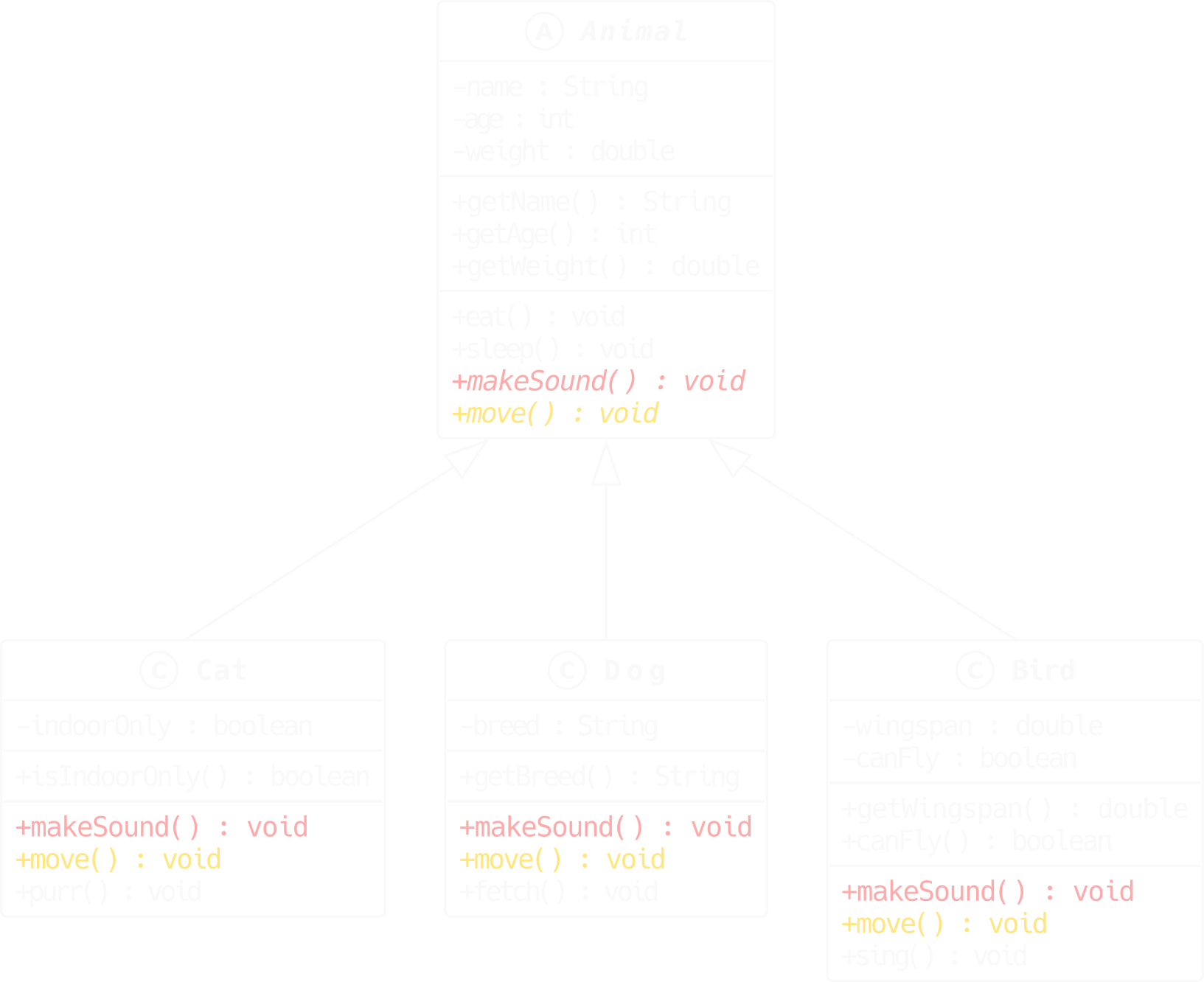
Reading the Diagram
Animalcarries a circled A and its name appears in italics, indicating it is abstract and cannot be instantiated.make_sound()andmove()appear in italics insideAnimal, indicating they are abstract and must be overridden.Cat,Dog, andBirdcarry a circled C, indicating they are concrete and can be instantiated.Each subclass provides its own implementation of
make_sound()andmove().eat()andsleep()are concrete inAnimaland inherited as-is by all subclasses.
Concrete and Abstract Methods Together
An abstract class can mix abstract and concrete methods. Concrete methods provide shared behavior inherited by all subclasses. Abstract methods enforce the interface each subclass must implement.
from abc import ABC, abstractmethod

class Animal(ABC):
    def __init__(self, name: str, age: int):
        self._name = name
        self._age = age

    @abstractmethod
    def make_sound(self) -> None: ...

    @abstractmethod
    def move(self) -> None: ...

    # concrete: shared by all
    def eat(self) -> None:
        print(f"{self._name} is eating")

    # concrete: shared by all
    def __repr__(self) -> str:
        return (f"{type(self).__name__}"
                f"(name={self._name!r}, age={self._age})")

class Cat(Animal):
    def make_sound(self) -> None:
        print(f"{self._name} says: Meow")

    def move(self) -> None:
        print(f"{self._name} walks gracefully")

if __name__ == '__main__':
    kitty = Cat("Kitty", age=3)
    kitty.eat()         # inherited from Animal
    kitty.make_sound()  # overridden in Cat
    kitty.move()        # overridden in Cat
    print(kitty)        # Cat(name='Kitty', age=3)
ABCs, Polymorphism, and Method Overriding
In the duck typing section, Cat and Dog defined make_sound()
independently with no contract from Animal. Nothing prevented a developer
from forgetting to implement it in a new subclass. ABCs solve this.
from abc import ABC, abstractmethod

class Animal(ABC):
    def __init__(self, name: str):
        self._name = name

    @abstractmethod
    def make_sound(self) -> None: ...  # contract: every subclass must override this

class Cat(Animal):
    def make_sound(self) -> None:      # overriding the abstract method
        print(f"{self._name} says: Meow")

class Dog(Animal):
    def make_sound(self) -> None:      # overriding the abstract method
        print(f"{self._name} says: Woof")
What Happens When You Forget
If a subclass does not implement all abstract methods, Python raises TypeError
at instantiation time, not at the point where the missing method is called.
class Dog(Animal):
    def move(self) -> None:
        print(f"{self._name} runs")
    # make_sound() is NOT implemented -- forgot!

kitty = Cat("Kitty")   # OK
rex   = Dog("Rex")     # TypeError: Can't instantiate abstract class Dog
                       # without an implementation for abstract method 'make_sound'
Note
ABCs, method overriding, and polymorphism work together. The ABC defines what must exist. The subclass defines how it behaves. The polymorphic function uses the interface without knowing the concrete type.
Data Classes (FYI)#
Reducing boilerplate for data-centric classes.
Refer to L7_dataclasses.py to follow along with the examples below.
What Is a Data Class?
A data class is a regular Python class decorated with
@dataclass. Python automatically generates__init__,__repr__, and__eq__from the class’s type-annotated fields, eliminating repetitive boilerplate.
The decorator inspects the class body for type-annotated fields.
Generated methods are equivalent to what you would write by hand.
Additional dunder methods (
__hash__,__lt__, etc.) can be enabled through decorator arguments.
Physical world examples
A
Point(x: float, y: float)– two fields, needs__init__and__repr__but no behavior.A
Color(r: int, g: int, b: int)– pure data, equality comparison useful.A
Config(debug: bool, max_retries: int, timeout: float)– settings bundle.
Robotics Competition examples
A
Pose(x: float, y: float, heading: float)– robot position, no behavior.A
SensorReading(sensor_id: str, value: float, timestamp: float)– logged data point.A
TaskResult(task_name: str, success: bool, duration_s: float)– result record.
Code Example
from dataclasses import dataclass

@dataclass
class Animal:
    name: str
    age: int
    weight: float

kitty = Animal("Kitty", 3, 4.2)
print(kitty)            # Animal(name='Kitty', age=3, weight=4.2)
print(kitty.name)       # Kitty
The @dataclass decorator is equivalent to writing:
class Animal:
    def __init__(self, name: str, age: int, weight: float) -> None:
        self.name = name
        self.age = age
        self.weight = weight

    def __repr__(self) -> str:
        return f"Animal(name={self.name!r}, age={self.age!r}, weight={self.weight!r})"

    def __eq__(self, other: object) -> bool:
        if isinstance(other, Animal):
            return (self.name, self.age, self.weight) == (other.name, other.age, other.weight)
        return NotImplemented
What is Happening?
@dataclassreads the type-annotated class-body fields in declaration order and builds__init__with matching parameters.__repr__is generated to list all fields by name, making instances easy to inspect in the REPL and in logs.__eq__compares instances field-by-field, which is the natural equality semantics for data-centric classes.
Note
When to use ``@dataclass``: Use it for classes whose primary purpose is storing data with little or no behavior. For classes with significant logic, encapsulation requirements, or complex initialization, a regular class is usually clearer.
field() and Default Factories
Use field() from the dataclasses module when a field needs a mutable
default, should be excluded from __repr__, or requires special initialization.
from dataclasses import dataclass, field

@dataclass
class Animal:
    name: str
    age: int
    weight: float
    nicknames: list[str] = field(
        default_factory=list
    )
    _id: int = field(
        default=0,
        repr=False,
        compare=False
    )

kitty = Animal("Kitty", 3, 4.2)
kitty.nicknames.append("Kit")
print(kitty)
# Animal(name='Kitty', age=3,
#        weight=4.2, nicknames=['Kit'])

rex = Animal("Rex", 5, 30.0)
print(rex.nicknames)   # []  (independent list)
Why ``field()``?
Mutable defaults like
listordictcannot be written asnicknames: list = []. Python would share the same list across all instances.field(default_factory=list)creates a fresh list for each new instance.
Useful ``field()`` parameters:
default: a fixed default value (for immutable types).default_factory: a callable that produces the default (for mutable types).repr=False: exclude the field from__repr__.compare=False: exclude the field from__eq__comparisons.init=False: exclude the field from__init__entirely.
Warning
Never use a mutable object (list, dict, set) directly as a default
value in a @dataclass. Use field(default_factory=...) instead.
__post_init__: Validation and Derived Attributes
__post_init__ is called automatically by the generated __init__ after all
fields have been assigned. It is the correct place to validate field values or
compute derived attributes.
Validation
from dataclasses import dataclass

@dataclass
class Animal:
    name: str
    age: int
    weight: float

    def __post_init__(self):
        if self.age < 0:
            raise ValueError(
                f"age cannot be negative: {self.age}"
            )
        if self.weight <= 0:
            raise ValueError(
                f"weight must be positive: {self.weight}"
            )

kitty = Animal("Kitty", age=3, weight=4.2)  # OK
bad   = Animal("Bad",   age=-1, weight=4.2)  # ValueError
Without __post_init__, nothing stops a caller from creating
Animal("Kitty", age=-1, weight=-5.0). Validation here catches the error
at construction time.
Derived Attributes
A derived attribute is computed from other fields rather than passed by the
caller. Declare it with field(init=False) to exclude it from __init__,
then assign it inside __post_init__.
from dataclasses import dataclass, field

@dataclass
class Animal:
    name: str
    age: int
    life_stage: str = field(init=False)

    def __post_init__(self):
        if self.age < 1:
            self.life_stage = "infant"
        elif self.age < 7:
            self.life_stage = "adult"
        else:
            self.life_stage = "senior"

kitty = Animal("Kitty", age=3)
print(kitty)
# Animal(name='Kitty', age=3, life_stage='adult')
life_stage is never passed by the caller. It is computed automatically from
age every time an Animal is created.
Frozen Data Classes
Setting frozen=True makes the data class immutable after creation. Python
generates __hash__, making instances usable as dictionary keys or set members.
from dataclasses import dataclass

@dataclass(frozen=True)
class Animal:
    name: str
    age: int
    weight: float

kitty = Animal("Kitty", 3, 4.2)
print(kitty)
# Animal(name='Kitty', age=3, weight=4.2)

kitty.age = 4
# FrozenInstanceError: cannot assign to field 'age'

# Frozen instances are hashable
animal_set = {kitty, Animal("Rex", 5, 30.0)}
lookup = {kitty: "indoor cat"}
print(lookup[kitty])   # indoor cat
What does frozen=True do?
Prevents any field from being modified after creation.
Any attempt to assign to a field raises
FrozenInstanceError.Automatically generates
__hash__, making the instance usable as a dictionary key or set member.
When to use frozen data classes:
Records that should never change after creation (sensor readings, event logs, configuration snapshots).
Objects used as dictionary keys or stored in sets.
Anywhere immutability is a design requirement.
Note
A regular @dataclass sets __hash__ to None by default (making it
unhashable) because mutable objects should not be hashed. frozen=True
restores hashability safely.
Situation |
Use |
Use regular class |
|---|---|---|
Primary purpose |
Storing data fields |
Complex behavior and logic |
Attribute access |
Direct field access |
Validated via |
Immutability |
|
|
Inheritance |
Simple hierarchies |
Deep or complex hierarchies |
Encapsulation |
Not a priority |
Central design concern |
Animal Domain Example
Use
@dataclassforAnimalRecord(name, species, date of birth, weight at intake): pure data, no behavior.Use a regular class for
Animalwith@propertyforweight(validated, cannot be negative) and methods likemake_sound()andmove().A frozen data class suits an
ObservationLogentry: timestamp, observer name, species, notes – write once, never modify.
__slots__ (FYI)#
Restricting attributes and reducing memory overhead.
Refer to L7_slots.py to follow along with the examples below.
What Is __slots__?
__slots__is a class-level declaration that replaces the per-instance__dict__with a fixed, compact array of named attribute slots. The result is lower memory use and faster attribute access at the cost of no longer allowing dynamic attribute assignment.
Without
__slots__: each instance carries a__dict__(~232 bytes).With
__slots__: attributes are stored in a fixed array (~48 bytes).
Physical world examples
A form with fixed fields vs. a blank notepad – a form only allows the declared fields; a notepad lets you write anything anywhere.
A database row with a fixed schema vs. a Python
dict.
Robotics Competition examples
A
Poseobject created millions of times in a trajectory planner – the memory savings from__slots__are significant at that scale.A
SensorReadinglogged thousands of times per second – compact storage reduces GC pressure.
Code Example
class Pose:
    """Regular class -- has __dict__."""

    def __init__(self, x: float, y: float, heading: float) -> None:
        self._x = x
        self._y = y
        self._heading = heading

class PoseSlotted:
    """Slotted class -- no __dict__."""

    __slots__ = ("_x", "_y", "_heading")

    def __init__(self, x: float, y: float, heading: float) -> None:
        self._x = x
        self._y = y
        self._heading = heading
import sys

p  = Pose(1.0, 2.0, 0.5)
ps = PoseSlotted(1.0, 2.0, 0.5)

print(sys.getsizeof(p)  + sys.getsizeof(p.__dict__))   # ~280 bytes
print(sys.getsizeof(ps))                                # ~56 bytes
What is Happening?
Posestores attributes in__dict__, which is a full Python dictionary with hash table overhead.PoseSlottedstores attributes directly in a fixed C-level array – no hash table, no per-instance overhead beyond the slot values themselves.Both classes behave identically for attribute reads and writes; the difference is invisible to callers.
Note
The exact byte counts vary by Python version and platform. The important result is that the slotted version uses significantly less memory.
Restrictions and Limitations
No dynamic attributes. Attempting to assign an attribute not listed in
__slots__raisesAttributeError.
ps = PoseSlotted(1.0, 2.0, 0.5)
ps._extra = "dynamic"   # AttributeError: 'PoseSlotted' object has no attribute '_extra'
Some serialization tools may break. Libraries that rely on
__dict__(e.g.,picklein certain modes, some ORMs) may not work with slotted classes without extra configuration.Use sparingly.
__slots__is an optimization. Reach for it only when profiling shows that__dict__memory is a genuine bottleneck – typically when creating tens of thousands of instances.
__slots__ with Inheritance
Each class in a hierarchy should declare only the new slots it introduces.
Python merges __slots__ from all classes in the chain automatically.
class PoseSlotted:
    __slots__ = ("_x", "_y", "_heading")

    def __init__(self, x: float, y: float, heading: float) -> None:
        self._x = x
        self._y = y
        self._heading = heading

class StampedPose(PoseSlotted):
    __slots__ = ("_timestamp",)   # Only declare the NEW attribute

    def __init__(self, x: float, y: float, heading: float, timestamp: float) -> None:
        super().__init__(x, y, heading)
        self._timestamp = timestamp

sp = StampedPose(1.0, 2.0, 0.5, timestamp=1712345678.0)
print(sp._x, sp._y, sp._heading, sp._timestamp)
# 1.0 2.0 0.5 1712345678.0
Warning
Do not redeclare a parent’s slot in the child. Doing so wastes memory and can cause subtle bugs because Python creates two slots for the same name.
Protocols (FYI)#
Structural subtyping without inheritance.
Refer to L7_protocols.py to follow along with the examples below.
What Is a Protocol?
A
typing.Protocoldefines an interface through structural subtyping: a class satisfies the Protocol simply by having the required methods and attributes, without needing to inherit from it. This is sometimes called “static duck typing” – the flexibility of duck typing with the explicitness of type annotations.
Nominal typing (ABCs): compatibility declared explicitly via inheritance.
Structural typing (Protocols): compatibility determined by structure alone.
Physical world examples
A USB port accepts any device that fits the connector and speaks the protocol – no registration required.
A power outlet accepts any plug of the right shape – the appliance does not need to be certified by the outlet manufacturer.
Robotics Competition examples
An
ExecutableProtocol requiresexecute(robot_name) -> bool. BothPickTaskandDeliverTasksatisfy it without inheriting from anything.A
LoggableProtocol requireslog_status() -> str. Any class that has that method qualifies – no shared base class needed.
Aspect |
ABC (Nominal) |
Protocol (Structural) |
|---|---|---|
Declaration |
Must inherit from the ABC |
No inheritance required |
Enforcement |
At instantiation time |
At type-check time ( |
Runtime check |
|
Needs |
Flexibility |
Tight coupling |
Loose coupling |
Best for |
Shared base behavior |
Independent implementations |
Note
typing.Protocol was introduced in Python 3.8 (PEP 544). It is the
preferred way to express interfaces in modern Python when you do not want to
require explicit inheritance.
Defining a Protocol
Inherit from typing.Protocol. Add @runtime_checkable if you need to use
isinstance() checks at runtime.
from typing import Protocol, runtime_checkable

@runtime_checkable
class Executable(Protocol):
    """Any object that can be dispatched to a robot."""

    def execute(self, robot_name: str) -> bool:
        ...
Implementing a Protocol (Without Inheritance)
Neither PickTask nor DeliverTask inherits from Executable. They satisfy
the protocol simply by having the required method.
class PickTask:
    """Satisfies Executable without inheriting from it."""

    def execute(self, robot_name: str) -> bool:
        print(f"{robot_name} picks an object")
        return True

class DeliverTask:
    """Also satisfies Executable -- no shared base with PickTask."""

    def execute(self, robot_name: str) -> bool:
        print(f"{robot_name} delivers to destination")
        return True

class SleepTask:
    """Does not satisfy Executable -- wrong method name."""

    def sleep(self, duration: float) -> None:
        print(f"sleeping for {duration}s")

def dispatch(task: Executable, robot_name: str) -> bool:
    """Accept any Executable -- structural typing in action."""
    return task.execute(robot_name)

pick    = PickTask()
deliver = DeliverTask()

dispatch(pick,    "Scout")
dispatch(deliver, "Arm-1")
Output:
Scout picks an object
Arm-1 delivers to destination
@runtime_checkable and isinstance()
With @runtime_checkable, isinstance() checks whether an object has the
required methods. It does not verify method signatures.
pick    = PickTask()
deliver = DeliverTask()
sleep   = SleepTask()

print(isinstance(pick,    Executable))   # True
print(isinstance(deliver, Executable))   # True
print(isinstance(sleep,   Executable))   # False
Warning
@runtime_checkable only checks for the presence of methods, not their
signatures. For full type safety, use a static type checker such as mypy
or pyright in addition to runtime checks.
ABCs vs. Protocols – Decision Guide
Choose an ABC when… |
Choose a Protocol when… |
|---|---|
Subclasses share concrete behavior (inherited methods with a body) |
Unrelated classes satisfy the same interface |
You want enforcement at instantiation time ( |
You prefer loose coupling across module or library boundaries |
You control all implementing classes |
You do not control the implementing classes |
Nominal typing fits your design |
Structural typing (“duck typing with annotations”) fits better |