

Lecture#
Prerequisites#
One-time workspace and environment setup required before running any code in this lecture.
One-Time Setup
Clone the course workspace and configure your shell so ROS 2 can find all packages automatically.
Clone the course workspace
git clone https://github.com/zeidk/enpm605-spring-2026-ros.git ~/enpm605_ws
Add the setup script to your shell rc file
# Bash users
echo "source ~/enpm605_ws/enpm605.sh" >> ~/.bashrc

# Zsh users
echo "source ~/enpm605_ws/enpm605.sh" >> ~/.zshrc
Reload your shell
source ~/.bashrc   # bash users
source ~/.zshrc    # zsh users
Run the setup function once per terminal
enpm605
Note
The enpm605 function must be run once in every new terminal
before using ros2 commands. It sources the ROS 2 base
installation and the course workspace in the correct order.
Build the Demo Packages
Build both demo packages used in this lecture before proceeding.
colcon build --symlink-install --packages-select launch_demo executor_demo
Source the workspace after each build:
source install/setup.bash
Launch Files#
A mechanism for starting multiple ROS 2 nodes simultaneously while enabling dynamic configuration.
Why Use Launch Files?
Managing each node manually with ros2 run becomes impractical in
real robotic systems. Launch files address this by combining node
startup, configuration, and coordination into a single, reproducible
command.
Node Management: Launch, configure, and control individual ROS 2 nodes, including lifecycle and composable nodes, to define system behavior.
Modularity and Reuse: Structure complex systems by reusing launch files, grouping nodes, and managing namespace scopes for better organization and scalability.
Configuration and Customization: Allow users to tailor launch behavior using arguments, environment variables, and substitutions that adapt to various runtime contexts.
Execution Control: Control the timing and conditions under which nodes and actions are launched, including timers, conditionals, and event-driven execution.
Custom Launch Logic: Use Python-based logic and functions to perform dynamic setup, computations, or system introspection before launching actions.
Logging and Diagnostics: Monitor system behavior and assist debugging by printing messages, adjusting log levels, and tracking node status during launch.
Resources
Note
Launch files support XML, YAML, and Python formats. This course uses Python exclusively.
Anatomy of a Launch File
A typical Python launch file contains three main parts.
Import statements: Required launch and ROS dependencies.
Launch description: A function named
generate_launch_descriptionthat returns theLaunchDescriptioncontaining all node configurations. This function must be defined for ROS 2 to recognize the file as a valid launch file.Node configuration: Information about nodes, parameters, remappings, and more.
Note
Launch files are typically placed in the launch/ directory
within your package. Edit setup.py to install them with:
(os.path.join('share', package_name, 'launch'), glob('launch/*'))
Launch files end with the .launch.py extension by convention.
Two equivalent patterns
# demo1.launch.py -- explicit LaunchDescription object
from launch import LaunchDescription
from launch_ros.actions import Node

def generate_launch_description():
    ld = LaunchDescription()
    talker = Node(package="demo_nodes_py", executable="talker")
    listener = Node(package="demo_nodes_py", executable="listener")
    ld.add_action(talker)
    ld.add_action(listener)
    return ld
# demo2.launch.py -- inline list pattern
from launch import LaunchDescription
from launch_ros.actions import Node

def generate_launch_description():
    return LaunchDescription([
        Node(package="demo_nodes_py", executable="talker"),
        Node(package="demo_nodes_py", executable="listener"),
    ])
Both patterns are equivalent. Choose whichever improves readability for your use case.
Demonstration
ros2 launch launch_files_demo demo1.launch.py
ros2 launch launch_files_demo demo2.launch.py
Advanced Features#
Launch files support several advanced features for building complex, configurable robot systems.
Include Other Launch Files
One launch file can include another from a different package using
IncludeLaunchDescription. This promotes modularity and allows
large systems to be composed from smaller, reusable launch files.
from launch.actions import IncludeLaunchDescription
from launch.launch_description_sources import PythonLaunchDescriptionSource
from launch.substitutions import PathJoinSubstitution
from launch_ros.substitutions import FindPackageShare

included_launch = IncludeLaunchDescription(
    PythonLaunchDescriptionSource(
        PathJoinSubstitution([
            FindPackageShare("other_package"), "launch", "other.launch.py"
        ])
    )
)
FindPackageShareresolves the installed share directory of a package at runtime without hardcoding paths.PathJoinSubstitutionconstructs a file path from components in a platform-independent way.
Demonstration
ros2 launch launch_files_demo demo3.launch.py
Conditional Launching
Nodes can be started conditionally based on launch arguments. The
IfCondition class evaluates the argument at launch time and
starts the node only when the value is "true".
from launch.actions import DeclareLaunchArgument
from launch.conditions import IfCondition
from launch.substitutions import LaunchConfiguration

talker_arg = DeclareLaunchArgument("start_talker", default_value="true")

talker = Node(
    package="demo_nodes_py",
    executable="talker",
    condition=IfCondition(LaunchConfiguration("start_talker")),
)
To inspect all available launch arguments for a file:
ros2 launch <package> <launch_file> --show-args
Demonstration
ros2 launch launch_files_demo demo4.launch.py start_talker:=true
ros2 launch launch_files_demo demo4.launch.py start_talker:=false
Node Grouping
Related nodes can be grouped together using GroupAction. Groups
make the launch description more readable and allow a condition to
be applied to an entire set of nodes at once.
from launch.actions import GroupAction
from launch_ros.actions import Node

chatter_group = GroupAction([
    Node(package="demo_nodes_py", executable="talker"),
    Node(package="demo_nodes_py", executable="listener"),
])
Conditional group – start the whole group based on an argument:
from launch.actions import GroupAction, DeclareLaunchArgument
from launch.conditions import IfCondition
from launch.substitutions import LaunchConfiguration

enable_arg = DeclareLaunchArgument("enable_chatter", default_value="false")

chatter_group = GroupAction(
    condition=IfCondition(LaunchConfiguration("enable_chatter")),
    actions=[
        Node(package="demo_nodes_py", executable="talker"),
        Node(package="demo_nodes_py", executable="listener"),
    ],
)
Demonstration
ros2 launch launch_files_demo demo5.launch.py
ros2 launch launch_files_demo demo6.launch.py enable_chatter:=true
Executors#
Executors manage how and when callbacks run, enabling complex multi-task robotic systems.
Overview
So far our nodes have been single-purpose: one callback managing one task. Real robotic systems require multiple concurrent tasks (processing sensor data, updating control commands, monitoring system health, handling user input, logging) and must handle coordination challenges such as blocking callbacks, concurrent vs. parallel execution, and task prioritization.
Executors simplify thread management by providing an abstraction layer, allowing operation with either a single thread or multiple threads.
Executors can manage the callbacks of one or more nodes at the same time.
Note
Concurrent means tasks are in progress at the same time but may take turns on one thread. Parallel means tasks run simultaneously on separate cores. The executor and callback group together determine which one you get.
Resources
Single-Threaded Executor#
Processes all callbacks sequentially in a single OS thread.
Key Concepts
A single-threaded executor processes all callbacks one at a time in the order they are scheduled, without concurrency.
All callbacks (timers, subscriptions, services, actions) share one thread and are queued and executed sequentially.
Execution order follows the scheduler queue – no two callbacks ever overlap.
No synchronization primitives (locks, mutexes) are needed because concurrent access to shared state is impossible by construction.
rclpy.spin(node)is a convenience wrapper that internally creates aSingleThreadedExecutor, adds the node, and callsexecutor.spin().Suitable for nodes with low computational demands or where deterministic, predictable execution order is required.
A long-running or blocking callback will delay every other callback for the duration of the block.
Execution Timeline
Three timer callbacks registered to the same single-threaded executor:
cb1at 2 Hz, 30 ms execution timecb2at 2 Hz, 20 ms execution timecb3at 4 Hz, 10 ms execution time

Fig. 51 Single-threaded executor timeline over 1 s. All callbacks share one thread and execute sequentially. cb2 incurs a fixed +30 ms phase offset and cb3 a fixed +50 ms offset whenever co-scheduled with cb1.#

Fig. 52 Single-threaded executor timeline over 1 s. All callbacks share one thread and execute sequentially. cb2 incurs a fixed +30 ms phase offset and cb3 a fixed +50 ms offset whenever co-scheduled with cb1.#
Callback |
Frequency |
Duration |
Scheduled at |
Actually fires at |
Delay |
|---|---|---|---|---|---|
cb1 cycle 1 |
2 Hz |
30 ms |
0 ms |
0 ms |
none |
cb2 cycle 1 |
2 Hz |
20 ms |
0 ms |
30 ms |
+30 ms |
cb3 cycle 1 |
4 Hz |
10 ms |
0 ms |
50 ms |
+50 ms |
cb3 cycle 2 |
4 Hz |
10 ms |
250 ms |
250 ms |
none |
cb1 cycle 2 |
2 Hz |
30 ms |
500 ms |
500 ms |
none |
cb2 cycle 2 |
2 Hz |
20 ms |
500 ms |
530 ms |
+30 ms |
cb3 cycle 3 |
4 Hz |
10 ms |
500 ms |
550 ms |
+50 ms |
cb3 cycle 4 |
4 Hz |
10 ms |
750 ms |
750 ms |
none |
rclpy.spin() vs SingleThreadedExecutor
They are essentially the same. rclpy.spin(node) is a convenience
wrapper that creates a SingleThreadedExecutor, adds the node to
it, and calls executor.spin().
# Simple spinning
def main(args=None):
    rclpy.init(args=args)
    node = MyNode()
    rclpy.spin(node)
    rclpy.shutdown()
# Explicit executor -- preferred when managing multiple nodes
from rclpy.executors import SingleThreadedExecutor

def main(args=None):
    rclpy.init(args=args)
    node1 = MyFirstNode()
    node2 = MySecondNode()
    executor = SingleThreadedExecutor()
    executor.add_node(node1)
    executor.add_node(node2)
    executor.spin()
    rclpy.shutdown()
Use the explicit executor when you need to add multiple nodes to one executor, switch executor types easily, or implement custom spin behaviors.
Multi-Threaded Executor#
Manages and executes callbacks across multiple threads, allowing for concurrent processing of tasks.
Overview and Benefits
A multi-threaded executor creates a pool of OS threads. Each thread can independently process callbacks from nodes added to the executor.
Thread pool: The executor creates a configurable number of threads via
num_threads. Each thread can handle a pending callback independently.Callback scheduling: When events occur (a timer fires, a message arrives, a service request comes in), the executor assigns pending callbacks to available threads. Multiple callbacks can run concurrently.
Spinning:
executor.spin()starts an event loop that continuously checks for and dispatches work to the thread pool.
Benefits
Performance: Ideal for applications with many independent tasks such as processing data from multiple sensors. Concurrent execution can reduce latency and improve throughput.
Scalability: Handles multiple nodes or high-frequency callbacks better than a single-threaded executor under heavy load.
Responsiveness: Critical tasks (such as responding to an emergency stop signal) will not be blocked by slower, less urgent ones.
Challenges
Race conditions: If callbacks access shared resources (a class attribute, a buffer), synchronization mechanisms like
threading.Lockare needed to prevent data corruption.Overhead: Managing multiple threads introduces complexity and CPU overhead. If your application is lightweight, the extra threads may not be worth it.
Concurrency vs. Parallelism
Concurrency means multiple tasks are in progress at the same time. Multiple software threads exist, but they share a single core. The OS task switcher rapidly alternates which thread gets the core, creating the illusion of simultaneity. This is about structure.
Parallelism means multiple tasks execute simultaneously on separate CPU cores. No task switching is needed – each core runs its thread uninterrupted. This is about execution.
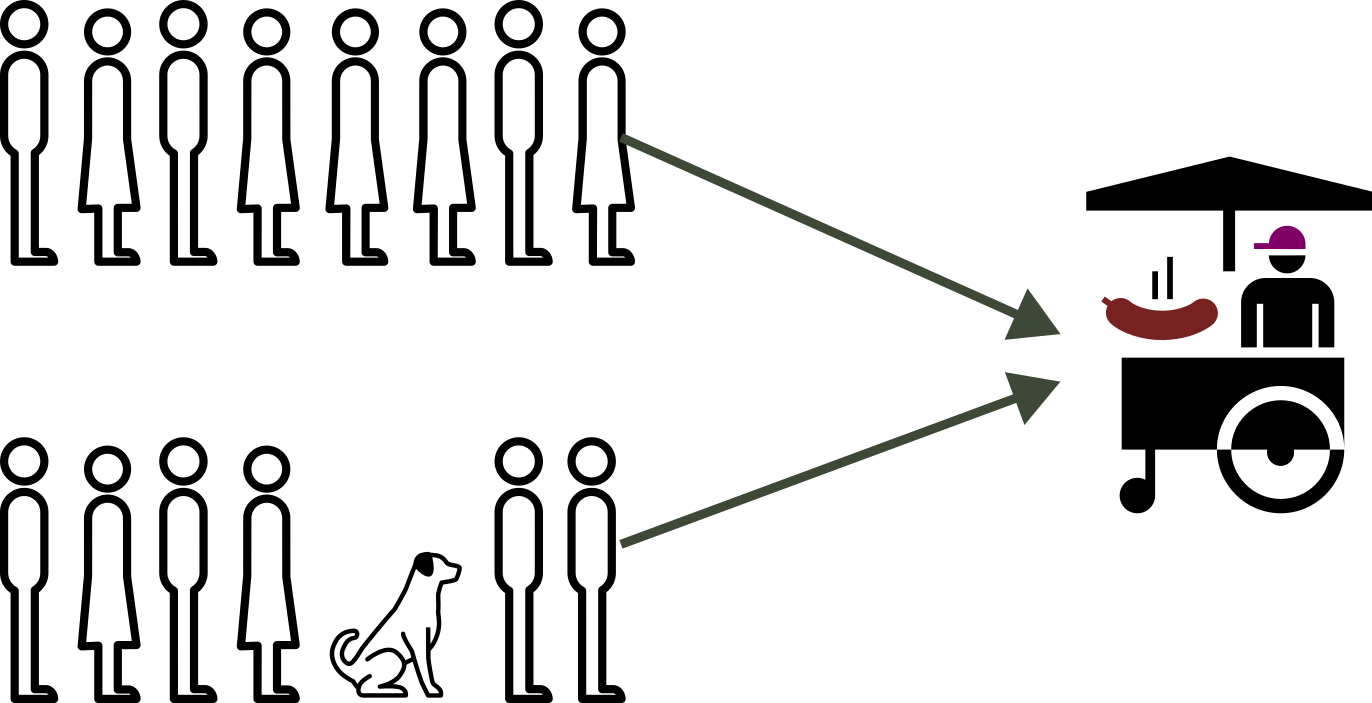
Fig. 54 Concurrency: two queues, one hot dog stand. Both groups are in progress, but only one customer is served at a time.#
Fig. 55 Concurrency: two queues, one hot dog stand. Both groups are in progress, but only one customer is served at a time.#
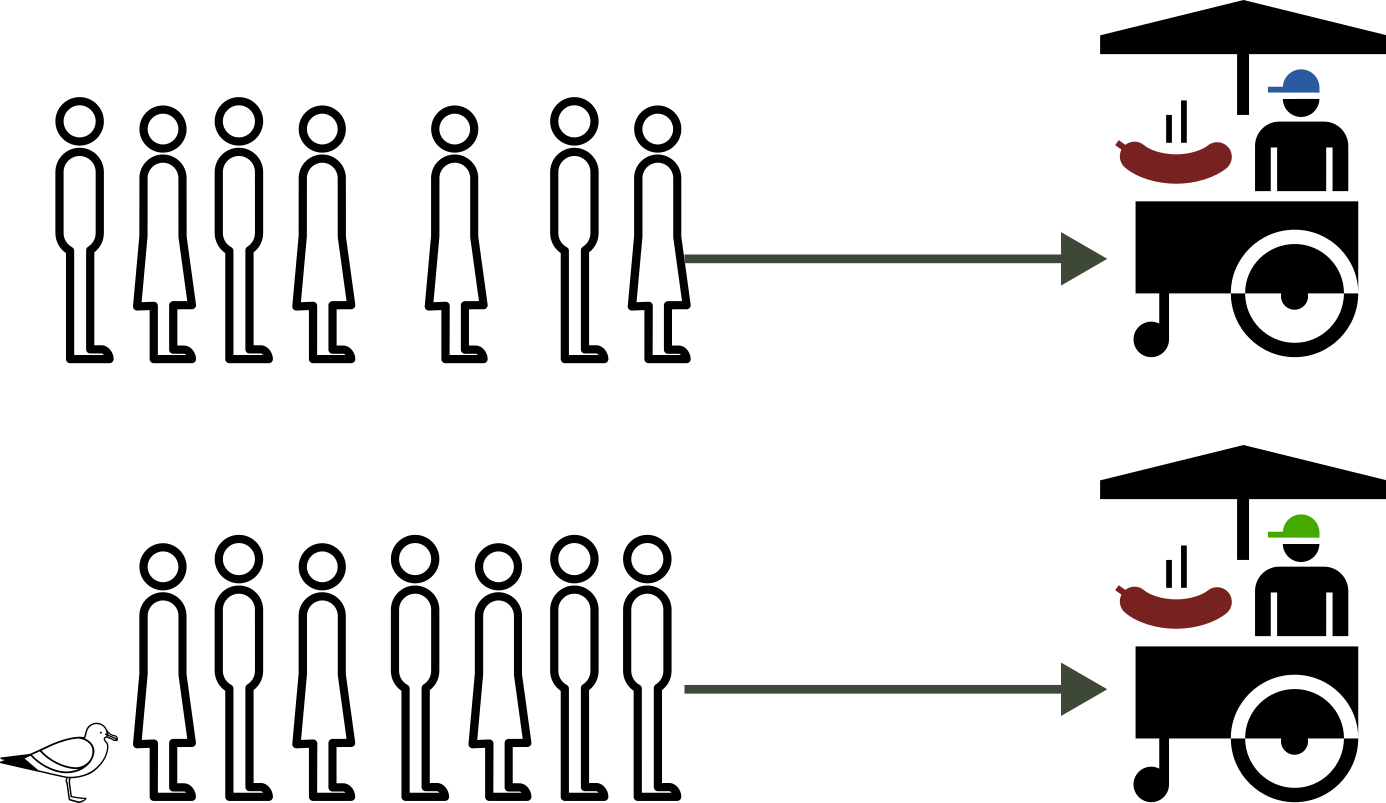
Fig. 56 Parallelism: two queues, two hot dog stands. Both groups are served simultaneously with no waiting on each other.#
Fig. 57 Parallelism: two queues, two hot dog stands. Both groups are served simultaneously with no waiting on each other.#
The Python GIL and Its Impact on ROS 2
CPython (the standard Python interpreter) has a Global Interpreter Lock (GIL): a mutex that allows only one thread to execute Python bytecode at a time, regardless of how many CPU cores are available.
Even if you create 32 threads on a 32-core machine, only one thread holds the GIL and runs at any instant. The others wait. The GIL exists to protect CPython’s internal memory management from concurrent access.
Impact on ROS 2 Python nodes:
A
MultiThreadedExecutorcreates a pool of OS threads, but the GIL serializes them back onto one core for any pure Python code.Adding more threads via
num_threadsdoes not add parallelism; it adds idle threads.A
ReentrantCallbackGroupallows multiple callback instances to be in progress simultaneously, but they still take turns on one core.
When true parallelism IS achieved:
The GIL is released during I/O, time.sleep(), and calls into
native libraries (NumPy, OpenCV, sensor drivers). Only then can two
threads run simultaneously on separate cores. This is why AV
callbacks processing LiDAR (NumPy) or images (OpenCV) can achieve
true parallelism in practice.
Callback Groups#
A callback group is a container within a node that holds callbacks for subscriptions, timers, or services. Each group defines how its callbacks are handled in terms of execution and threading.
Overview
By default, all callbacks belong to the node’s implicit callback group (
MutuallyExclusiveCallbackGroup). You can create explicit groups to customize execution behavior.Two types exist:
MutuallyExclusive(only one callback executes at a time) andReentrant(multiple callbacks can execute in parallel on separate threads).Useful for managing concurrency, preventing race conditions, prioritizing callbacks, and isolating time-critical operations from blocking ones.
The executor type (single-threaded vs. multi-threaded) determines whether callback groups can actually leverage concurrency.
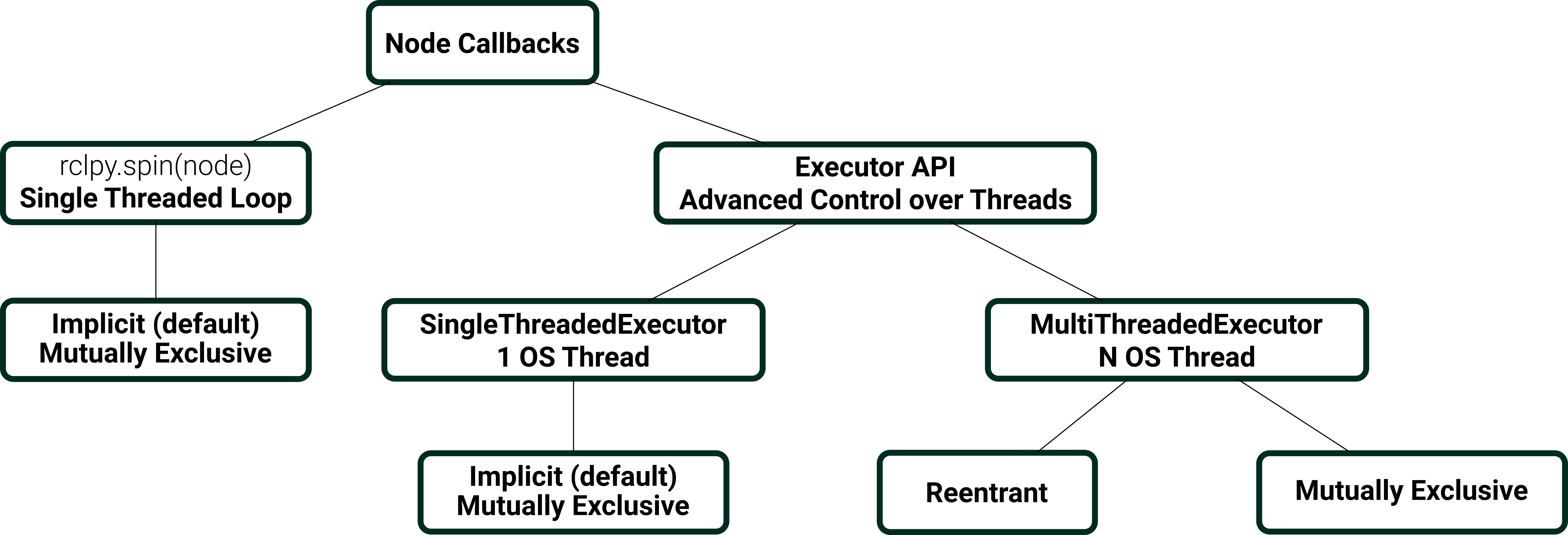
Fig. 60 Overview of executor and callback group options in ROS 2.#
Mutually Exclusive Callback Group
Callbacks within a mutually exclusive callback group cannot run concurrently, even in a multi-threaded executor. The executor withholds any queued callback from the group until the currently running one returns.
Use case: Callbacks share a resource (a class attribute, a buffer, a hardware interface) and you want to avoid race conditions without writing explicit locks. Also useful when you need deterministic, sequential execution within a group while other groups or nodes run in parallel.
Limitation: A long-running callback in the group delays every other callback in the same group for its entire duration, regardless of how many threads the executor has.
Declaration:
from rclpy.callback_groups import MutuallyExclusiveCallbackGroup

class MutexDemoNode(Node):
    def __init__(self):
        super().__init__("mutex_demo")
        self._group = MutuallyExclusiveCallbackGroup()

        # All three timers share the same group
        self.create_timer(1.0,  self._cb1, callback_group=self._group)
        self.create_timer(0.5,  self._cb2, callback_group=self._group)
        self.create_timer(0.25, self._cb3, callback_group=self._group)
Effect of ``num_threads`` on a single mutex group:
# Default: os.cpu_count() threads -- behavior identical to any explicit value
executor = MultiThreadedExecutor()

# Explicit: 4 threads -- preferred for portability and clarity
executor = MultiThreadedExecutor(num_threads=4)
For a single MutuallyExclusiveCallbackGroup, num_threads has
no effect on callback ordering or timing. The mutex gate serializes
all callbacks regardless of pool size. Prefer explicit values in
production code.
Execution timeline (1 Hz cb1 at 200 ms, 2 Hz cb2 at 80 ms, 4 Hz cb3 at 40 ms):
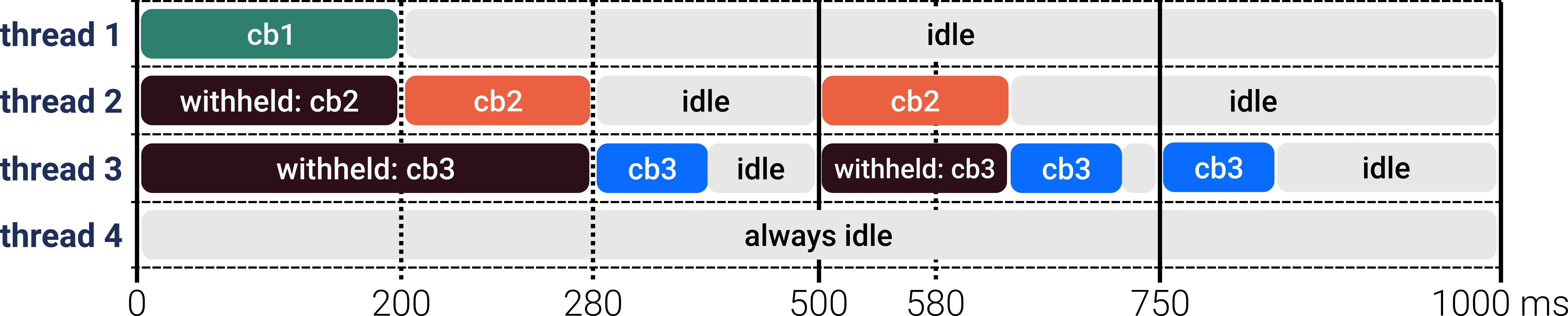
Fig. 62 MultiThreadedExecutor(num_threads=4) with one
MutuallyExclusiveCallbackGroup. Despite 4 threads, the
mutex gate serializes all callbacks.#
Fig. 63 MultiThreadedExecutor(num_threads=4) with one
MutuallyExclusiveCallbackGroup. Despite 4 threads, the
mutex gate serializes all callbacks.#
Callback |
Frequency |
Scheduled at |
Actually fires at |
Delay |
|---|---|---|---|---|
cb1 cycle 1 |
1 Hz |
0 ms |
0 ms |
none |
cb2 cycle 1 |
2 Hz |
0 ms |
200 ms |
+200 ms |
cb3 cycle 1 |
4 Hz |
0 ms |
280 ms |
+280 ms |
cb2 cycle 2 |
2 Hz |
500 ms |
500 ms |
none |
cb3 cycle 3 |
4 Hz |
500 ms |
580 ms |
+80 ms |
cb3 cycle 4 |
4 Hz |
750 ms |
750 ms |
none |
cb1 cycle 2 |
1 Hz |
1000 ms |
1000 ms |
none |
Note
num_threads controls how many threads exist in the pool. It
does not control how many callbacks can run simultaneously
within a MutuallyExclusiveCallbackGroup – that is always
exactly one.
Reentrant Callback Group
Callbacks within a reentrant callback group can run concurrently with each other on different threads. The executor places no serialization constraint. If a thread is free and a callback is ready, it fires immediately regardless of whether another instance of the same callback is already running.
Use case: Independent tasks that do not share state and can safely overlap. Sensor pipelines, logging, and data publishing where each invocation is self-contained. Any callback whose execution time may occasionally exceed its period without blocking others.
Risk: If two concurrent instances of the same callback read and
write shared state (a class attribute), a race condition occurs.
Use a threading.Lock or switch to
MutuallyExclusiveCallbackGroup if shared state is involved.
Declaration:
from rclpy.callback_groups import ReentrantCallbackGroup

class ReentrantDemoNode(Node):
    def __init__(self):
        super().__init__("reentrant_demo")
        self._group = ReentrantCallbackGroup()
        self.create_timer(1.0,  self._cb1, callback_group=self._group)
        self.create_timer(0.5,  self._cb2, callback_group=self._group)
        self.create_timer(0.25, self._cb3, callback_group=self._group)

def main(args=None):
    rclpy.init(args=args)
    node = ReentrantDemoNode()
    executor = MultiThreadedExecutor(num_threads=4)
    executor.add_node(node)
    executor.spin()
    rclpy.shutdown()
Fast callbacks (all complete within their period):
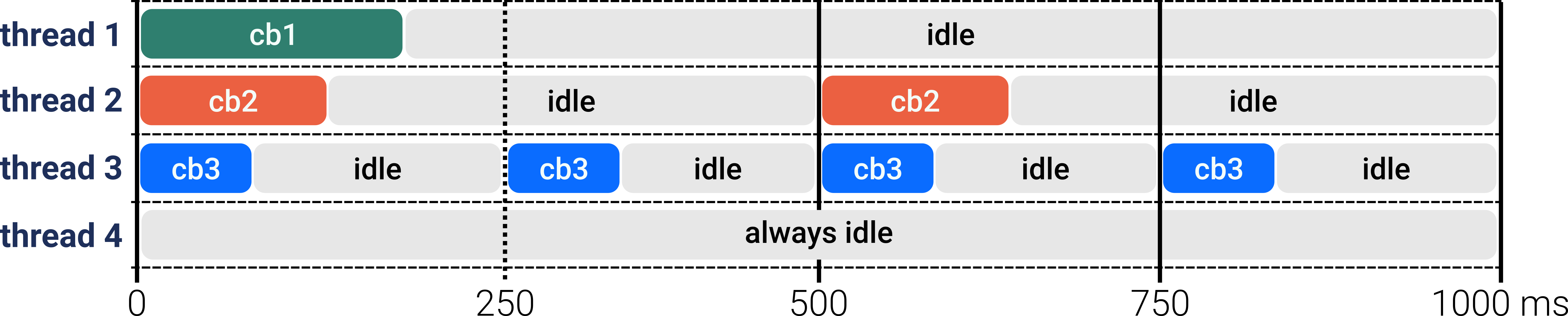
Fig. 65 All callbacks complete within their periods – each fires exactly on schedule with no overlap.#
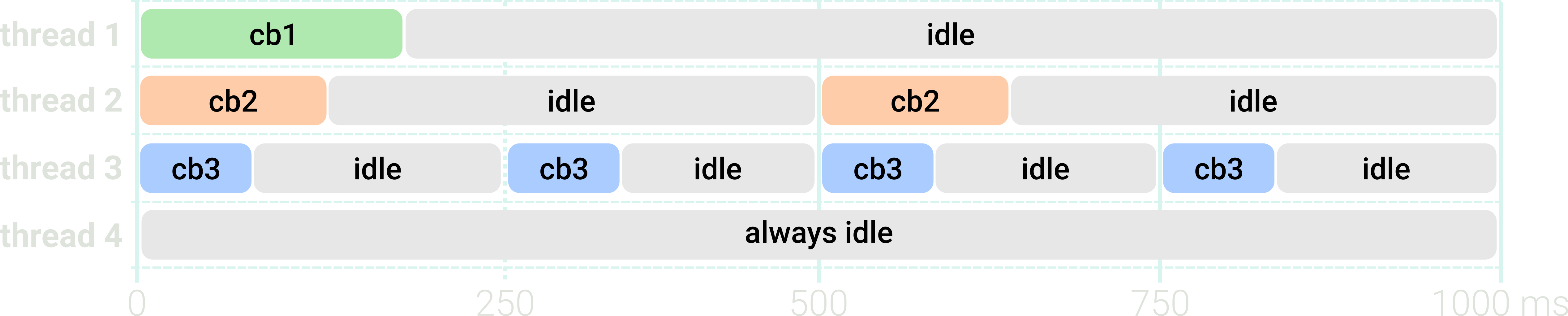
Fig. 66 All callbacks complete within their periods – each fires exactly on schedule with no overlap.#
Blocked callback (600 ms execution, 500 ms period):
With a ReentrantCallbackGroup, a new callback instance fires at
its scheduled time even if a previous instance is still executing
on another thread. By t=1000 ms, three instances can be active
concurrently. With a MutuallyExclusiveCallbackGroup, each new
instance would be withheld until the previous one completes –
preventing overlap at the cost of increasing delay.
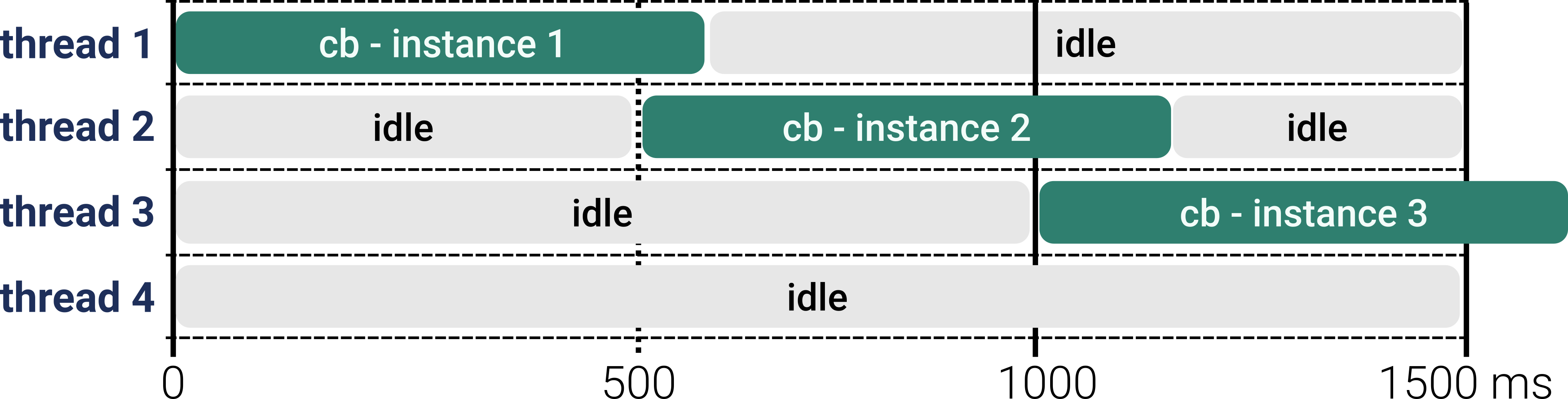
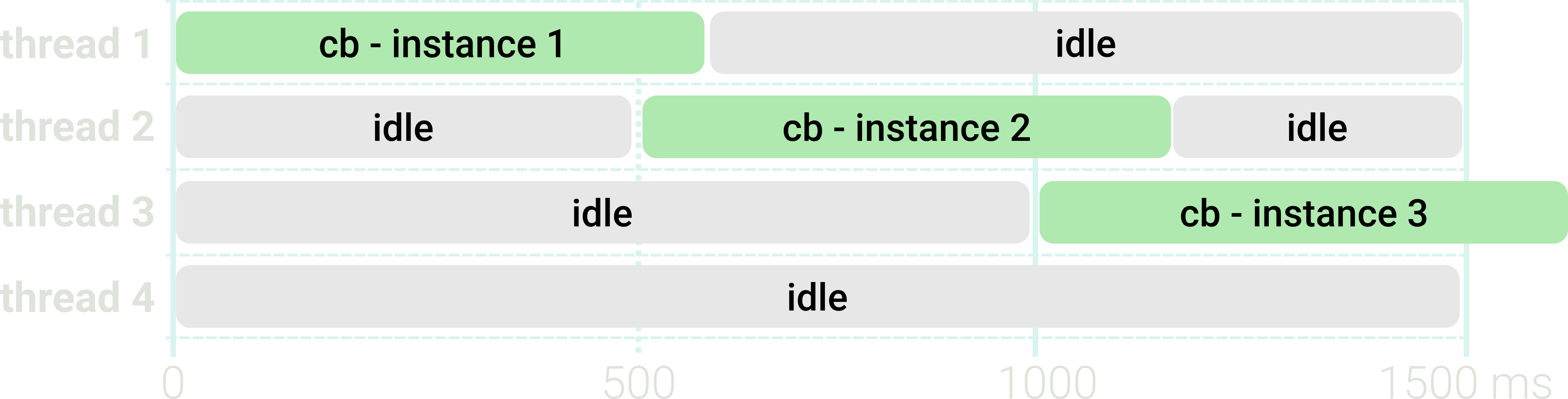
Fig. 68 Reentrant group with a callback whose execution (600 ms) exceeds its period (500 ms). New instances fire on schedule regardless of prior instances still running.#
Choosing Between Mutex and Reentrant
MutuallyExclusive |
Reentrant |
|
|---|---|---|
Concurrent instances |
Never |
Allowed – multiple on separate threads |
Slow callback blocks group? |
Yes – others wait |
No – others fire on schedule |
Shared state safe? |
Yes – serialized |
No – needs explicit lock |
Missed period? |
Instance delayed, not duplicated |
New instance starts regardless |
Typical use |
Shared resources, hardware |
Independent pipelines, logging |
If in doubt, start with MutuallyExclusiveCallbackGroup. Switch
to ReentrantCallbackGroup only when you have confirmed the
callbacks are stateless or properly protected with a
threading.Lock.