

Lecture#
Prerequisites#
Ensure you have followed the simulation instructions and have everything set up before running any code in this lecture.
Before You Start
Remove the
log/,build/, andinstall/folders.Do a
git pull.Install dependencies:
rosdep install -i --from-path src \
    --rosdistro $ROS_DISTRO --ignore-src -y \
    --skip-keys "micro_ros_agent python3-ftdi"
Compile lecture 14 packages only:
colcon build --symlink-install \
    --cmake-args -DCMAKE_BUILD_TYPE=Release \
    --packages-up-to lecture14_meta
Source your workspace.
Verify Gazebo launches cleanly:
ros2 launch rosbot_gazebo husarion_world.launch.py
Lifecycle Nodes#
A lifecycle node is a ROS 2 node that follows a standardized state machine. Rather than starting immediately when launched, it waits for explicit transition commands, giving the system precise control over initialization order, resource allocation, and shutdown.
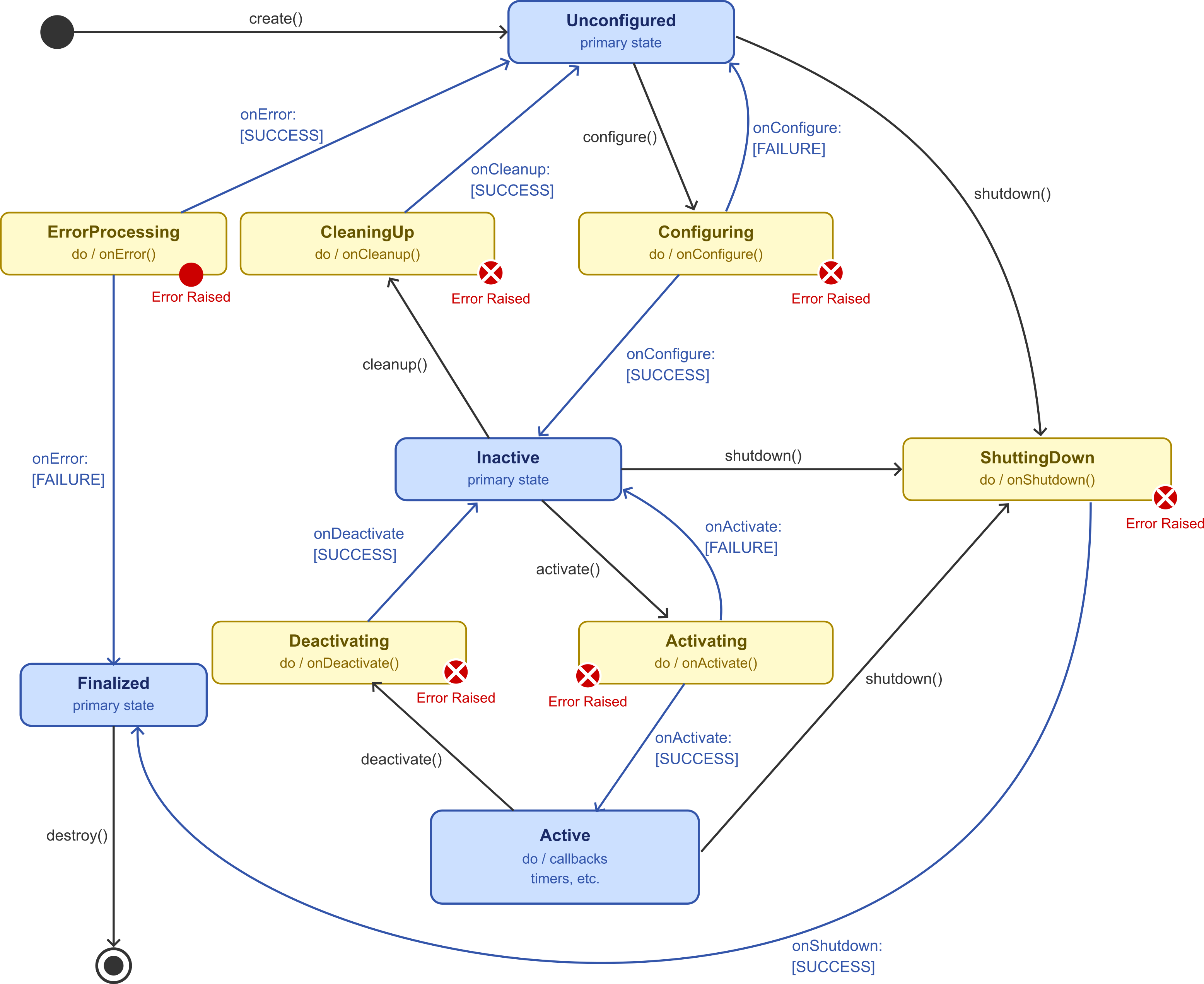
Fig. 120 Transitions are issued explicitly; the node never moves between states on its own.#
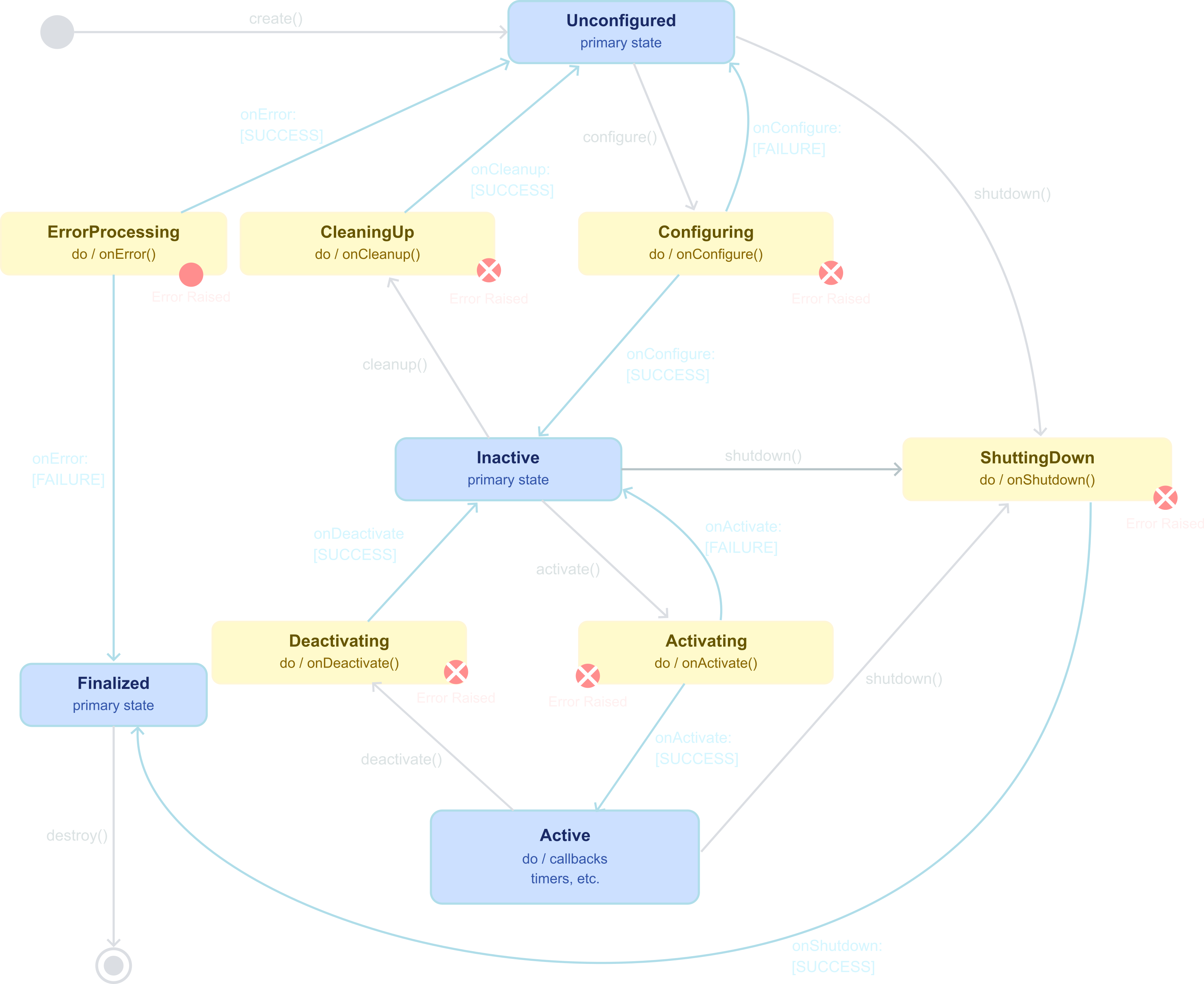
Fig. 121 Transitions are issued explicitly; the node never moves between states on its own.#
State Machine#
A lifecycle node moves through four primary states. Each state is entered via a named transition command that invokes a callback your node overrides.
Primary States
A lifecycle node is always in exactly one primary state. The state determines what the node is allowed to do and what resources it holds.
State |
What the node does here |
|---|---|
Unconfigured |
Exists but holds no resources. Waiting to be configured. |
Inactive |
Resources allocated (publishers, parameters). Not yet processing data. |
Active |
Fully operational. Publishers enabled, timers running, data flowing. |
Finalized |
Cleaned up and ready to be destroyed. No further transitions possible. |
Note
A node starts in Unconfigured the moment it is created. It
stays there indefinitely until a configure command is issued.
No publishers, timers, or subscriptions exist at this point.
Transition Commands
Each transition command moves the node from one primary state to another and invokes a specific Python callback that your node overrides.
Command |
From |
To |
Callback |
|---|---|---|---|
|
Unconfigured |
Inactive |
|
|
Inactive |
Active |
|
|
Active |
Inactive |
|
|
Inactive |
Unconfigured |
|
|
Any |
Finalized |
|
Note
Transitions must follow the state machine strictly. You cannot
jump from Unconfigured directly to Active: configure
then activate must be issued in order. Skipping configure
is why ros2 lifecycle set returns Transition failed.
Why Use Lifecycle Nodes?
Controlled initialization order: a sensor driver stays in Inactive until a dependent processing node finishes configuring, preventing race conditions at startup.
Resource management: publishers, timers, and connections are created in
on_configureand released inon_cleanup, so resources are never held when the node is not active.Runtime pause and resume: deactivate a node during calibration or reconfiguration without killing and restarting it.
System coordination: a lifecycle manager issues transitions in a defined order and can shut down the entire stack cleanly on error.
Note
Nav2 runs map_server, amcl, planner_server,
controller_server, and bt_navigator as lifecycle nodes,
all managed by lifecycle_manager.
Implementing a Lifecycle Node#
A lifecycle node in Python extends LifecycleNode and overrides
one callback per transition. Each callback must return
TransitionCallbackReturn.SUCCESS or
TransitionCallbackReturn.FAILURE.
Scenario
A lifecycle node, sensor_publisher, publishes
std_msgs/String messages on the sensor_data topic at 1 Hz,
but only while in the Active state.
The publisher is allocated on configure and released on
cleanup; the timer is created on activate and cancelled on
deactivate.
Each message carries an incrementing counter so consumers can detect gaps caused by deactivation.
Note
State transitions are driven externally from the CLI with
ros2 lifecycle set, so the node reacts to operator commands
rather than cycling itself.
Class Declaration
import rclpy
from rclpy_lifecycle import LifecycleNode, TransitionCallbackReturn
from std_msgs.msg import String

class SensorPublisher(LifecycleNode):
    def __init__(self):
        super().__init__('sensor_publisher')
        self._publisher = None
        self._timer = None
        self._counter = 0
LifecycleNodeis imported fromrclpy_lifecycle, part of the standard ROS 2 Jazzy installation.Publishers and timers are declared as
Nonehere. They are created inon_configure, not in__init__, so they are only allocated when explicitly requested.TransitionCallbackReturncarries three values:SUCCESS,FAILURE, andERROR. A callback returningFAILUREaborts the transition and keeps the node in its current state.
on_configure: Allocate Resources
def on_configure(self, state):
    self.get_logger().info(f'Configuring from: {state.label}')
    try:
        self._publisher = self.create_lifecycle_publisher(String, 'sensor_data', 10)
    except Exception as e:
        self.get_logger().error(f'Configuration failed: {e}')
        return TransitionCallbackReturn.FAILURE
    return TransitionCallbackReturn.SUCCESS
Use
create_lifecycle_publisherinstead ofcreate_publisher. A lifecycle publisher is created here but remains inactive untilon_activateis called.An inactive lifecycle publisher silently discards any messages published to it, preventing data from being sent before the node is fully ready.
Returning
FAILUREon a recoverable problem keeps the node in Unconfigured; the operator can fix the issue and reissueconfigure.Do not create timers here. Timer callbacks would fire even while the node is Inactive.
Failure vs. Error
A transition callback returns one of three values from
TransitionCallbackReturn. The choice determines what state the
node ends up in.
Return |
Meaning |
Resulting state |
|---|---|---|
|
Transition completed correctly. |
Moves to the target state. |
|
Transition could not complete, but the node is in a clean, recoverable state. |
Stays in the previous state. The transition can be retried. |
|
Something unexpected happened; the node may be in an inconsistent state. |
Invokes |
When to return ``FAILURE``: parameter missing, hardware not yet responding, expected file not found. Nothing was half-allocated.
When to return ``ERROR``: an exception was raised after partial setup, leaving some resources allocated and others not.
Overriding
on_erroris optional but useful: cleaning up partial state and returningSUCCESSsends the node back to Unconfigured for a fresh retry, instead of straight to Finalized.
on_activate: Start Processing
def on_activate(self, state):
    super().on_activate(state)           # enables the lifecycle publisher
    self._timer = self.create_timer(1.0, self._publish_sensor_data)
    return TransitionCallbackReturn.SUCCESS

def _publish_sensor_data(self):
    msg = String(data=f'Reading {self._counter}')
    self._publisher.publish(msg)
    self._counter += 1
Note
Always call super().on_activate(state) before publishing.
The base class activates the lifecycle publisher; messages sent
before this call are silently dropped.
on_deactivate: Stop Processing
def on_deactivate(self, state):
    if self._timer is not None:
        self._timer.cancel()
        self._timer = None
    super().on_deactivate(state)         # disables the lifecycle publisher
    return TransitionCallbackReturn.SUCCESS
Cancel the timer first so no further callbacks fire, then call
super().on_deactivate(state)to disable the publisher.The publisher object still exists after deactivation. It is re-enabled by the next
on_activatecall without needing to be recreated.
on_cleanup: Release Resources
def on_cleanup(self, state):
    self._publisher = None
    self._counter = 0
    return TransitionCallbackReturn.SUCCESS

def main(args=None):
    rclpy.init(args=args)
    rclpy.spin(SensorPublisher())
    rclpy.shutdown()
Setting
self._publisher = Nonedrops the only reference, allowing the publisher to be garbage-collected. The node returns to Unconfigured and can be reconfigured.
Demonstration: Changing States with the CLI
Use ros2 lifecycle list /sensor_publisher to output a list of
available transitions.
Term |
Command |
Effect |
|---|---|---|
T1 |
|
Start the node (Unconfigured) |
T2 |
|
Output a list of nodes with lifecycle |
T2 |
|
|
T2 |
|
Inactive: publisher created, no data |
T2 |
|
Active: timer starts, data flows |
T3 |
|
Confirm data is being published |
T2 |
|
Pause: timer cancelled, publisher disabled |
T2 |
|
Release resources, back to Unconfigured |
Experiment
After cleanup the node is Unconfigured again. Issue
configure and activate a second time. Does the counter
reset? What does this tell you about when on_cleanup runs
relative to __init__?
Programmatic State Changes#
Instead of waiting for an operator, a lifecycle node can drive its
own transitions by calling the change_state service that every
lifecycle node automatically advertises.
Scenario
A lifecycle node, self_cycling_node, drives its own state
transitions on a 5 second timer instead of waiting for CLI commands.
It walks through the full sequence indefinitely:
The publish behavior mirrors sensor_publisher: a
std_msgs/String publisher on sensor_data allocated on
configure, a 1 Hz publish timer started on activate, and an
incrementing counter reset on cleanup.
Note
The cycling timer keeps running across all four states.
Transitions are requested by the node calling its own
change_state service.
Key Insight: The Service Already Exists
Note
Every node that extends LifecycleNode automatically
advertises a service of type lifecycle_msgs/srv/ChangeState
at /<node_name>/change_state. We do not create the
service; we only need a client to call it.
Calling this service programmatically is exactly equivalent to running
ros2 lifecycle setfrom the CLI; the CLI itself is just another client of the same service.The request payload is a
Transitionmessage whoseidfield selects which transition to request (TRANSITION_CONFIGURE,TRANSITION_ACTIVATE, …).The response carries a single
successboolean:Trueif the transition callback returnedSUCCESS,Falseotherwise.
Class Declaration: Cycle List and Client
class SelfCyclingNode(LifecycleNode):
    _CYCLE = [
        Transition.TRANSITION_CONFIGURE,
        Transition.TRANSITION_ACTIVATE,
        Transition.TRANSITION_DEACTIVATE,
        Transition.TRANSITION_CLEANUP,
    ]

    def __init__(self):
        super().__init__('self_cycling_node')
        self._publisher = None
        self._timer = None
        self._counter = 0
        self._step = 0
        self._cli = self.create_client(ChangeState, f'/{self.get_name()}/change_state')
        self._cycle_timer = self.create_timer(5.0, self._advance_state)
_CYCLEencodes the transition order;_stepis the index advanced on every tick.The client target is built with
self.get_name()so the path stays consistent if the node is later renamed (e.g. viaremap)._cycle_timeris a regular timer (not lifecycle-managed) and keeps firing in every state.
Timer Callback: Request the Next Transition
def _advance_state(self):
    if not self._cli.wait_for_service(timeout_sec=1.0):
        self.get_logger().warn('change_state service not available')
        return

    transition_id = self._CYCLE[self._step % len(self._CYCLE)]
    req = ChangeState.Request()
    req.transition.id = transition_id

    future = self._cli.call_async(req)
    future.add_done_callback(self._on_change_state_done)

    self._step += 1
self._step % len(self._CYCLE)wraps the index so the cycle repeats forever.The request payload is a
ChangeState.Request()whosetransition.idfield selects the next transition.call_asyncavoids deadlock: the timer callback runs inside the executor, and a blockingcallwould prevent the same executor from servicing the response.
Done Callback: Inspect the Result
def _on_change_state_done(self, future):
    result = future.result()
    if result is not None and result.success:
        self.get_logger().info('Transition succeeded.')
    else:
        self.get_logger().error('Transition failed.')
Registered via
future.add_done_callback(...)in_advance_state; the executor invokes it once the service response arrives.future.result()returnsNoneif the call was cancelled or failed before reaching the server, so it must be checked before readingresult.success.result.successisTrueonly if the corresponding lifecycle callback (on_configure,on_activate, …) returnedTransitionCallbackReturn.SUCCESS.
Lifecycle Callbacks
The four transition callbacks are identical to sensor_publisher;
only the trigger differs.
def on_configure(self, state):
    ...

def on_activate(self, state):
    ...

def on_deactivate(self, state):
    ...

def on_cleanup(self, state):
    ...
Demonstration
Term |
Command |
Effect |
|---|---|---|
T1 |
|
Start the node; cycling begins after 5 s |
T2 |
|
Watch the state advance every 5 s |
T3 |
|
|
T1 |
All four transitions are reported in the node’s own log output |
Note
Full cycle: Unconfigured \(\xrightarrow{5\,\text{s}}\) Inactive \(\xrightarrow{5\,\text{s}}\) Active \(\xrightarrow{5\,\text{s}}\) Inactive \(\xrightarrow{5\,\text{s}}\) Unconfigured \(\xrightarrow{5\,\text{s}}\) …
Experiment
Modify the _CYCLE list to skip TRANSITION_DEACTIVATE and
TRANSITION_CLEANUP so the node only cycles between configure
and activate. What happens? Then add
Transition.TRANSITION_SHUTDOWN at the end of the original
list and observe the result.
ROS 2 Bags#
A ROS 2 bag is a file that records messages published on any set of topics, along with their timestamps, so they can be replayed later exactly as they were produced. Bags are the primary tool for capturing real or simulated robot runs and replaying them offline for debugging, algorithm development, and regression testing.
Common Use Cases#
Algorithm development: record sensor data from Gazebo, then iterate on a perception or planning algorithm by replaying the same bag repeatedly without restarting the simulation.
Debugging: capture a run where the robot behaved unexpectedly, then replay it with additional subscribers or visualization tools attached.
Regression testing: keep a reference bag and replay it against a new version of the code to check that outputs have not changed.
Dataset creation: record annotated sensor streams for training or evaluating machine learning models.
Remote operation: record a run on a robot that is not always accessible, then analyze the data back at the workstation.
Note
During replay, ROS 2 republishes messages on the same topics they were recorded from, with the original timestamps preserved. Any node that subscribes to those topics receives the replayed data exactly as if the original publisher were still running.
Storage Formats#
ROS 2 bags support pluggable storage backends. The two formats available in Jazzy are SQLite3 (default) and MCAP. Choosing the right format matters for large navigation datasets.
SQLite3 |
MCAP |
|
|---|---|---|
Default |
Yes |
No (requires plugin install) |
File extension |
|
|
Performance |
Good for low-bandwidth topics |
Better for high-rate topics (e.g., LiDAR) |
Random access |
Slow on large files |
Fast seek to any timestamp |
Tooling |
Standard SQL inspection |
Foxglove Studio, mcap CLI |
When to use |
Short runs, text topics, parameters |
Long navigation runs, sensor-heavy bags |
Install the MCAP plugin:
sudo apt install ros-jazzy-rosbag2-storage-mcap
Note
MCAP is the recommended format for navigation bags that include
/scan at high rates. A 10-minute navigation run recording
LiDAR at 10 Hz can easily exceed 1 GB with SQLite3 due to
indexing overhead; MCAP compresses significantly better and
allows fast scrubbing in Foxglove Studio.
Switching the Storage Format
Pass --storage to any ros2 bag command to select the
backend:
Record with SQLite3 (default, no flag needed):
ros2 bag record -o my_bag /scanRecord with MCAP:
ros2 bag record -o my_bag --storage mcap /scanConvert an existing SQLite3 bag to MCAP:
ros2 bag convert -i my_bag -o my_bag_mcap --output-storage mcap
Note
The bag directory always contains a metadata.yaml file that
records the storage plugin used, the list of topics, message
counts, and the time range. ros2 bag info reads this file
and does not need the storage plugin to be installed.
Recording#
ros2 bag record subscribes to the specified topics and writes
every incoming message to disk. Recording stops when you press
Ctrl+C.
Useful Recording Options
Flag |
Effect |
|---|---|
|
Set the output directory name. Defaults to a timestamped name. |
|
Record all topics currently being published. |
|
Use MCAP instead of SQLite3. |
|
Split the bag into multiple files once the size limit is reached. |
|
Split the bag by time duration instead of size. |
|
Record only topics matching a regular expression. |
Note
Recording /tf_static requires special handling: it is a
latched topic and its messages are only published once at
startup. Always include /tf_static explicitly rather than
relying on -a to catch it.
Recording a Navigation Run
Record the topics needed to reconstruct a full navigation run offline:
Term |
Command |
|---|---|
T1 |
|
T2 |
|
T2 |
|
T3 |
|
T2 |
|
Topic |
Message type |
Why it is needed |
|---|---|---|
|
|
Robot pose and velocity estimates |
|
|
LiDAR measurements for mapping and localization |
|
|
Velocity commands sent to the robot |
|
|
Dynamic transforms |
|
|
Static transforms |
|
|
Static occupancy grid published by |
Inspecting#
Before replaying a bag, inspect it to verify the recorded topics, message counts, time range, and storage format.
ros2 bag info nav_run
Check that all expected topics are present and their message counts are non-zero before replaying.
A count of zero on
/tf_staticusually means the static publisher was not running when recording started.
Replaying#
ros2 bag play republishes recorded messages on their original
topics at the recorded timestamps, so any node subscribed to those
topics receives the data as if the original publisher were running.
Basic Replay
ros2 bag play nav_run
Flag |
Effect |
|---|---|
|
Replay at half speed. Useful for inspecting fast events. |
|
Skip the first n seconds before starting replay. |
|
Repeat the bag indefinitely. |
|
Replay only a subset of recorded topics. |
|
Remap a topic during replay to avoid clashing with a live publisher. |
|
Publish a |
Note
If the live system is also running (e.g., Gazebo is still open),
replaying /tf and /cmd_vel will conflict with the live
publishers. Either close the live system before replaying, or
use --remap to redirect the replayed topics to different
names.
Foxglove Studio#
Foxglove is a free, cross-platform visualization tool purpose-built for robotics. It opens MCAP bags directly (no conversion) and lets you inspect topics, plot signals, and render 3D scenes from a multi-panel layout, without writing any code.
Resources
What and Why#
Foxglove Studio is what most teams reach for when rqt and
rviz2 stop scaling – it gives you many time-aligned views of
the same recording in one window.
Native MCAP support – opens
*.mcapfiles directly, no transcoding.Multi-panel layouts – 3D, Plot, Image, Raw Messages, Diagnostics, Teleop, … all driven from the same timeline.
Offline or live – read a saved bag, or connect to a running ROS 2 system over the Foxglove WebSocket bridge.
Cross-platform – desktop app for Linux, macOS, and Windows, or run entirely in the browser at
app.foxglove.dev(your bag stays local; nothing is uploaded).
Note
Foxglove and rviz2 solve overlapping problems. Use rviz2
when you want a quick 3D view of a live system; use Foxglove
when you need to scrub through a recording, plot a signal, and
inspect raw messages at the same time.
Installing and Launching#
Pick whichever install method you prefer (all three open the same app and read the same bags).
Option 1: Debian package (recommended on Ubuntu)
Download the
.debfrom the Foxglove downloads page, then:
sudo apt install ./foxglove-studio-*-linux-amd64.deb
foxglove-studio &
Option 2: Snap
sudo snap install foxglove-studio
foxglove-studio &
Option 3: Browser (no install)
Open https://app.foxglove.dev/. The bag file you choose is read locally in the browser (nothing is uploaded).
Note
The browser version requires Chrome/Edge/Firefox. Safari is not supported. For the best 3D performance on large bags, prefer the desktop app.