

Lecture#
Prerequisites#
One-time workspace and environment setup required before running any code in this lecture.
One-Time Setup
Clone the course workspace and configure your shell so ROS 2 can find all packages automatically.
Clone the course workspace
git clone https://github.com/zeidk/enpm605-spring-2026-ros.git ~/enpm605_ws
Add the setup script to your shell rc file
# Bash users
echo "source ~/enpm605_ws/enpm605.sh" >> ~/.bashrc

# Zsh users
echo "source ~/enpm605_ws/enpm605.sh" >> ~/.zshrc
Reload your shell
source ~/.bashrc   # bash users
source ~/.zshrc    # zsh users
Run the setup function once per terminal
enpm605
Note
The enpm605 function must be run once in every new terminal
before using ros2 commands. It sources the ROS 2 base
installation and the course workspace in the correct order.
VSCode Extension
Install the Robot Developer Extensions for ROS 2 extension for syntax highlighting, launch file support, and integrated ROS 2 tooling inside VS Code:
code --install-extension ranch-hand-robotics.rde-ros-2
What Is ROS?#
An open-source middleware framework for building, deploying, and connecting robotic software components.
Overview
The Robot Operating System (ROS) is an open-source middleware framework for developing, building, and deploying robotic applications. Prototypes originated from Stanford AI research and were officially released by Willow Garage in 2007. ROS 2 was redesigned from the ground up in 2017 and is currently maintained by Open Robotics.

Fig. 31 ROS equation diagram#

Resources
Where Is ROS Used?
ROS is deployed across a wide spectrum of robotic applications.
Transportation
Delivery drones (Amazon Prime Air, UPS Flight Forward)
Maritime autonomous systems (Kongsberg Maritime)
Railway automation (Siemens Mobility)
Manufacturing
Industrial robotic arms (KUKA, ABB Robotics)
Collaborative robots (Universal Robots, Rethink Robotics)
Warehouse automation (Amazon Robotics, Berkshire Grey)
Specialized Domains
Medical robots (Intuitive Surgical, Stryker Mako)
Space exploration (NASA JPL, NASA Astrobee)
Agricultural automation (Blue River Technology, John Deere)
Search and rescue (Boston Dynamics Spot, ANYbotics)
Emerging Areas
Entertainment (Anki, SoftBank Pepper)
Security (Knightscope, Cobalt Robotics)
Environmental monitoring (Ocean Infinity, Clearpath Robotics)
Resource: ROS Robotics Companies
ROS 1 Limitations and ROS 2 Improvements
ROS 1 Limitations |
ROS 2 Improvements |
|---|---|
Limited support for real-time computing |
Improved real-time capabilities |
Weak networked communication robustness |
Better network management via DDS middleware |
Insufficient security features |
Enhanced security: encryption and authentication |
Scalability issues as node count grows |
Cross-platform support (Linux, macOS, Windows) |
(none) |
Quality of Service (QoS) per topic |
ROS 2 Architecture#
ROS 2 runs many specialized, independent processes, each doing exactly one thing.
Processes
Definition: Process
A process is a program in execution: a passive program on disk becomes an active process the moment the OS loads it into memory and begins executing it. Each process is assigned its own isolated resources by the operating system:
Memory space: code segment, heap, and call stack – private and inaccessible to other processes.
Process ID (PID): a unique integer identifier assigned by the OS.
CPU time: the OS scheduler allocates time slices across all running processes.
File descriptors: open files, sockets, and device handles owned by that process.
Note
Processes communicate only through explicit OS-provided mechanisms (pipes, sockets, shared memory). One process cannot directly read or write another process’s memory. This isolation is what enables fault containment.
Monolithic vs. Distributed Design
Core Questions
What goes wrong when all robot software lives in one program?
How does a distributed design fix it?
Traditional: Monolithic
One large program handles everything.
Tight coupling: change one thing, risk breaking everything.
Single point of failure.
Difficult for teams to work in parallel.
Key implication
Change sensor? Recompile and rerun everything. Add a feature? Risk breaking existing code.
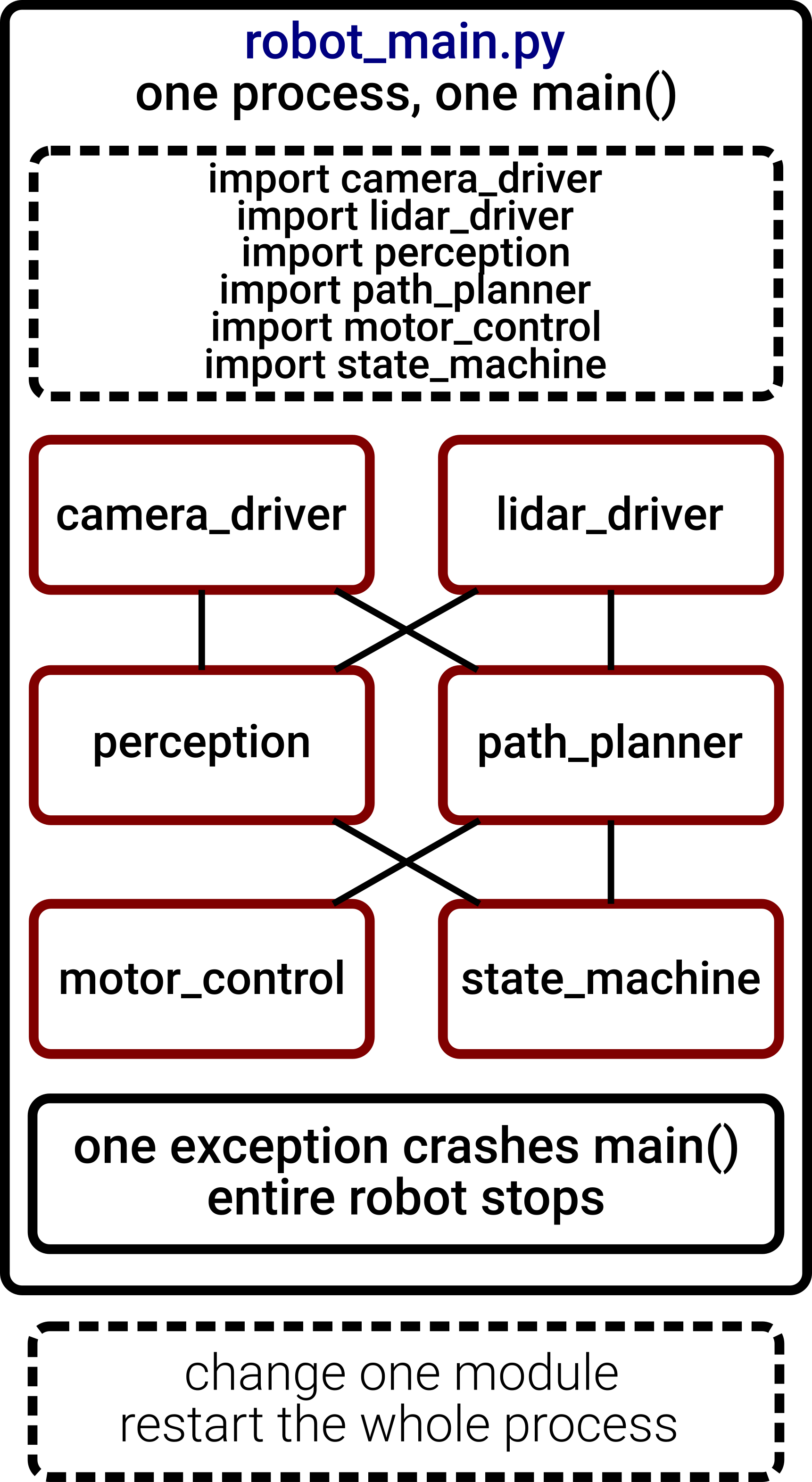
Fig. 33 Monolithic Design#
ROS 2: Distributed
Each component is a separate process (node).
Nodes communicate via message passing over named topics.
Fault isolation: one crash does not kill the system.
Teams develop nodes in parallel.
Key implication
Modular, scalable, robust, and collaborative: the four pillars of distributed robot software.
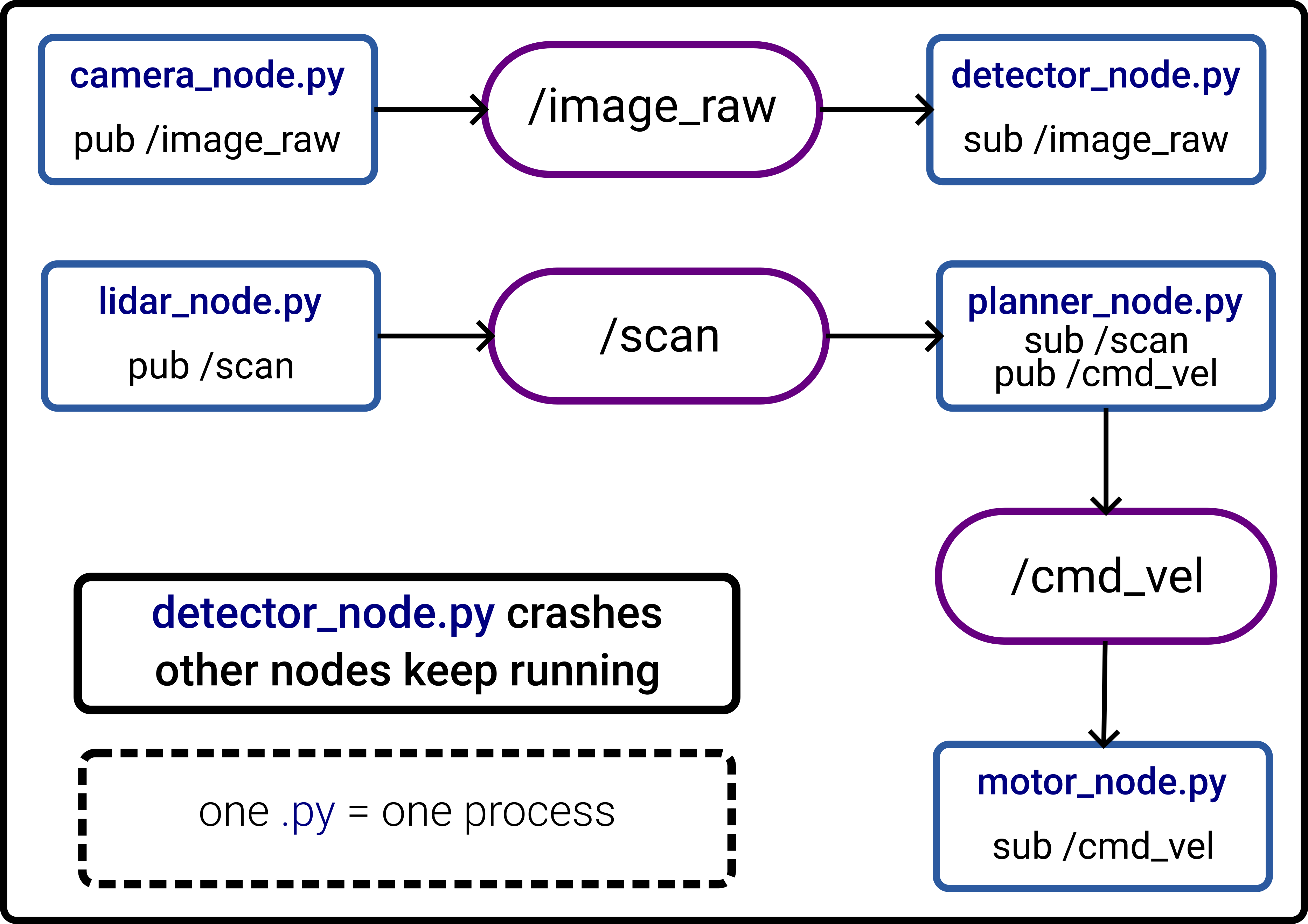
Fig. 35 Distributed Design#
Core Components
Communication Primitives
Nodes: individual processes performing specific tasks.
Topics: named channels for asynchronous data streaming.
Services: synchronous request-response communication.
Actions: long-running interruptible tasks with feedback.
When to Use Each
Topics: continuous data streams (sensors, robot state).
Services: one-shot requests (get pose, save map).
Actions: long tasks with progress feedback (navigate to goal).
Task Example: Pick Up a Part
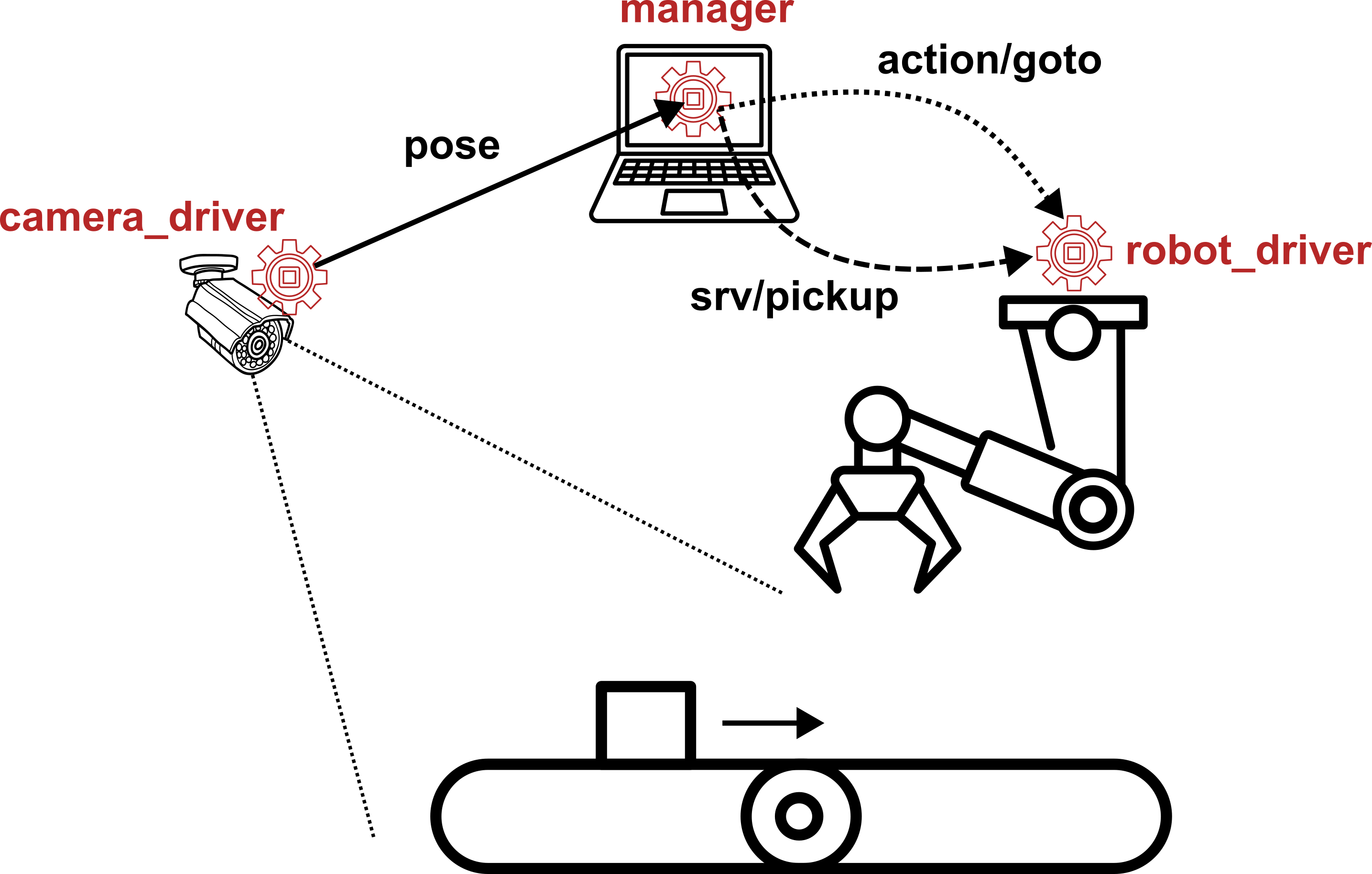
Fig. 37 Topic, Action, and Service.#
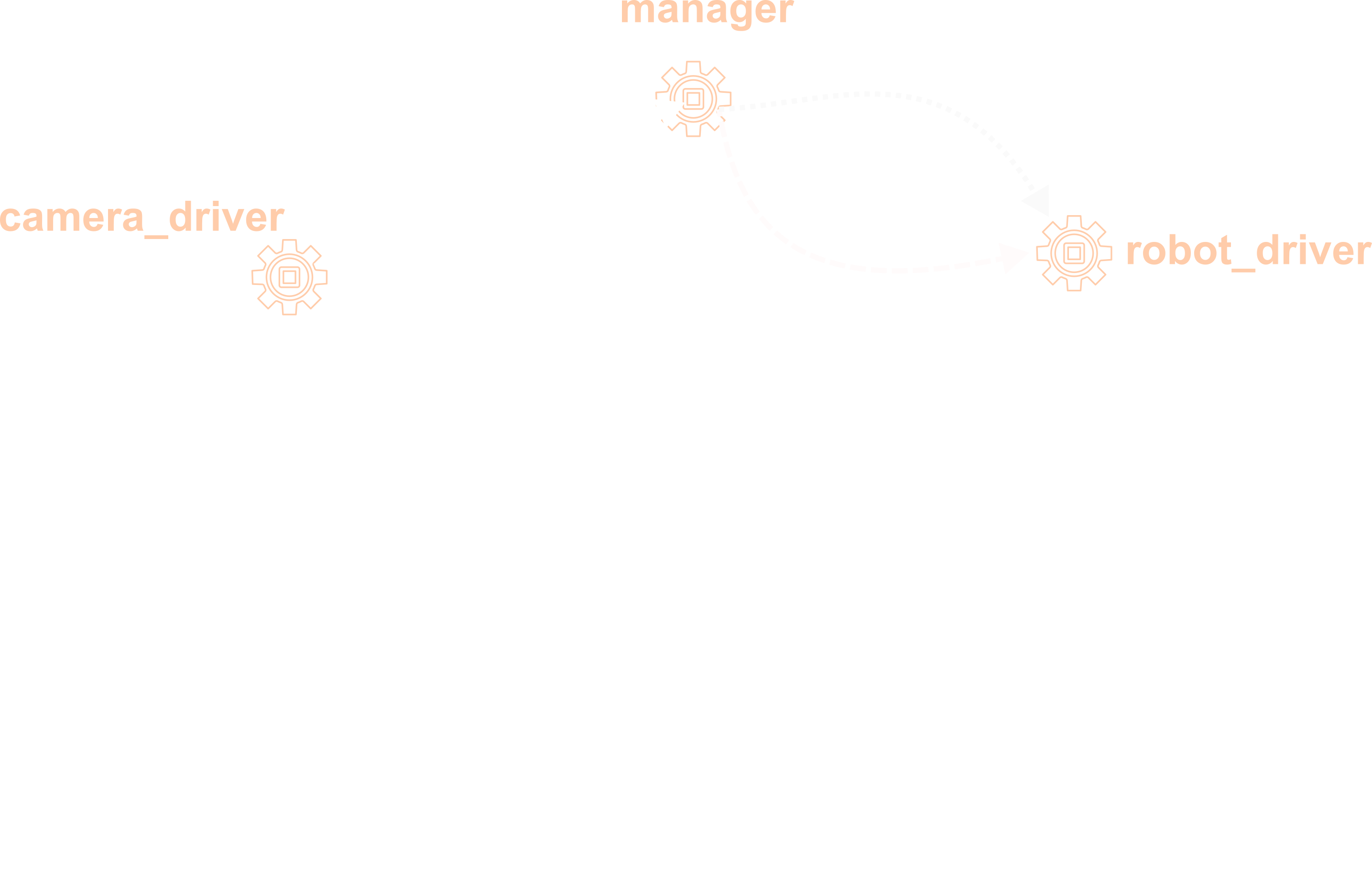
camera_driver(process 1): continuously streams the detected pose of a part on the conveyor belt by publishing to a topic (e.g.,/part_pose).manager(process 2): subscribes to/part_pose, computes the target pick-up pose, then sends a goal to the robot arm via an action (long-running: move arm to pose, with feedback on progress), then calls a service once the arm is in position (short, synchronous: trigger the gripper to pick up the part).robot_driver(process 3): receives the action goal, moves the arm to the target pose, and exposes the pick-up service.
Data Distribution Service (DDS)
DDS is an open, data-centric publish-subscribe middleware standard managed by the Object Management Group (OMG). Specification work began in 2001; version 1.0 was published in 2004. The underlying wire protocol is RTPS (Real-Time Publish-Subscribe), which enables interoperability across vendor implementations.
Application Domains
Defense: radar, combat management, UAV telemetry.
Air traffic control: real-time flight-data distribution.
Autonomous vehicles: high-rate sensor fusion pipelines.
Industrial automation: SCADA and factory control systems.
Financial trading: low-latency market-data feeds.
IoT/Industrial Internet: large-scale sensor networks.
Key Properties
Decentralized: no broker or master node required.
Automatic discovery: participants announce themselves via multicast; no manual configuration.
Transport-independent: runs over UDP, TCP, or shared memory.
Language-independent: C, C++, Java, Python, Ada.
Fine-grained QoS: 22 configurable policies per topic.
QoS Overview
DDS exposes per-topic QoS policies that control how data is delivered. The four most relevant policies in ROS 2:
Reliability:
RELIABLE(guaranteed delivery with retransmission) vs.BEST_EFFORT(lossy, lower latency).Durability:
TRANSIENT_LOCAL(late-joiners receive last cached value) vs.VOLATILE(no caching).History:
KEEP_LAST(buffer last N messages) vs.KEEP_ALL(unbounded retention).Deadline: maximum allowed gap between consecutive messages.
Supported Vendors (Jazzy)
Fast DDS (eProsima) – default; Apache 2.0 license.
Cyclone DDS (Eclipse) – lightweight, real-time focus; Eclipse license.
Connext DDS (RTI) – commercial; safety-certified variants available.
GurumDDS (GurumNetworks) – commercial.
Inspect and Switch at Runtime
# Check active RMW implementation
ros2 doctor --report | grep rmw

# Switch vendor (current shell only)
export RMW_IMPLEMENTATION=rmw_cyclonedds_cpp
Publish/Subscribe Model#
Nodes communicate without knowing each other exist; only the topic name and message type must match.
Nodes, Topics, and Messages
Definition: Node
A Node is a small program written in Python or C++ that executes a relatively simple task. Nodes can send data (publisher) and receive data (subscriber).
Definition: Topic
A Topic is a named bus over which nodes exchange messages
with a fixed name (e.g., /scan) and a fixed message type.
Rules and Patterns
Rules
Rule 1: publisher and subscriber must use the exact same topic name.
Rule 2: publisher and subscriber must agree on the message type.
Rule 3: publishers send regardless of whether any subscriber is listening.
Rule 4: subscribers can exist with no active publisher.
Patterns
One-to-many:
camera_nodepublishes/image_raw; multiple nodes subscribe.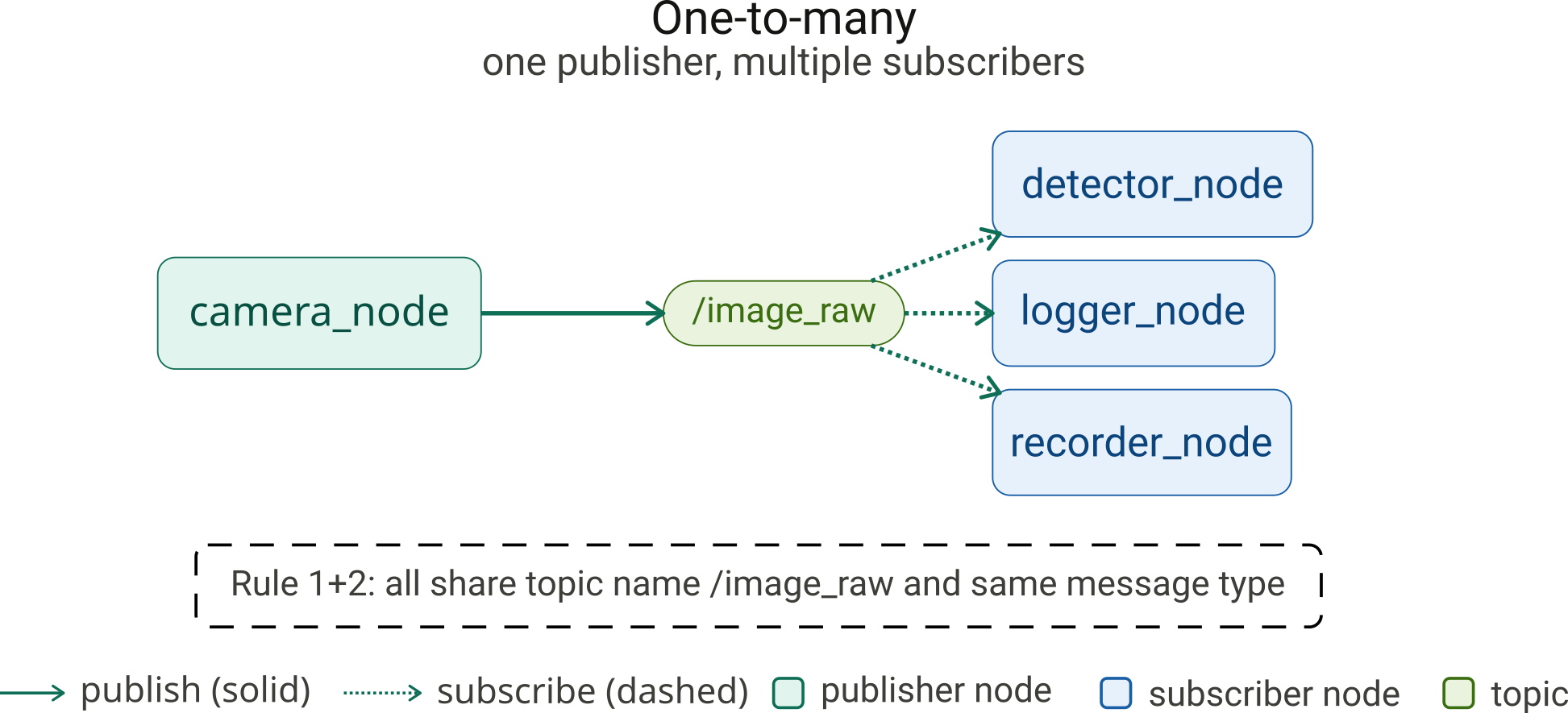
Fig. 39
camera_nodepublishes/image_raw; multiple nodes subscribe.#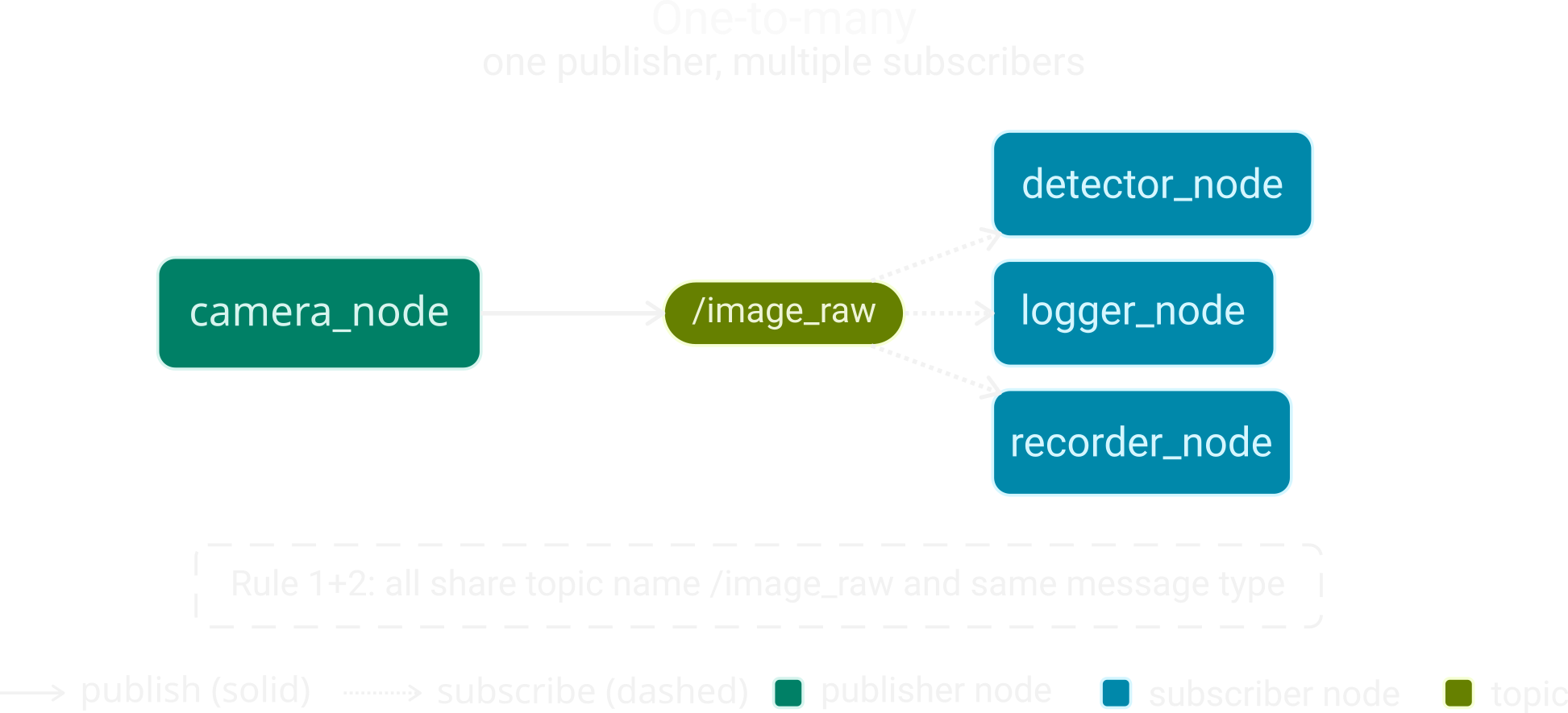
Many-to-one: multiple sensor nodes publish to
/diagnostics.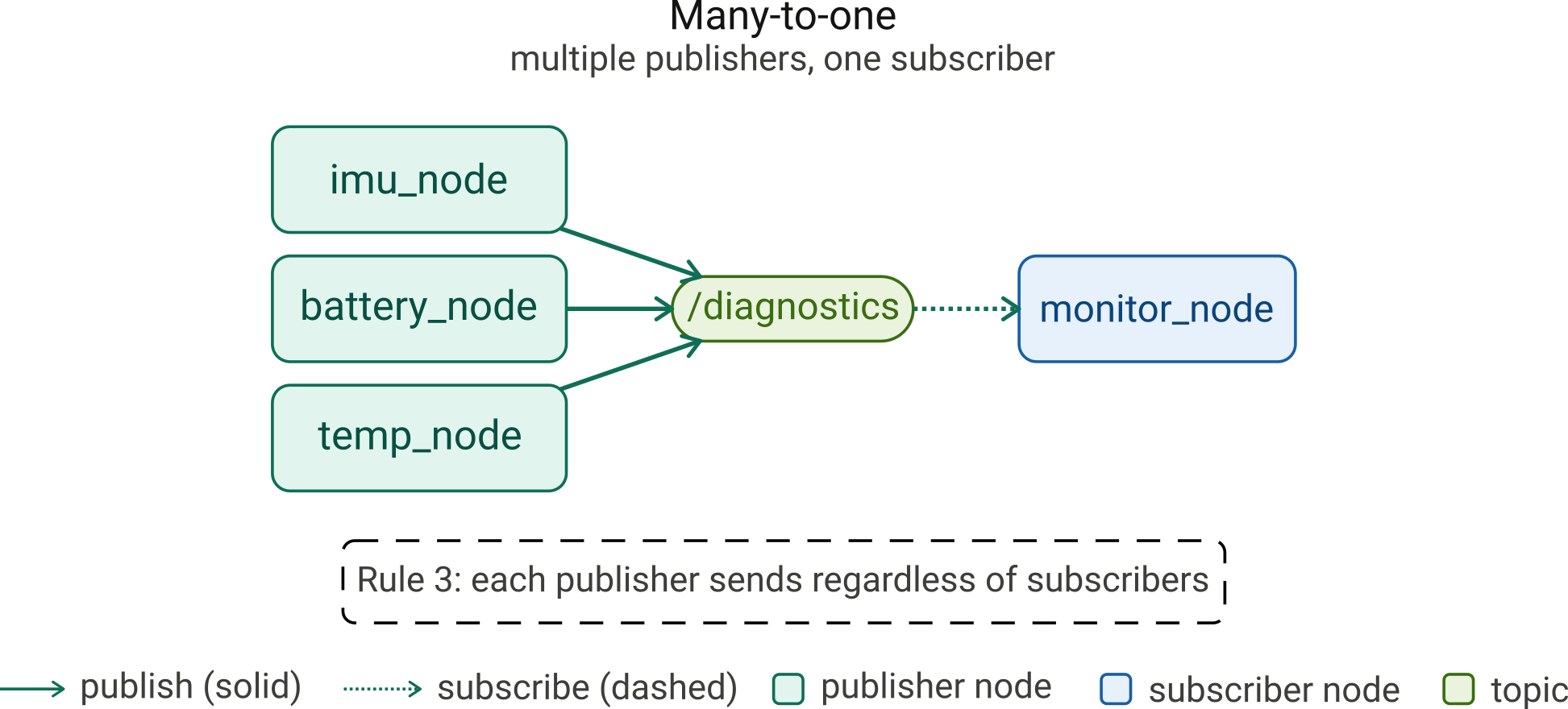
Fig. 41 Multiple sensor nodes publish to
/diagnostics.#
Multi-topic: a robot driver publishes to
/lidar,/cmd_vel,/status.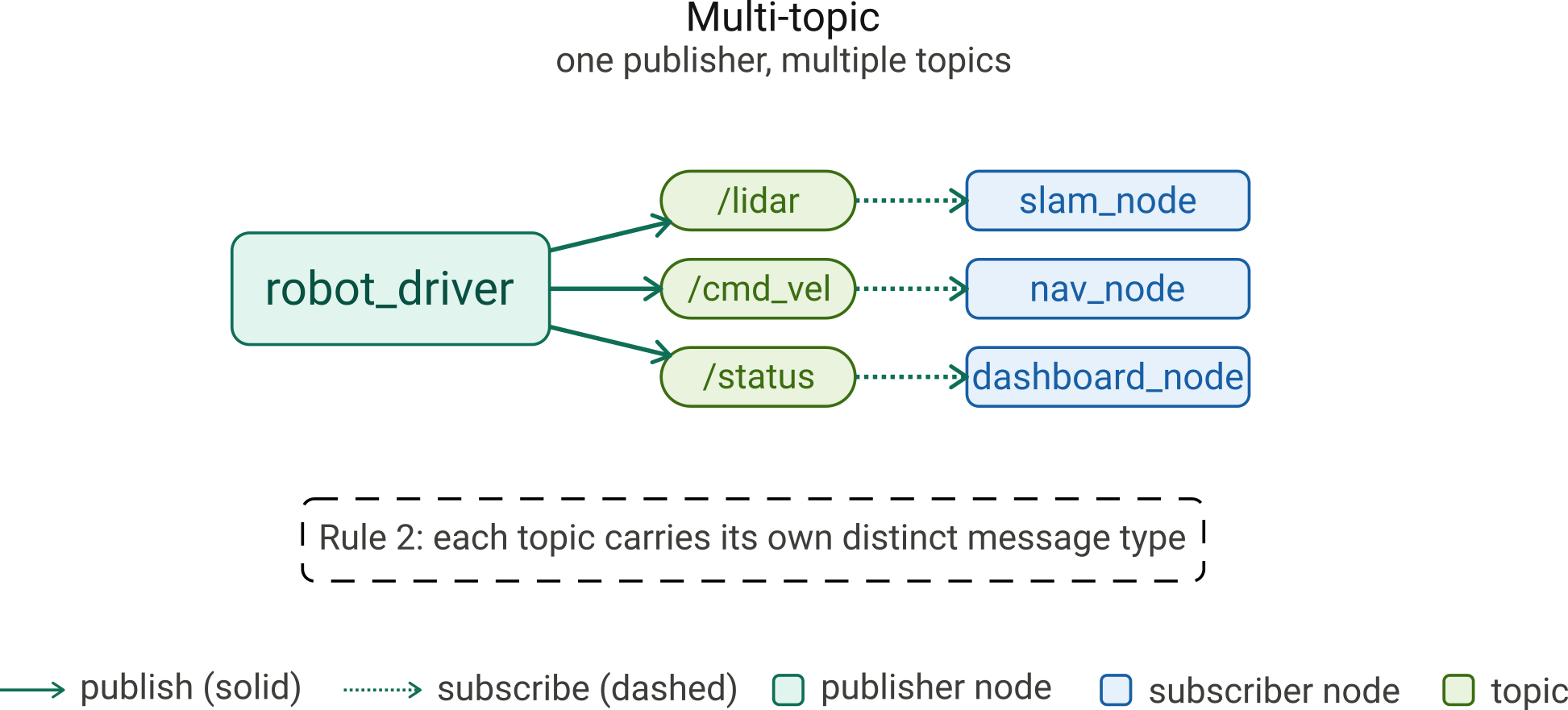
Fig. 43 A robot driver publishes to
/lidar,/cmd_vel,/status.#
Bidirectional: a planning node subscribes to
/mapand publishes to/path.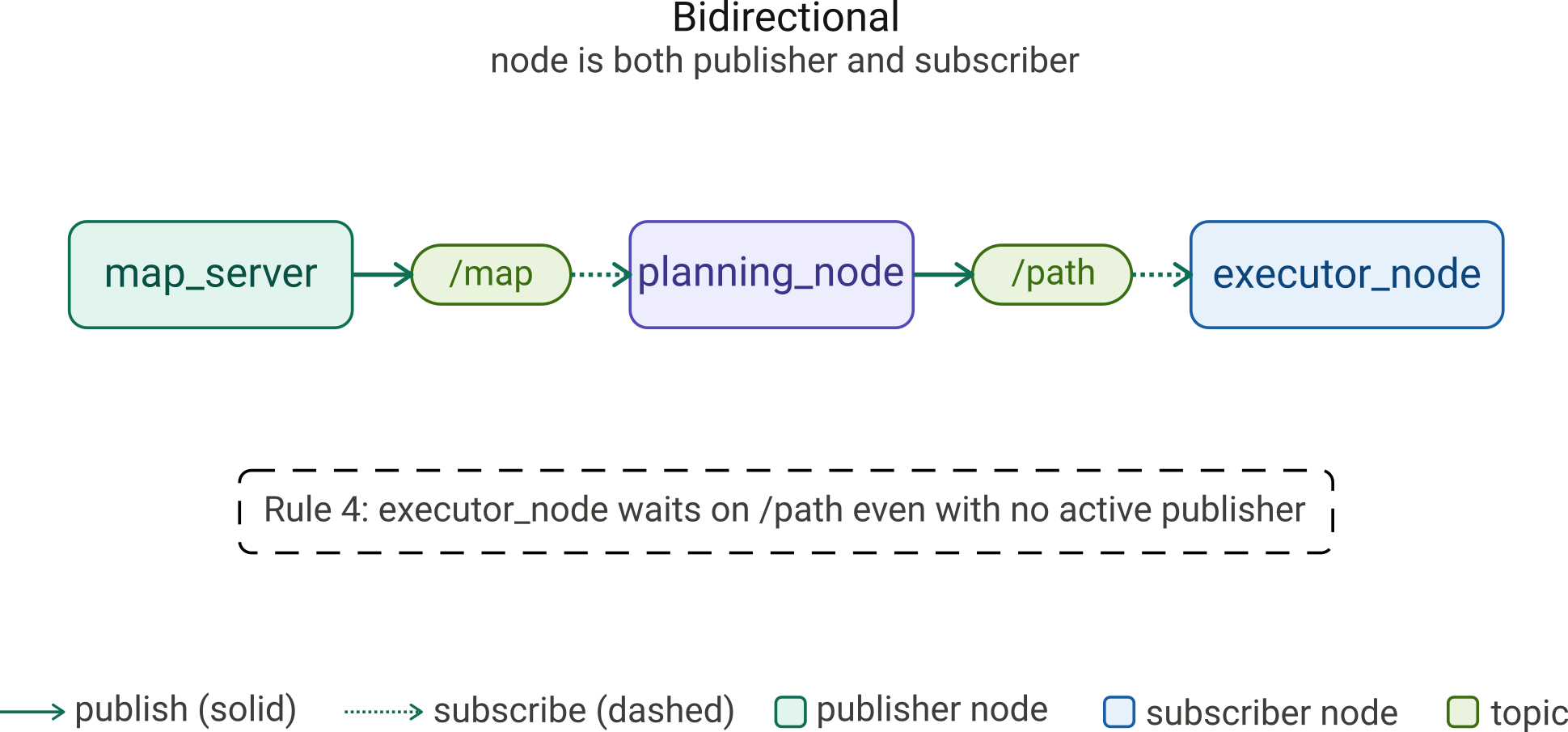
Fig. 45 A planning node subscribes to
/mapand publishes to/path.#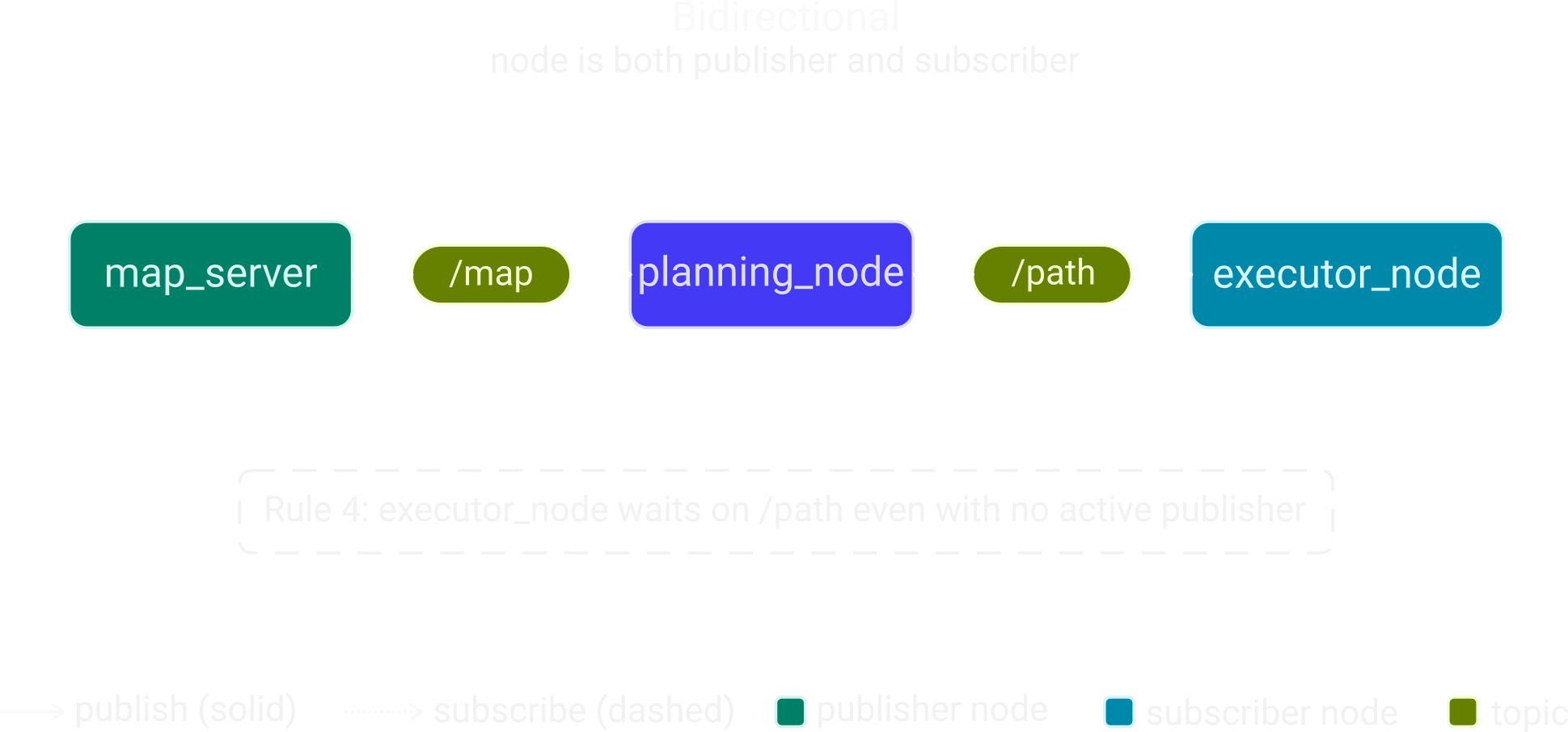
Introspection Tools
Use these commands to inspect a live ROS 2 system:
ros2 node list: all running nodes.ros2 node info <node>: publishers, subscribers, and services of a node.ros2 topic list: all active topics. Add-tfor message types.ros2 topic info <topic> -v: publisher and subscriber counts with QoS.ros2 topic echo <topic>: print messages as they are published.ros2 topic hz <topic>: publishing frequency.ros2 interface show <msg_type>: fields and types of a message.rqt_graph: visual computation graph of nodes and topics.
Running Nodes
Two ways to start nodes
ros2 runstarts a single node from the command line.ros2 launchstarts multiple nodes from a single command.
ros2 run
ros2 run <package> <executable> finds the executable registered
in <package> and launches it as a new OS process in the current
terminal.
# Terminal 1
ros2 run demo_nodes_py talker

# Terminal 2
ros2 run demo_nodes_cpp listener
ros2 run starts exactly one node per invocation and blocks
the terminal until you press Ctrl-C. You need one terminal per
node.
Terminal 1 – talker output:
[INFO] [1741200001.123456789] [talker]: Publishing: 'Hello World: 1'
[INFO] [1741200002.123456789] [talker]: Publishing: 'Hello World: 2'
[INFO] [1741200003.123456789] [talker]: Publishing: 'Hello World: 3'
Each log line contains: severity level ([INFO]), timestamp in
seconds since epoch, node name ([talker]), and the user-defined
message. The talker publishes one std_msgs/msg/String message
per second on the topic /chatter by default.
Terminal 2 – listener output:
[INFO] [1741200001.145678901] [listener]: I heard: [Hello World: 1]
[INFO] [1741200002.145678901] [listener]: I heard: [Hello World: 2]
[INFO] [1741200003.145678901] [listener]: I heard: [Hello World: 3]
The timestamp is slightly later than the talker’s – this is the network and middleware delivery latency. Always check that the counter in the listener matches the talker. A gap indicates dropped messages, a QoS mismatch, or a network issue.
ros2 launch
ros2 launch <package> <launch_file> starts an entire set of
nodes defined in a launch file as a single command, replacing the
need for multiple terminals.
ros2 launch demo_nodes_py talker_listener.launch.py
All node output appears in the same terminal, prefixed by node name. A single Ctrl-C stops the entire system.
Expected output:
[INFO] [talker-1]: Publishing: 'Hello World: 1'
[INFO] [listener-1]: I heard: [Hello World: 1]
[INFO] [talker-1]: Publishing: 'Hello World: 2'
[INFO] [listener-1]: I heard: [Hello World: 2]
The -1 suffix is appended by the launch system to give each
process a unique identifier in the log output.
Criterion |
ros2 run |
ros2 launch |
|---|---|---|
Nodes started |
One |
Many |
Terminals needed |
One per node |
One for everything |
Output |
Single node only |
All nodes, prefixed by name |
Typical use |
Development, debugging |
Integration, demos |
Stop all nodes |
Ctrl-C in each terminal |
Single Ctrl-C |
Note
Use ros2 run when you want to focus on a single node. Use
ros2 launch when you need the full system running together.
ROS 2 Setup#
Creating and building a workspace and Python package.
Workspace
A ROS 2 workspace is a directory containing all packages, dependencies, and build artifacts for a project.
Directory Structure
src/: source code for all your packages.build/: intermediate build artifacts.install/: final install tree sourced at runtime.log/: build and test logs.
Make enpm605_ws a ROS Workspace
mkdir ~/enpm605_ws/src
cd ~/enpm605_ws
colcon build
source install/setup.bash
mkdir ~/enpm605_ws/src: creates thesrcdirectory.colcon build: scanssrcfor packages and builds them, producingbuild,log, andinstall.source install/setup.bash: adds the workspace to the current shell’s environment soros2 runandros2 launchcan find your packages.
Warning
Always run colcon build from the workspace root
(enpm605_ws), never from inside src or a package
directory.
Note
Workspace Overlays
Always source the base ROS 2 installation first, then your workspace. Later sources override earlier ones.
Never source two different ROS 2 distributions in the same session.
colcon
colcon (collective construction) is the official build tool for ROS 2, replacing the ROS 1 build tools.
Key Features
Language agnostic: builds C++, Python, and other package types.
Parallel execution: builds multiple packages simultaneously.
Isolated builds: each package built in its own space.
Cross-platform: works on Linux, Windows, and macOS.
Installation and Verification
sudo apt install python3-colcon-common-extensions
colcon version-check
Building
colcon build: build all packages in the workspace.colcon build --symlink-install: symlink Python and config files; edits take effect without rebuilding.colcon build --packages-select <pkg>: build only one package.colcon build --packages-up-to <pkg>: build a package and all its dependencies.
Inspecting
colcon list: list all packages found insrc.colcon graph: display the package dependency graph.
Note
--symlink-install creates symbolic links instead of copying
files into install. After editing a Python script you do
not need to rebuild; changes take effect immediately on the
next ros2 run.
Creating a Python Package
cd ~/enpm605_ws/src
ros2 pkg create first_pkg --build-type ament_python --dependencies rclpy
cd ..
colcon build --symlink-install
source install/setup.bash
ros2 pkg list | grep first_pkg
This generates a ready-to-build package with the correct
ament_python structure. package.xml is pre-filled with a
<depend>rclpy</depend> entry and setup.py has the
entry_points section ready for you to register node executables.
Package Layout
first_pkg/
├── first_pkg/
│   └── __init__.py
├── resource/
├── test/
├── package.xml
├── setup.py
└── setup.cfg
first_pkg/: importable Python modules go here. Every new.pynode file lives in this folder.resource/: marker file required by the ROS 2 package index. Do not delete it.test/: unit test files.package.xml: the package manifest – name, version, license, maintainer, and dependencies.setup.py: registers node executables soros2 runcan find them.setup.cfg: required by the ament build system to locate executables insideinstall.
package.xml
package.xml is the package’s birth certificate (also called
the manifest). It defines metadata, dependencies, and build
information that ROS 2 tooling reads at build time, install time,
and runtime.
Dependency resolution:
amentreads it to determine the correct build order across all packages in the workspace.Automated installation:
rosdepreads it to download and install any missing system dependencies.Package index: metadata published to index.ros.org for distribution.
Fields to edit immediately after creating a package
<description>: one-sentence description of what the package does.<maintainer>: your name and email address.<license>: legal terms (Apache-2.0, MIT, BSD-3-Clause, etc.)<version>: semantic version, e.g.1.0.0.
Dependency tags
<depend>pkg</depend>: needed at both build and runtime (covers most cases).<build_depend>pkg</build_depend>: needed only at build time.<exec_depend>pkg</exec_depend>: needed only at runtime.
Install all missing dependencies in one command
cd ~/enpm605_ws
rosdep install --from-paths ./src --ignore-packages-from-source -y
Note
You can inspect any package’s manifest with
ros2 pkg xml <package_name>.
setup.py
setup.py is the build script for a Python ROS 2 package. It
tells colcon how to install your nodes, launch files, and
resource files into the workspace install tree.
Entry points: registers executables so
ros2 runcan find your nodes by name.Data files: declares launch files, config files, and other resources to be copied into
install.Package metadata: name and version must match
package.xmlexactly.
Warning
setup.py and package.xml must always agree on package
name and version – a mismatch causes a build error.
Fields to edit after creating a package
name: must match the package name inpackage.xml.version: semantic version, e.g.'1.0.0'.maintainer_email: your email address.description: one-sentence description of the package.license: legal terms (Apache-2.0, MIT, BSD-3-Clause, etc.)
Registering nodes as entry points
Each entry point maps a command name to a Python function:
'talker = my_pkg.talker:main'. The command name is what you
pass to ros2 run <pkg> <n>. Multiple nodes are registered as
additional entries in the console_scripts list.
Declaring data files
('share/<pkg>/launch', glob('launch/*.launch.py')): installs all launch files into the share directory.('share/<pkg>/config', glob('config/*.yaml')): installs config files alongside the package.
Note
After adding a new entry point or data file declaration, you
must run colcon build again – these are not picked up by
--symlink-install.
Writing Nodes#
A node without spinning exits immediately. A node without callbacks has nothing to respond to.
Interfaces
A ROS 2 interface is a typed data contract shared between
nodes. Interfaces are defined in .msg, .srv, and
.action files and compiled into language-specific code at build
time.
Three kinds of interfaces
Messages (
.msg): one-way data sent over a topic.Services (
.srv): request/response pairs – one node calls, another replies.Actions (
.action): long-running tasks with goal, feedback, and result.
Publishers and subscribers use messages. Services and actions are covered in a later lecture.
Standard Message Packages
Standard message packages ship precompiled with ROS 2. After sourcing ROS 2 you can import them directly:
std_msgs: primitive types –Bool,String,Int8/16/32/64,UInt8/16/32/64,Float32,Float64,Header.geometry_msgs: spatial data –Point,Pose,Twist,Transform,Vector3.sensor_msgs: sensor data –Image,LaserScan,PointCloud2,Imu,NavSatFix.nav_msgs: navigation –Odometry,Path,OccupancyGrid.
Note
These packages are installed under /opt/ros/jazzy/ via
sudo apt install ros-jazzy-std-msgs etc. You never build
them yourself unless you define custom message types.
From Text Files to Language Code
Each message is defined in a plain-text .msg file that declares
field names and types – one per line.
# geometry_msgs/msg/Point.msg
float64 x
float64 y
float64 z
The precompiled Python import:
from geometry_msgs.msg import Point
The .msg definition is language-agnostic – the same file
generates Python, C++, and other bindings.
ros2 interface show geometry_msgs/msg/Point prints the original
.msg source.
Primitive Types vs. std_msgs
In a .msg file, float64, int32, bool, and so on
are IDL primitive types – the raw building blocks of the
interface definition language, not ROS message types.
float64 xin a.msgfile means the fieldxholds a plain 64-bit floating point number – it maps tofloatin Python anddoublein C++.std_msgs/Float64is a wrapper message: a full ROS 2 message whose only field isfloat64 data. It exists so you can publish a single number on a topic.Use primitive types (
float64,int32, etc.) inside your own.msgfield definitions.Use
std_msgswrappers only when publishing a bare scalar on a topic and no richer message type exists.
Introspecting Interfaces
ros2 interface list -m                         # all message types
ros2 interface show geometry_msgs/msg/Pose     # fields of a message
ros2 interface package geometry_msgs           # all interfaces in a package
Creating and Populating a Message Object
from geometry_msgs.msg import Pose, Point, Quaternion

def main(args=None):
    pose = Pose()

    pose.position = Point()
    pose.position.x = 1.0
    pose.position.y = 2.5
    pose.position.z = 0.0

    pose.orientation = Quaternion()
    pose.orientation.x = 0.0
    pose.orientation.y = 0.0
    pose.orientation.z = 0.0
    pose.orientation.w = 1.0  # identity rotation

    print(pose)
Pose is a composite message: it contains two nested message
fields. Nested types must be imported and instantiated separately.
orientation.w = 1.0 is the identity quaternion (no rotation).
Minimal Node
Write a minimal procedural node that logs a message and exits.
File: first_pkg/minimal_node.py
import rclpy

def main(args=None):
    rclpy.init(args=args)
    node = rclpy.create_node("minimal_node")
    node.get_logger().info("Hello from ROS 2")
    rclpy.shutdown()

if __name__ == "__main__":
    main()
rclpy.init(): initializes ROS 2 runtime. Must be called first.rclpy.create_node(): shorthand for a simple node without subclassing.node.get_logger().info(): logs an info-level message with timestamp. In ROS 2, never useprint()– the logger routes messages to the terminal, log files, andros2 topic echo /rosoutsimultaneously. See ROS 2 Logging.rclpy.shutdown(): cleanly destroys all nodes and releases resources.
Register in setup.py
entry_points={
    'console_scripts': [
        'minimal_node = first_pkg.minimal_node:main',
    ],
},
Build and Run
cd ~/enpm605_ws
colcon build --packages-select first_pkg --symlink-install
source install/setup.bash
ros2 run first_pkg minimal_node
Expected output:
[INFO] [<timestamp>] [minimal_node]: Hello from ROS 2
Note
minimal_node exits immediately after rclpy.shutdown() –
it does not spin. Run ros2 node list right after launching it
and you will see nothing, because the process has already
terminated. This is expected behavior for a procedural node with
no spin loop.
OOP Node Design
Real-world ROS 2 code almost always uses class-based nodes.
Publishers, subscribers, timers, and state are cleanly encapsulated
in one class. Inheriting from Node gives the full ROS 2 API via
self.
File layout
first_pkg/advanced_node.py: the node class only – nomain()scripts/run_advanced_node.py: the entry point – instantiates the node.
first_pkg/advanced_node.py:
import rclpy
from rclpy.node import Node

class AdvancedNode(Node):
    def __init__(self, node_name: str):
        super().__init__(node_name)
        self.get_logger().info(
            f"Hello from {self.get_name()}")
The class inherits from Node and calls
super().__init__(node_name) to register with the ROS 2 runtime.
No main() function – the class only defines behavior.
self.get_name() returns the node name passed at instantiation
time.
scripts/run_advanced_node.py:
import rclpy
from first_pkg.advanced_node import AdvancedNode

def main(args=None):
    rclpy.init(args=args)
    node = AdvancedNode("advanced_node")
    rclpy.shutdown()

if __name__ == "__main__":
    main()
Register in setup.py:
'advanced_node = scripts.run_advanced_node:main',
Spinning
Spinning keeps a node alive and responsive.
rclpy.spin(node) blocks until the node is shut down.
Without spinning, the node exits immediately and no callbacks ever run.
Threads
Definition: Thread
A thread is the smallest unit of execution inside a process. A process can have multiple threads running concurrently, sharing the same memory.
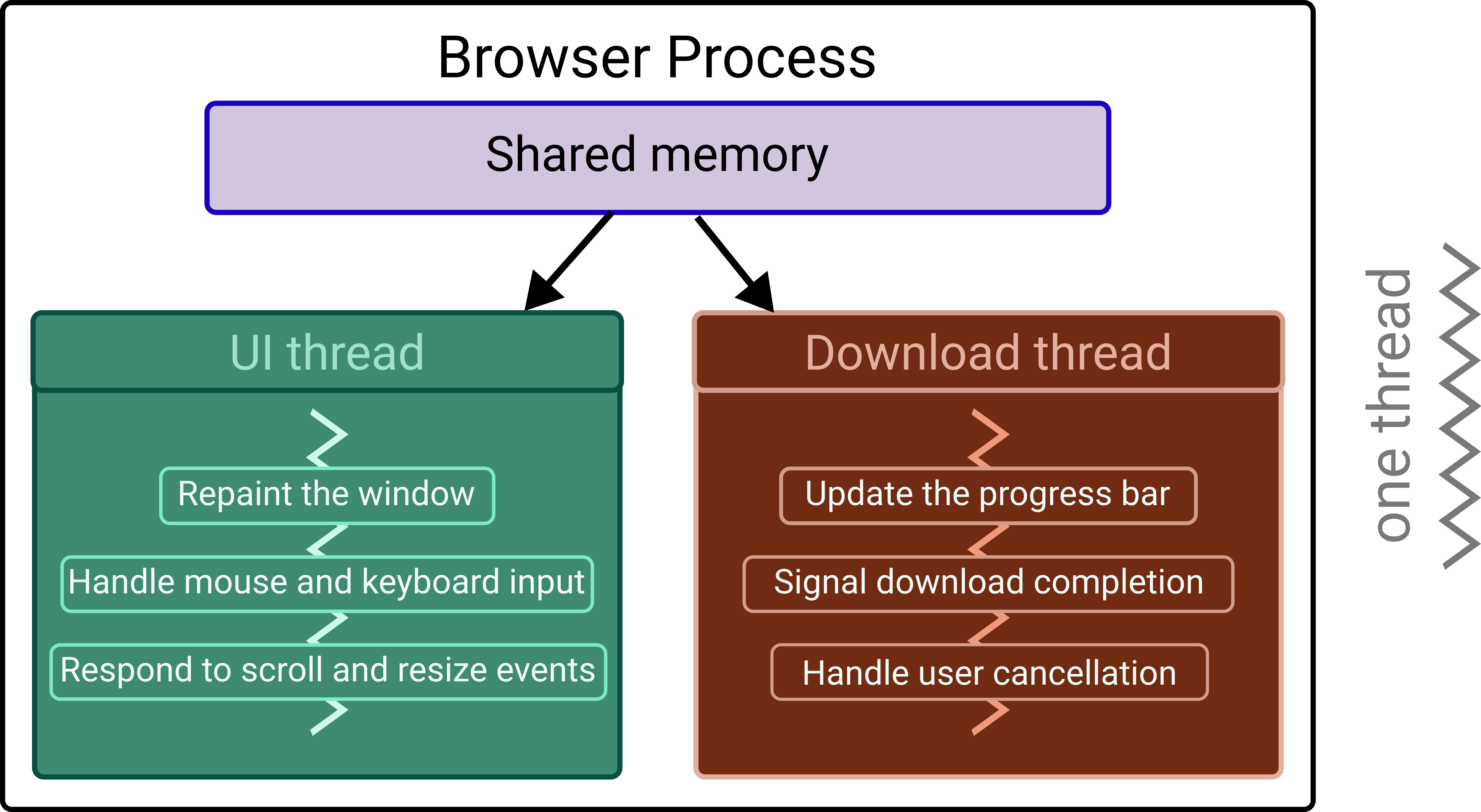
Fig. 47 Example: A browser process with multiple threads.#
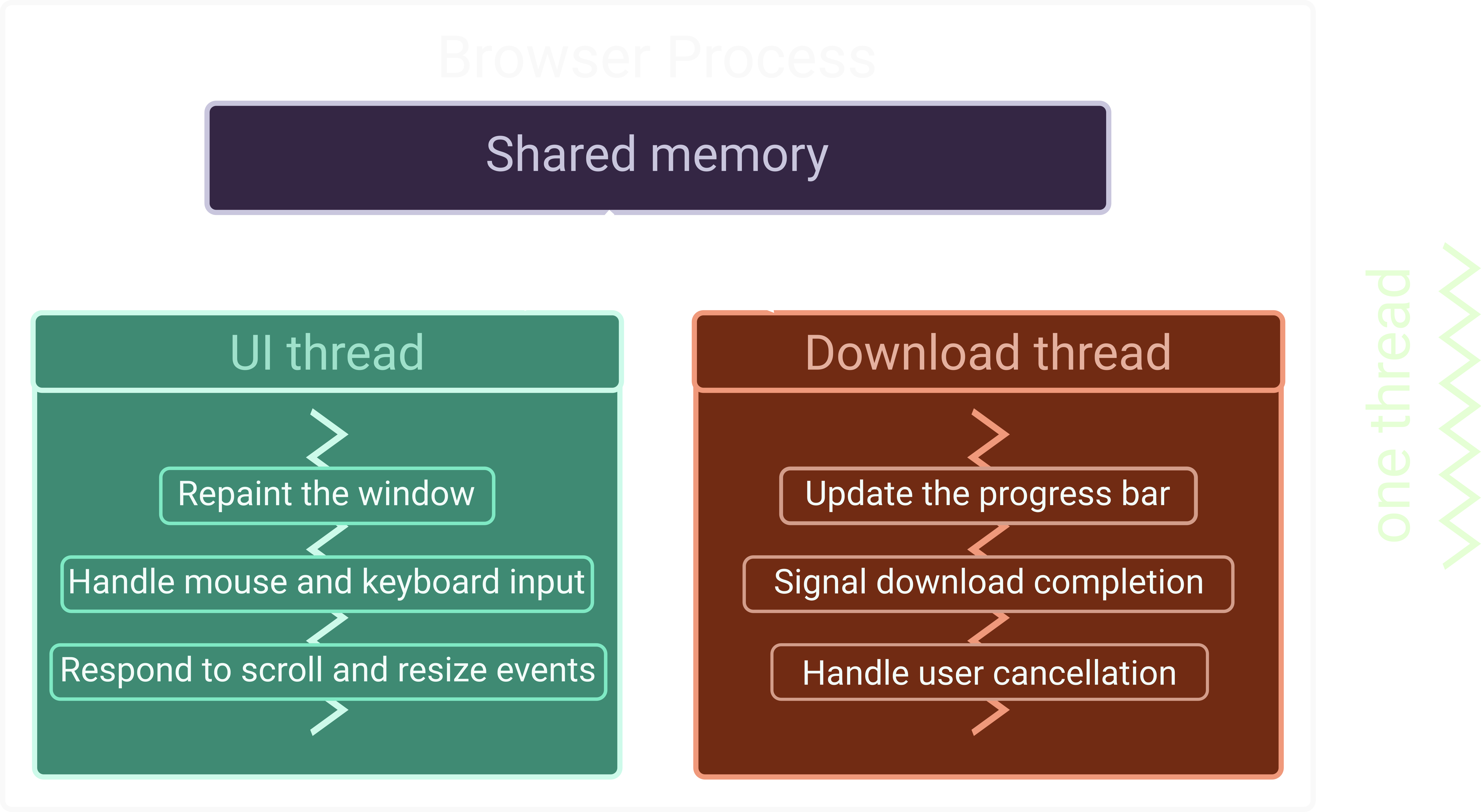
The Main Thread
Every Python program starts with one thread (the main thread).
When you call rclpy.spin(node), that main thread is handed over
to the ROS 2 executor, which runs it in a loop checking for work to
do.
rclpy.spin()blocks the main thread – no code after it runs until the node is shut down (e.g., Ctrl-C).The ROS executor uses this thread to fire callbacks, service handlers, and timer functions one at a time.
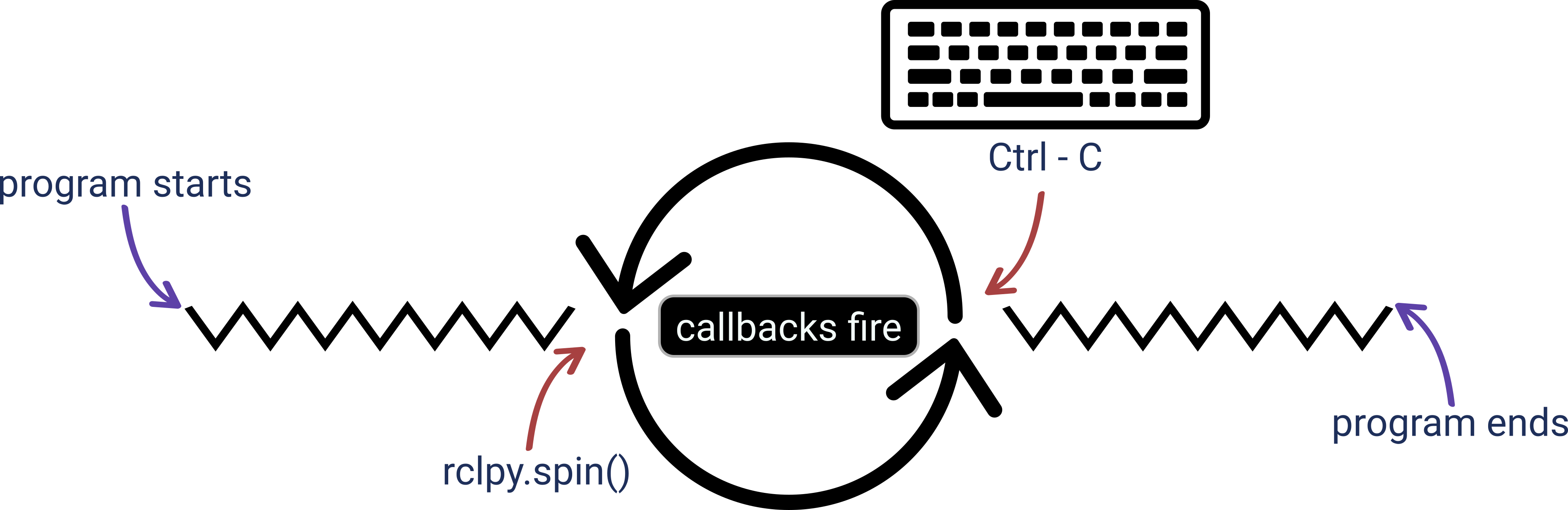
Fig. 49 Main thread blocked by spin loop, executor dispatching callbacks.#
Why Must You Spin?
Spinning activates the ROS 2 executor. Without it, the node is registered but completely passive – nothing ever runs.
Incoming messages: subscriber callbacks are only invoked while spinning.
Timer callbacks:
create_timer()registers a timer, but the timer only fires while the executor is running.Service requests: a service server only processes requests while spinning.
Action servers and clients: goal handling, feedback, and result delivery all require an active executor.
Parameter updates: parameter change callbacks are also dispatched by the executor.
rclpy.spin(node) is the event loop of a ROS 2 node.
Without it, the node is a program that starts, does nothing, and
exits.
Update scripts/run_advanced_node.py to spin
import rclpy
from first_pkg.advanced_node import AdvancedNode

def main(args=None):
    rclpy.init(args=args)
    node = AdvancedNode("advanced_node")
    try:
        rclpy.spin(node)
    except KeyboardInterrupt:
        node.get_logger().info("Shutting down.")
    finally:
        node.destroy_node()
        rclpy.shutdown()

if __name__ == "__main__":
    main()
rclpy.spin(node): blocks the main thread, processing callbacks as they arrive.except KeyboardInterrupt: catches Ctrl-C from the terminal and logs a clean shutdown message. Without this, the traceback would be printed to the terminal.finally: runs regardless of how thetryblock exits. This guarantees cleanup always happens.node.destroy_node(): releases all ROS 2 resources held by the node (publishers, subscribers, timers).rclpy.shutdown(): shuts down the ROS 2 runtime. Always the last call.
Spinning Alternatives
# Blocks forever -- standard choice for most nodes
rclpy.spin(node)

# Processes one batch of callbacks then returns
rclpy.spin_once(node)

# Blocks until a Future completes -- used for async service calls
rclpy.spin_until_future_complete(node, future)

# Manual spin loop using spin_once
while rclpy.ok():
    rclpy.spin_once(node, timeout_sec=0.1)
    # do other work here
Note
Use rclpy.spin(node) for all standard nodes. Only use
spin_once() if you have a specific reason to interleave
ROS 2 processing with non-ROS work. The spin loop always lives
in the entry point script, not in the node class – this keeps
the class reusable by any executor or script without
modification.
Timers and Callbacks
A timer schedules a callback at a fixed interval. Callbacks only run while the node is spinning.
class AdvancedNode(Node):
    def __init__(self, node_name: str):
        super().__init__(node_name)
        self._counter = 0
        self._timer = self.create_timer(1.0, self._timer_callback)

    def _timer_callback(self):
        self.get_logger().info(f"Count: {self._counter}")
        self._counter += 1
self._counter = 0: instance variable holding state across callback invocations.self.create_timer(1.0, self._timer_callback): registers a timer that fires every1.0second and calls_timer_callback.self._timer_callback(): called by the ROS 2 executor on each tick – only runs while the node is spinning.self.get_logger().info(): logs the current counter value with a timestamp; never useprint()in ROS 2 nodes.self._counter += 1: state is preserved between calls becauseselfpersists for the lifetime of the node.
Publishers
A publisher sends messages regardless of whether anyone is listening. The topic name and message type are the only contract.
File: first_pkg/publisher_demo.py
Workflow
Create a publisher object: specify message type, topic name, and QoS queue depth.
Create a message instance and populate its fields.
Publish inside a timer callback at a fixed rate.
Create a Publisher Object
from std_msgs.msg import Int64
from rclpy.node import Node

class PublisherDemo(Node):
    def __init__(self, node_name: str):
        super().__init__(node_name)
        self._publisher = self.create_publisher(
            Int64,      # message type
            "counter",  # topic name
            10          # QoS queue depth
        )
create_publisher()takes three arguments: message type, topic name, and queue depth – all three are required.The topic name string: by convention use
snake_case; a leading"/"is added automatically by ROS 2.Queue depth
10: up to 10 undelivered messages are buffered; older ones are dropped when the queue is full.Store the result in
self._publisherso it is not garbage collected when__init__returns.
Create a Message Instance
from std_msgs.msg import Int64

# Option A: create once in __init__, reuse in every callback (preferred)
self._message = Int64()

# Option B: create a new instance on every publish
def _timer_callback(self):
    msg = Int64()
    msg.data = self._counter
    self._publisher.publish(msg)

# Option A usage in callback:
def _timer_callback(self):
    self._message.data = self._counter
    self._publisher.publish(self._message)
Option A (preferred): create the object once in __init__ and
reuse it – avoids repeated memory allocation on every timer tick.
Publish Inside a Timer Callback
class PublisherDemo(Node):
    def __init__(self, node_name: str):
        super().__init__(node_name)
        self._counter = 0
        self._message = Int64()
        self._publisher = self.create_publisher(Int64, "counter", 10)
        self._timer = self.create_timer(2.0, self._timer_callback)

    def _timer_callback(self):
        self._message.data = self._counter
        self._publisher.publish(self._message)
        self.get_logger().info(f"Publishing: {self._counter}")
        self._counter += 1
The callback runs in the executor thread – never block it with
time.sleep() or heavy computation. Always publish inside a
callback rather than a while loop.
Run and Inspect
# Terminal 1
colcon build --symlink-install --packages-select first_pkg
source install/setup.bash
ros2 run first_pkg publisher_demo

# Terminal 2
ros2 node list
ros2 node info /publisher_demo
ros2 topic list -t
ros2 topic echo /counter
ros2 topic hz /counter
rqt_graph
Quality of Service (QoS)
QoS is the set of policies that govern how messages are delivered between publishers and subscribers. It is the contract between the two parties on reliability, history, and durability.
Warning
Publisher and subscriber QoS policies must be compatible or DDS silently refuses the connection – no error, no data.
The Four Core QoS Policies
Reliability:
RELIABLEretransmits dropped messages and guarantees delivery.BEST_EFFORTskips retransmission for lower latency. UseRELIABLEfor commands and critical data;BEST_EFFORTfor high-frequency sensor streams.Durability:
TRANSIENT_LOCALcaches the last message so late-joining subscribers receive it immediately.VOLATILEsends nothing to late joiners. UseTRANSIENT_LOCALfor topics published once but needed by nodes that start later (e.g. robot description, map).History:
KEEP_LASTbuffers the last N messages (depth).KEEP_ALLretains every message at the cost of unbounded memory.Deadline: maximum allowed gap between consecutive messages. If no message arrives within the interval, the middleware triggers a callback – useful for detecting sensor failures.
Default vs. Explicit QoS in Python
from rclpy.qos import QoSProfile, ReliabilityPolicy, DurabilityPolicy, HistoryPolicy

# Passing an integer sets queue depth with all-default policies
self._publisher = self.create_publisher(Int64, "counter", 10)

# Equivalent explicit profile
qos = QoSProfile(
    depth=10,
    reliability=ReliabilityPolicy.RELIABLE,
    durability=DurabilityPolicy.VOLATILE,
    history=HistoryPolicy.KEEP_LAST,
)
self._publisher = self.create_publisher(Int64, "counter", qos)
Predefined QoS Profiles
from rclpy.qos import qos_profile_sensor_data
from rclpy.qos import qos_profile_system_default

# Sensor data: BEST_EFFORT, VOLATILE, depth 5
self._publisher = self.create_publisher(LaserScan, "scan", qos_profile_sensor_data)

# System default: RELIABLE, VOLATILE, depth 10
self._publisher = self.create_publisher(Int64, "counter", qos_profile_system_default)
qos_profile_sensor_data: best effort, volatile, depth 5. Designed for high-frequency sensor streams where losing an occasional message is acceptable.qos_profile_system_default: reliable, volatile, depth 10. The implicit default when you pass an integer.qos_profile_services_default: reliable, volatile. Used internally by services and actions.
Note
Prefer predefined profiles over manual QoSProfile
construction when your use case matches one of them.
QoS Compatibility Rules
A publisher and subscriber only connect if their policies are compatible. Incompatible QoS causes a silent failure – no error, no warning, no data.
Reliability: a
RELIABLEsubscriber will not connect to aBEST_EFFORTpublisher. The reverse works.Durability: a
TRANSIENT_LOCALsubscriber will not connect to aVOLATILEpublisher. The reverse works.Deadline: subscriber deadline must be greater than or equal to publisher deadline.
Diagnosing QoS Mismatches
ros2 topic info /counter -v
ros2 doctor --report | grep qos
Warning
A subscriber that receives nothing is often a QoS mismatch, not a bug in your code. Always check QoS compatibility before debugging elsewhere.
Subscribers
A subscriber is unaware of which publisher sends the messages. Its sole objective is to receive and process them.
File: first_pkg/subscriber_demo.py
Workflow
Create a subscription object: specify message type, topic name, callback, and QoS queue depth.
Define a callback function to process each incoming message.
Spin the node – the ROS 2 executor delivers messages to the callback as they arrive.
Create a Subscription Object
from std_msgs.msg import Int64
from rclpy.node import Node

class SubscriberDemo(Node):
    def __init__(self, node_name: str):
        super().__init__(node_name)
        self._subscriber = self.create_subscription(
            Int64,                        # message type
            "counter",                    # topic name
            self._subscriber_callback,    # callback
            10                            # QoS queue depth
        )
        self.get_logger().info("Subscriber initialized.")
create_subscription()takes four arguments: message type, topic name, callback, and queue depth – all four are required.Topic name and message type must match the publisher exactly – a mismatch causes a silent failure with no data received.
The callback is passed by reference as
self._subscriber_callback, not called – no parentheses.Store the result in
self._subscriberso it is not garbage collected when__init__returns.
Define the Callback
from std_msgs.msg import Int64

# Named callback (preferred)
def _subscriber_callback(self, msg: Int64):
    self.get_logger().info(f"Received: {msg.data}")

# Equivalent lambda (for simple single-expression callbacks only)
self._subscriber = self.create_subscription(
    Int64,
    "counter",
    lambda msg: self.get_logger().info(f"Received: {msg.data}"),
    10,
)
The callback receives a single argument: the incoming message object. Type-hint it (
msg: Int64) for IDE autocompletion on fields.Named callback (preferred): easier to read, test, and extend. Use whenever the body is more than one expression.
Lambda: acceptable for trivial one-liners but becomes unreadable quickly.
Keep callbacks fast – a slow callback blocks the executor and causes queue buildup on the subscriber side.
Complete Subscriber Node
import rclpy
from rclpy.node import Node
from std_msgs.msg import Int64

class SubscriberDemo(Node):
    def __init__(self, node_name: str):
        super().__init__(node_name)
        self._subscriber = self.create_subscription(
            Int64, "counter",
            self._subscriber_callback, 10
        )
        self.get_logger().info("Subscriber initialized.")

    def _subscriber_callback(self, msg: Int64):
        self.get_logger().info(f"Received: {msg.data}")

def main(args=None):
    rclpy.init(args=args)
    node = SubscriberDemo("subscriber_demo")
    try:
        rclpy.spin(node)
    except KeyboardInterrupt:
        pass
    finally:
        node.destroy_node()
        rclpy.shutdown()

if __name__ == "__main__":
    main()
Note
If the callback is never invoked, check topic name, message type, and QoS compatibility before assuming the code is broken.
Communication Scenarios#
What actually happens to messages when publishers and subscribers run at different speeds?
Setup for all scenarios
Publisher rate: 2 Hz (one message every 0.5 s).
QoS queue depth: 3 on both publisher and subscriber.
Policy:
KEEP_LAST– oldest message dropped when queue is full.
Scenario 1 – No Subscriber
Setup: publisher at 2 Hz, no subscriber connected, QoS depth 3.
Time |
Publisher action |
Result |
|---|---|---|
t = 0.0 s |
Publishes msg1 |
No matching subscriber – discarded by DDS |
t = 0.5 s |
Publishes msg2 |
No matching subscriber – discarded by DDS |
t = 1.0 s |
Publishes msg3 |
No matching subscriber – discarded by DDS |
t = 1.5 s |
Publishes msg4 |
No matching subscriber – discarded by DDS |
DDS does not buffer messages for a subscriber that does not exist. Messages are discarded immediately.
The publisher continues running normally with no performance impact.
Messages are lost forever unless
TRANSIENT_LOCALdurability is configured – in which case the last message is cached and delivered to any subscriber that joins later.
Note
This is the expected behavior for VOLATILE durability (the
default). If you need late-joining subscribers to receive the
last value, switch to TRANSIENT_LOCAL on both publisher and
subscriber.
Scenario 2 – Fast Subscriber
Setup: publisher at 2 Hz, callback duration 0.1 s, QoS depth 3 on both sides.
Time |
Publisher |
Queue |
Callback |
Notes |
|---|---|---|---|---|
t = 0.0 s |
Publishes msg1 |
[msg1] |
Starts on msg1 |
Queue: 1 |
t = 0.1 s |
– |
[] |
Completes |
Queue: 0, ready |
t = 0.5 s |
Publishes msg2 |
[msg2] |
Starts on msg2 |
Queue: 1 |
t = 0.6 s |
– |
[] |
Completes |
Queue: 0, ready |
t = 1.0 s |
Publishes msg3 |
[msg3] |
Starts on msg3 |
Queue: 1 |
t = 1.1 s |
– |
[] |
Completes |
Queue: 0, ready |
The queue never builds up – it holds at most one message at a time.
Latency between publish and processing is minimal.
The system is healthy – no messages are dropped.
This is the ideal scenario for real-time sensor processing.
Note
Design your callbacks to be faster than the publish rate. If the callback cannot keep up, offload heavy computation to a separate thread.
Scenario 3 – Slow Subscriber
Setup: publisher at 2 Hz, callback duration 1.7 s, QoS depth 3 on both sides.
Time |
Publisher |
Queue |
Callback |
Notes |
|---|---|---|---|---|
t = 0.0 s |
Publishes msg1 |
[msg1] |
Starts on msg1 |
Queue: 1 |
t = 0.5 s |
Publishes msg2 |
[msg2] |
Still on msg1 |
Queue: 1 |
t = 1.0 s |
Publishes msg3 |
[msg2, msg3] |
Still on msg1 |
Queue: 2 |
t = 1.5 s |
Publishes msg4 |
[msg2, msg3, msg4] |
Still on msg1 |
Queue full (depth 3) |
t = 1.7 s |
– |
[msg3, msg4] |
Starts on msg2 |
msg2 dequeued |
t = 2.0 s |
Publishes msg5 |
[msg3, msg4, msg5] |
Still on msg2 |
Queue full again |
t = 2.5 s |
Publishes msg6 |
[msg4, msg5, msg6] |
Still on msg2 |
msg3 dropped |
t = 3.4 s |
– |
[msg4, msg5, msg6] |
Starts on msg3 |
msg3 dequeued |
t = 3.5 s |
Publishes msg7 |
[msg5, msg6, msg7] |
Still on msg3 |
msg4 dropped |
Once the queue reaches depth 3, every new message evicts the oldest one –
KEEP_LASTpolicy.The subscriber always processes stale data – it is never caught up with real time.
Increasing queue depth delays the first drop but does not solve the underlying problem.
Summary of Scenarios
Scenario |
Callback time |
Messages lost |
Latency |
|---|---|---|---|
No subscriber |
– |
All |
N/A |
Fast subscriber |
0.1 s |
None |
Minimal |
Slow subscriber |
1.7 s |
Yes (oldest) |
Grows over time |
Diagnostic Commands
ros2 topic hz /counter        # check publish rate
ros2 topic echo /counter      # watch messages in real time
ros2 topic info /counter -v   # check QoS on both sides
Note
If ros2 topic hz shows the expected rate but your node
output is slower, your callback is the bottleneck – not the
publisher. Offload heavy work to a separate thread or reduce the
publish rate.